

I love tacos. For anyone who follows me on the gram, this isn’t news. I seriously have a taco problem.
(more…)Search results for: “good news”
-

Hobby Lobby, The Music Man, We Got Trouble
Like everyone else I was shocked by the news that Hobby Lobby, a privately owned company whose owners successfully challenged the Affordable Care Act mandate that their health insurance cover birth control on grounds that they are a closely held owned company driven by Christian morality, got caught smuggling Iraqi antiquities into the United States.
-
Waste
Earlier this week I wrote about the journey we are on in our household to bring a dead place back to life.
Want to know a crazy by-product of this process? A dramatic decrease in waste.
-

Bringing It Back to Life
We bought our house about 18 months ago. But the house wasn’t new to us since we’d lived across the street for 7 years prior to buying it.
It’d been a rental for about 20 years prior to our buying it. And for 7 years we watched as people moved in, people moved out, sometimes they’d stay for 6 months and sometimes they’d stay a couple years. Some we were friends with but most we barely got to know their names before they moved out.
-
Leadership is Local
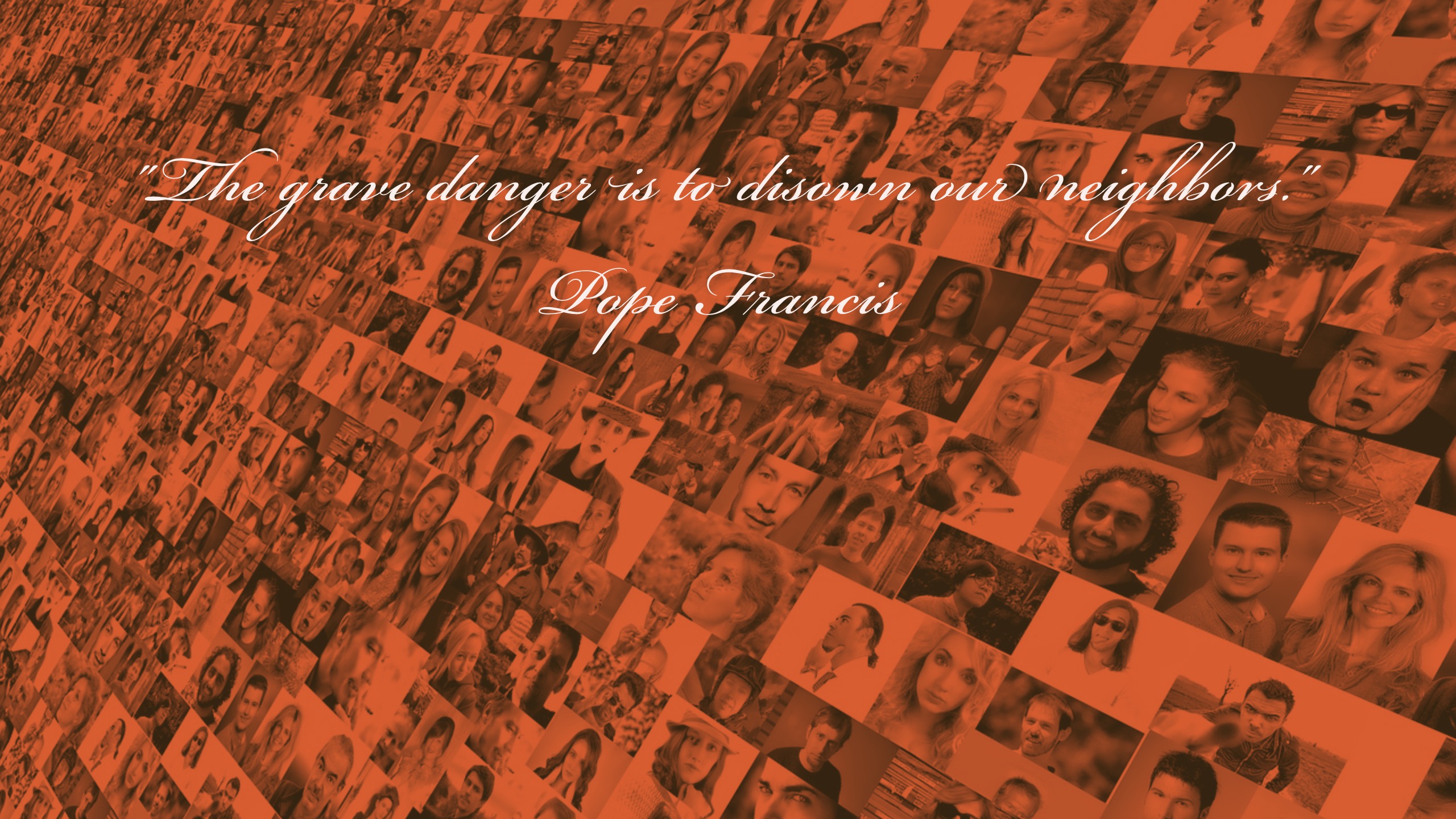
The grave danger is to disown our neighbors. When we do so, we deny their humanity and our own humanity without realizing it; we deny ourselves, and we deny the most important Commandments of Jesus. Herein lies the danger, the dehumanization. But here we also find an opportunity: that the light of the love of neighbor may illuminate the Earth with its stunning brightness like a lightning bolt in the dark; that it may wake us up and let true humanity burst through with authentic resistance, resilience and persistence.
~ Pope Francis, February 17th, 2017 – Message to popular movements meeting in California
Some of what I explore in my new book is a recalibration in my life, distinguishing between things that seem important in a 24/7/365 world and what’s really important.
-

I Am Dean Spanos
Yesterday, NFL owner Dean Spanos walked into his San Diego office and told his staff that after 56 years they were moving the franchise to Los Angeles.
-

Welcome Back, Students
Over the next week our neighborhood welcomes back 30,000 students to San Diego State University. That includes about 6,500 brand new students from the 83,000 who applied.
Once considered a “fall back” school State has transformed itself over the past decade into a top 100 public university in the country. Despite it’s local reputation as a safe school to apply to it’s now pretty tough to get into! Last year’s freshmen class had an average high school GPA of 3.69 and average SAT of 1118. In other words, lots of alumni never would have gotten into today’s SDSU.
Enrollment achievements aside, college students are– well — college students! They are coming to college for an education but looking for a lot more than an education: They are learning to become adults.
Our family chooses to live near State. Why? We love it! And, while we enjoy (cough, need) the quietness of summer we kind of love it when everyone comes back. Starbucks is open until 10 again, woohoo! (It closes at 5 in the summer.)
Students bring energy and playfulness that makes our area feel like home.
Tips for Students
This is our 8th year in the college area. So, if you’d indulge, allow this old man to pass along some tips to the young guns.
- Commuters… get involved in something on campus. While SDSU is becoming more residential there’s still a huge population of students who live at home and commute to campus each day. While t’s really cool that commuter students can maintain life at home with their relationships from high school they really shouldn’t do that exclusively. Just because you’re a commuter doesn’t mean you shouldn’t get involved on campus. Find something to join, even if it’s a volunteer group, that’ll connect you to the Mesa. Don’t just drive over here, go to class, and then go back home. Get invested on campus or you’ll regret it.
- On campus students… get involved in something off campus. The opposite of point 1 is also totally true, particularly of first year students. It’s great that you live in the dorms and you go to all the campus activities. But there’s more to going to State than the men’s volleyball games or the parties that they throw on campus. Get a part-time job off campus or join a volunteer group or just commit to getting off campus for all-day on Sunday. Going to Ralph’s shouldn’t feel like an expedition. It’s 4 blocks! Seriously, get off campus to study or whatever. Just get off campus more.
- Join your neighborhood. The vast majority of non-first year students live in the neighborhoods surrounding SDSU. There’s a growing cottage industry of rental housing that caters to students, sliding around zoning and rental laws to put 8-9 people in a 3 bedroom house. This fosters an “us vs. them” mentality, I imagine a similar mentality to those who live near Airbnb rentals in beach areas. My advice would be to act at least somewhat neighborly. When you move in go ahead and knock on some doors to introduce yourself. Trust me, everyone really is peaking out to see who you are. If you’re friendly and offer up some contact info… they will love you. Understand that last year’s tenants may have had raging parties or been total jerks… just take the first step to show them you’re normal. (In the SDSU area, join Nextdoor. This is where people talk.
- Give it some time. One of the complaints I hear from students is that they don’t make friends right away unless they jump in on the party scene. This takes a little time. Don’t get down on yourself too much, too quickly. I think the biggest challenge is that a lot of first-year students don’t know how to make friends since their friendships back home developed over a long period of time. Relax, it’ll happen. Just be yourself, take some chances to do things with other people, try out some friend groups… and give it some time.
- Don’t be a tool. We, your neighbors, know college students better than you know yourself. We know you take school seriously Monday-Thursday and want to have a good time over the weekend. (How you get a 3-day weekend every weekend I’ll never understand!) But there are things that we see all the time which really do get annoying: If you’re underage you can’t buy booze. And yeah, you will get a ticket in the Vons parking lot if you have someone who is 21 go in and buy booze for you because the police have seen that trick before. Even though a street corner isn’t painted red, you cannot park in an intersection. I know parking is sometimes tough. But if you don’t want a parking ticket for parking in a sidewalk or intersection, don’t park there. You can party until 2 AM. But you’ve gotta keep it down after 10 PM… OK 11 PM. When I talk to my neighbors most of us totally get it… you want to party and you’re a college kid. We respect that. But you’ve got to respect the quiet hours, too. Please tell your drunk self, “Don’t dump your garbage on the street.” I don’t even know why I have to say this! But unfortunately, I do. If it was in your car take it to your house and throw it away. Gosh, if you can’t manage that please just walk up a neighbors driveway and put it in the garbage.
- Pace Your Money. Towards the end of each semester we see students start to run out of money. Now, on the one hand, this is pretty understandable considering it might be your first time away from home and managing your money. But do yourself a favor… when you get that financial aid money in your bank account this weekend… put some money aside for the last 2 weeks of school, say $75 just in case. Related: The produce area at Vons and Ralphs are not a smorgasbord. I can’t tell you how many times I see students stuffing their faces with fruits and veggies in the store. That’s stealing. Don’t do it. Just because your mom tastes a grape before putting it in the cart doesn’t mean you can eat an entire meal in the store and not pay for it. Seriously, what do we have to do… weigh people before and after they leave the grocery store? Don’t steal food.
- Don’t go it alone. Whether it’s a party or the gym or whatever trouble for students seems to start when they go alone. This is particularly true for female students. No one wants to think about it, but there are older guys who are predators… they are just waiting to see someone break away from the pack. Be wise, don’t go it alone.
- Avoid the pack of stupidity. Something happens among young college students where they seem to completely accept the “wisdom” of their group. So twenty 18-19 year olds create a new set of ethics that are completely situational to their context. You hear things like, “I’m young, sex is about me getting mine. It doesn’t mean anything to me.” Or “It’s not cheating, my roommate took that class last semester and had all the quizzes.” No, literally… there’s no such thing as casual, emotionless sex. We’re humans– we have emotions. Passing a class isn’t about passing the quizzes, it’s about learning the material. So cheating is only cheating yourself! My advice: Find someone who’s a bit older than you, say an older sibling or friend of the family, who can help you process things outside of your group.
Get off my lawn! OK, just kidding. Kind of. Please don’t puke on my lawn.
Share your tips! Do you live near a university? Or are you a college students? Share your tips for college students in the comments below.
-
Amazon Tap Review
A couple months back I was looking for a nice Bluetooth speaker for my office. Specifically, something that was better sound than my Macbook speakers and better than the built-in speakers on the TV mounted on the wall.
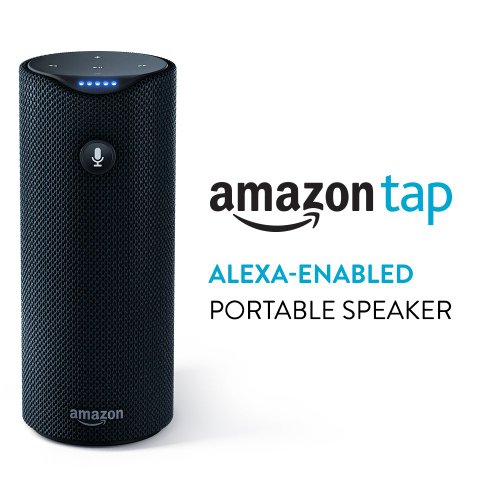
I wanted it to be small, have good sound, and connect to anything. After some digging around I went with the Amazon Tap and have been pretty pleased.
What is it?
Here’s the official description:
- Just tap and ask for music from Prime Music, Spotify, Pandora, iHeartRadio, and TuneIn
- Uses the Alexa Voice Service when connected to Wi-Fi or a mobile hotspot to play music, read the news, provide weather reports, and even order a pizza
- Streams all your music via Bluetooth from your phone or tablet
- Delivers crisp sound powered by Dolby, with dual stereo speakers that provide 360º omni-directional audio
- Provides up to 9 hours of playback
- Always getting smarter and adding new features and skills
- Includes Charging Cradle
Adam’s description:
It’s a portable Bluetooth speaker made by Amazon with some built-in Amazon features.
The Good
You might be familiar with Tap’s big brother, Amazon Echo. Echo didn’t meet my needs for my office for a couple of reasons. First, I just needed a speaker and not a personal assistant. Second, I’m not 100% sold that I want an internet-connected device listening to and recording everything it hears. Edward Snowden would tell you that’s a bad idea.
What I like about Tap is it’s simplicity.
- I like that it’s got a crazy long battery life… it’s listed at 8-9 hours but I regularly use it 12-14 hours between charging.
- I like that it’s portable. I can use it in my office all day. But I can (and do) pick it up and take it with me. So when I’m out working in the yard I can still listen to music or a podcast or whatever I want. It switches pretty seamlessly from being connected to home wifi and my phone’s Bluetooth. So I’m looking forward to taking Tap on vacation or the beach or anything like that.
- I like that it’s connected to all things Amazon. I ditched iTunes Radio when they went to a subscription service for Amazon Music, which is part of the Amazon Prime membership. I stream music all day, every day. Plus, I can add something to my Prime Now shopping list or ask when my next Amazon order will arrive.
- I’m learning to like Alexa. I’ve been kind of slow to find a real function to Alexa (or Apple’s Siri for that matter). But I’ve been learning to use her to set timers and add things to my calendar or any other number of small tasks. I know I can connect Alexa to all sorts of home automation things, too. So I look forward to telling Alexa to turn off the lights in my office and set the AC to 75 degrees.
Things I Don’t Like
There are a couple of things that kind of annoy me about Tap. First, it’s really hard to turn it off manually. I know I can press the button and say, “turn the power off” and it’ll power down. But I don’t think the actual power button on the back turns the thing off… just on. Second, Alexa can sometimes fail to deliver what you want on Amazon Music. She seems to be infatuated with recommending a couple of stations I don’t particularly like. Since I use Tap for background noise while I work (like right now as I’m writing this) I like to ask Alexa to “just play some music.” Instead of playing Amazon Music stations I listen to all the time, say the U2 channel, she’ll start playing some random alternative music channel. And if I tell her “I don’t like that channel, play something else” she gets confused and says “I don’t know what you want, Adam.” That’s a little too angsty and existential for me. Just play something else!
The Money Line
Is this worth $129? On the face of it, as a Bluetooth speaker alone, a better value would be found in the Bose or JBL portable Bluetooth speakers. Though I didn’t do a side-by-side comparison my assumption is that both would have a higher quality sound experience. So just as a Bluetooth speaker I don’t think it’s a great value… should be more like $70.
But when you add in the other stuff that it does… that it can connect to your home wifi to play music independent of another device, plus have all the benefits of Amazon Alexa, plus still be used as a Bluetooth speaker? I think it might creep into that category of being a good deal. Though, in all honesty, $99 would be a better price point.
Overall I’m pleased with it. I use it all the time.
-
Do people really care about online privacy?
There’s an interesting lawsuit against Facebook snaking it’s way through the legal system. Here’s the gist of the complaint:
The lawsuit alleges that Facebook’s photo-tagging system violated user privacy by creating faceprints — geometric representations of a person’s face — without explicit consent. Those faceprints are typically used to identify users to suggest tags for uploaded photos. According to the complaint, that’s a violation of Illinois’s Biometric Information Privacy Act, which forbids the collection of biometric identifiers like fingerprints or faceprints without a person’s explicit consent. As Alvaro Bedoya of the Center on Privacy and Technology at Georgetown Law described it, “If you run a bar, the law doesn’t prevent you from picking up my used pint glass, but it prevents you from pulling my DNA off it.”
What is this about? Do you know how you upload an image to Facebook and it sometimes will ask, “Is this Adam McLane?” That’s happening because Facebook scans all of the images of you that you’ve tagged as yourself to determine unique biometric characteristics of your face to detect images of you all over Facebook. That biometric scanning, originally developed for military and law enforcement purposes, is now being used for commercial purposes by Facebook.
Social media principle #5 says, “You aren’t the customer of social media companies, you are the product they are selling.” If you read Facebook’s terms of service carefully you’ll see that Facebook reserves the right to use this information to target advertising to you. So you might not say that you are a fan of Nike shoes. But that photo of you wearing Nike shoes? Yup, Facebook can sell Nike (or it’s competitors) information about Facebook users who wear Nike shoes. (They sell information about you which you freely give them!)
That’s a rather benign example. But what about things which might not be so benign?
We care about privacy but we don’t
I find that people care deeply about their personal privacy. They will vehemently defend their legally protected rights to privacy, are offended by breaches of privacy, and can articulate “the line” clearly.
That’s in theory, of course. In practice people don’t really care that much about their personal privacy much. Here’s a small sample of what they might post online:
- Physical location
- Location of their home
- First, last names
- Names of children, pets
- Names of employers
- Names of friends, co-workers, family members
- Contact information, email, phone numbers
- Photos and videos, themselves, their spouse, the children, their friends and relatives (including biometric information like their voice)
- Writing samples
- Religious information
- Employment history
- Educational background
- Personal ideologies, aspirations
- Purchase history
- Travel patterns
- Medical information
These are the things that we post openly on the most popular social networks. (Facebook, Twitter, Instagram, Snapchat, LinkedIn, Periscope, etc) So many people will say they care deeply about privacy but they really don’t.
Their behavior is mismatched with their actions.
What apps are tracking me?
To further this claim that most people don’t actually care about their privacy, they just say they do, let’s take a look at who you are sharing even more personal information with your smartphone.
A June 2015 report from Nielsen showed that the average number of apps American users access per month is steadily increasing, about 26 apps per month. (Source)
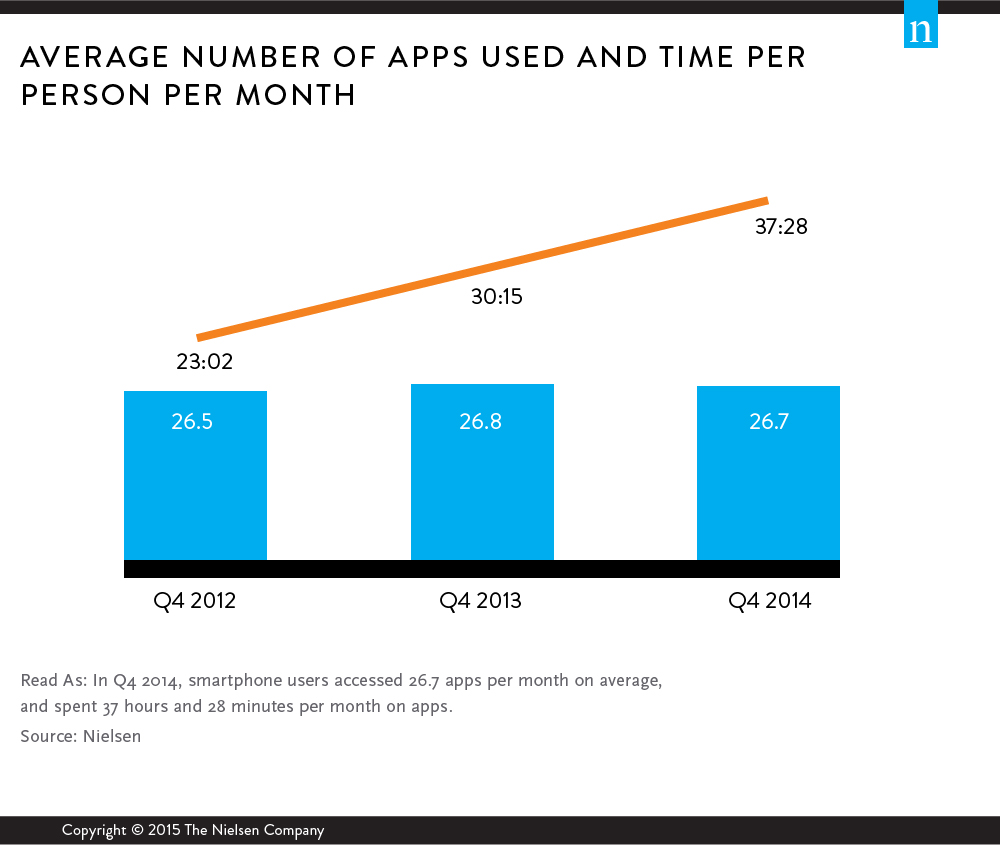
The study also says, “Over 70% of the total usage is coming from the top 200 apps.”
Here’s the question I find very few people seem to be asking: Who owns the top 200 apps, what types of data are they collecting about me, and what are they doing with that data?
Here’s the Top 20 free iPhone App as of right now. Can you answer the above 3 questions for each of them? (Source)
- Hungry Shark World
- Slither.io
- Snapchat
- Messenger
- Fitbit
- YouTube
- Running Man Challenge
- Trumps Wall: Build it Huuuge
- Hovercraft: Takedown
- Houseparty: Group Video Chat
- Pandora
- Color Switch
- Google Maps
- Best Friends
- iTunes U
- Uber
- Layout from Instagram
- Spotify
Each of these apps, as well as the rest that you have on your phone right now, each collect information about you. Do you know who owns that data? Do you know what’s being collected? Do you know what they are doing with your private information?
Should you?
The example of location
Right now, my iPhone has 65 apps that ask to track my location, 16 of which are listed as tracking my location “Always.” Why do you think they want this information? Some of it is to make the app work properly, for sure. But some of it is to collect, aggregate, and use that information for their own purposes.
While not always visible when you post something online… if you’re using an app that accesses your GPS location
How accurate is that information? The iPhone is accurate to about 8 meters. There’s a noticeable difference in the geolocation data in pictures that I take at my house between the front yard, my bedroom, the kitchen, and my office.
The device itself
 Of course, let’s not forget that while apps are tracking and reporting back all sorts of information about you all the time, your device itself is tracking even more.
Location… always means always. Here’s a fun fact that I don’t think most smartphone users realize. Your phone’s GPS only turns off if the phone is off. For instance, I kept my phone on Airplane Mode for my recent trip to Haiti so I wouldn’t use any international data. But pictures I took with my iPhone while it was on Airplane Mode… they are still geotagged. See, your phone is tracking you all the time. Don’t believe me? Open up the Health App for iPhone. It’s tracking your steps, your altitude, and your level of activity all the time. If you use Apple Pay you better believe they are keeping track of your spending habits, too.
So what do I do?
I suppose the smartphone has become the ultimate accountability partner. And, in some ways, that’s a good thing. The phone you keep in your pocket tracks your every move, what you’re thinking, what you are spending your money on, what you listen to, when you sleep, where you drive, and who you talk to.
My point is that you can’t do all of these things and then claim you care about privacy. You say you do. But you don’t.
-
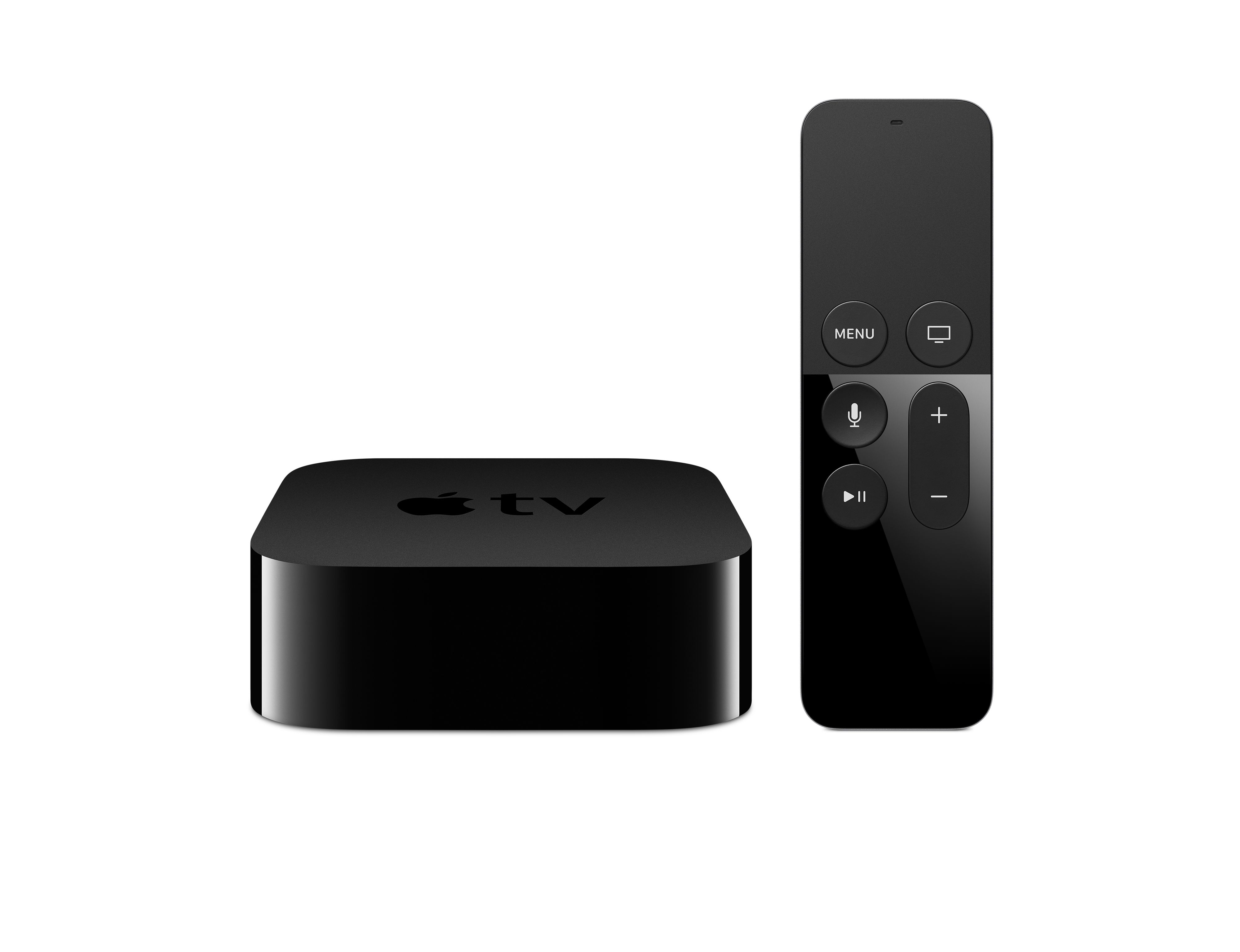
Apple TV review
Last week I mounted a TV in the Tiny Office, connecting it to the new edition of the Apple TV. The previous edition of the Apple TV has been the backbone of our cord cutting efforts and while I did also purchase a Smart TV with Roku built-in for the house, my exclusive Mac usage in the office meant that Apple TV makes the most sense.
What is Apple TV?
Here’s Apple’s official description:
TV is a major part of our lives. We gather together around our big screens to watch big shows and big events. Yet somehow, the overall experience of TV has continued to stagnate. Until now. It all starts by recognizing that apps are the future of television. HBO NOW, WatchESPN, Netflix, Hulu, iTunes — apps are quickly becoming how we watch today. So we built a new foundation around this vision — with a new operating system called tvOS, innovative ways to connect with
your screen, and a smart use of Siri to search for something to watch. This is the new Apple TV. This is where television is headed.Adam’s Description:
It’s is a small, internet connected media streaming device. It connects your TV to the internet and your home network essentially turning your TV into a giant computer monitor.
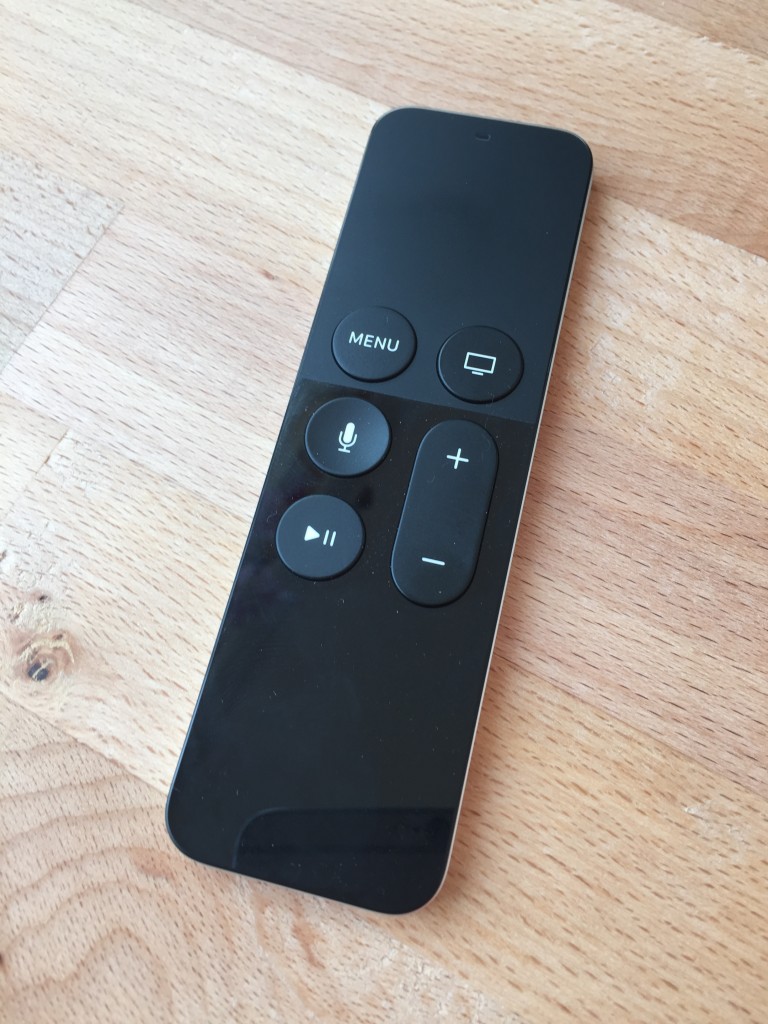
The new Apple TV remote. The matte black area above the menu button is a touch pad, with a click to select. (Only about 15% bigger than the old Apple TV remote, too) The Good
I was slow to get on board with Apple TV. I actually had one for about 2 years as part of my travel kit when I speak before we started using it at home. But once we got rid of cable TV the Apple TV has become more and more important to us.
I really like the new edition. I think it’s well worth the $149 upgrade. The addition of apps and tvOS is huge, already leading to the release of 500 apps. I also really like the new remote… it’s really the star of the show. But the star of the show, feature-wise, is the edition of Bluetooth! No more pointing the remote at the TV. And you can sync Apple TV to other Bluetooth devices! In my case I connected my wireless headphones and instantly replaced my need for a nice sound system in the office.
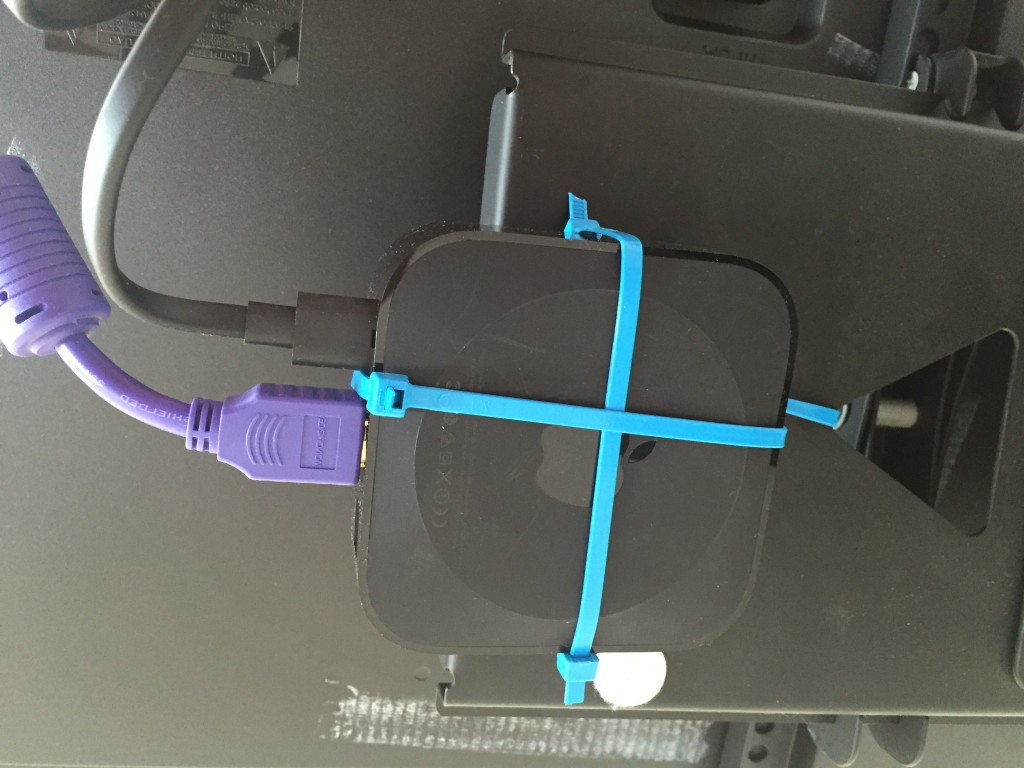
No need to buy a mount, just zip tie it to your wall mount. Installation
Installation takes less than 5 minutes. Take it out of the package, plug it into the wall, plug the HDMI into the device and the back of your TV, then turn it on.
If you have another iOS device connected to your home network just turn on Bluetooth and select the Apple TV, your iPhone or iPad will actually set-up the Apple TV for you. (This didn’t work for me) Going through the manual setup process took a total of 2-3 minutes, add your iTunes login credentials and wifi password and you’re done.
You can buy mounts. But since this device is basically invisible after installation, I just zip tied it to my TV mount and called it good.
Features I Like
I already mentioned the two new features I like most, the new remote and the the addition of Bluetooth. Beyond that I like that the new edition has 32 GB of storage for movies, music, and games. And I really like that tvOS has opened up Apple TV to act a lot like Apple’s line of phones and tablets. Instead of waiting for Apple to add things, like in previous editions, you can go to the app store and add whatever you want. Plus, if you’ve already purchased the iOS version of a game you can add the tvOS version of the game for free. (Sssshhh… we haven’t told Jackson that the office TV has games!)
As of right now, my most used apps are the CBS All-Access app, WatchESPN, and Netflix. But I really like some of the other apps.
Another little thing that I actually enjoy is the new moving screensavers. That might sound silly but they are STUNNING. For real, you can watch them all here.
Things I Don’t Like
If you aren’t already invested in Apple stuff, particularly if you’ve not purchased movies and music through iTunes, I would recommend Roku instead of Apple TV.
- The ongoing battle with Amazon means important apps are missing. As of right now there are a few major things missing that make Roku better. Namely, Roku has Amazon Video [for Amazon Prime members, huge!] and Apple TV doesn’t. (Amazon doesn’t even sell the Apple TV….) But Apple TV is also missing the Sling app. You can still use Sling on your Apple TV, just through AirPlay, which somewhat degrades the experience, especially in contrast to the Roku which has Sling natively and broadcasts it in full HD. But it’s also missing the ability to play Amazon Music, which is what I use instead of the overpriced, overhyped Apple Music.
- The remote degrades Bluetooth headphone playback quality. I’m not an expert, but I think the Bluetooth frequency is relatively limited in what it can handle. So if I’m streaming a podcast from Apple TV to my headphones, if I do anything with the remote, which also uses Bluetooth, the sound quality will degrade and stutter until the remote goes to sleep. I think that might be a bug, but it’s an annoying one until Apple addresses it.
The Money Line
If you’ve got an older edition of Apple TV, it’s time for an upgrade. If you’re thinking about dropping cable… you probably want to go ahead and invest. It’s a beautiful interface and Apple has already shown that they are going to continue to invest in tvOS. (Here’s a list of new features in yesterday’s update)
The addition of the app store, Siri, games, media storage… really, Apple TV is another step towards giving you the media you want when you want it.