Tag: ettiquette

  • How to adjust privacy settings for Facebook Places

    What is it?

    Facebook describes it this way:

    Places is a Facebook feature that allows you to see where your friends are and share your location in the real world. When you use Places, you’ll be able to see if any of your friends are currently checked in nearby and connect with them easily. You can check into nearby Places to tell your friends where you are, tag your friends in the Places you visit, and view comments your friends have made about the Places you visit. Use Places to experience connecting with people on Facebook in a completely new way. link

    In other words, its a bigger and instantly more popular version of Fourquare, Gowalla, and Yelp. With 97 million American teenagers owning a mobile phone, this has the potential to be huge.

    Facebook has a very well done FAQ are for Places, I’d recommend checking it out and educating yourself.

    How to Adjust Privacy Settings

    For most people, your default settings are going to be fine. By default, you can use a mobile device to tell your friends where you are at. Additionally, by default you are allowing Facebook to point you to other people who are checked in at the same place.

    For people into social networking, this is fine. I actually like that if I check-in at Starbucks I can know who else is there because I might actually like to have a conversation with them. It doesn’t creep me out that I could check-in at Ikea and 20 other people in Ikea who aren’t my friends could know I’m there.

    But a good majority of people don’t use Facebook for social networking. They use it for existing friend connections. In other words, while Facebook is designed to help you expand your network by meeting new people, there are tons of people who want to “protect their privacy” and not network with anyone outside of people they know if real life.

    That’s a personal choice and Facebook allows for that. (Even though its outside of the original design of Facebook, they’ve made concessions.)

    Now, let’s adjust those settings!

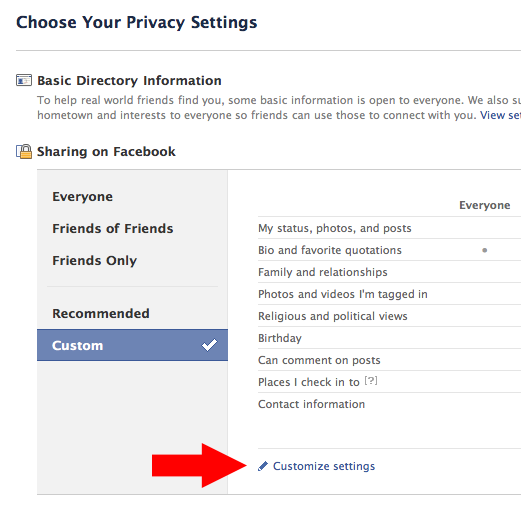
    Step one: Go to the Privacy Settings tab in your account settings. Here’s the link. This is an overview of all of your general settings.

    Step two: Click on “Customize Settings.

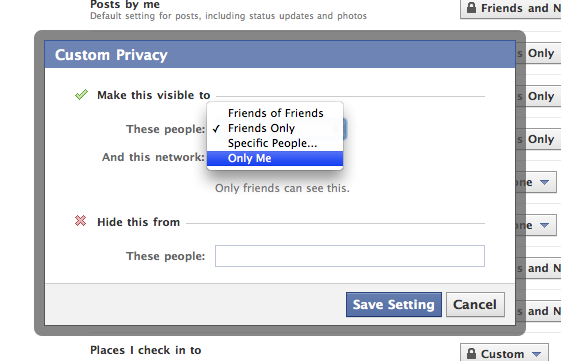
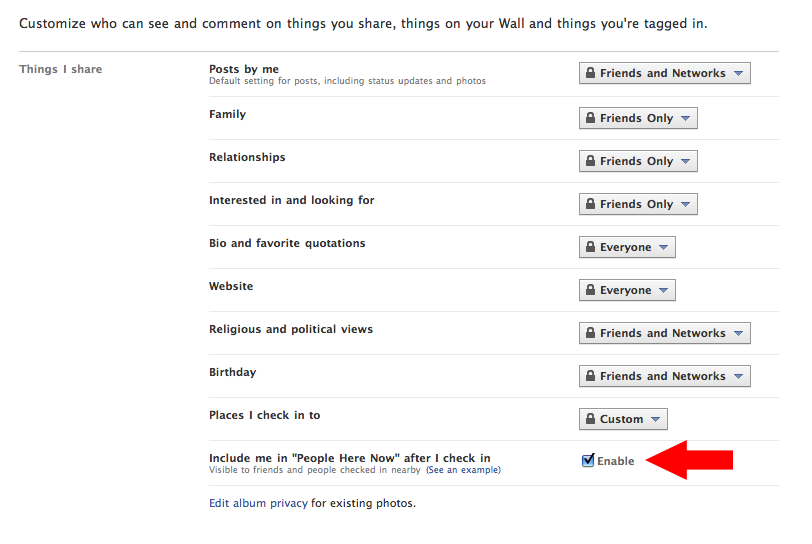
    Step three: Scroll down to “Places I Check In To” and click “Customize.” This will bring up a box where you can select exactly who you want to see where you check in at. If you just want to play with it to get used to it, but don’t want other people to see it, change it to “Only Me.” Changing it to “Only Me” is as private as it gets if you want to check in places. You’ll notice you can also block specific people from seeing where you check in at. Think about who you want to block specifically and list them there. When you are done click “Save Setting” and you are done with this step.
    Step four: Enable or disable the “Here Now” feature. If this whole thing creeps you out, I’d suggest disabling this setting. But also keep in mind that if you want any of the cool freebies that retailers/restaurants may come up with for checking it, you’ll need to keep this enabled. (I’ve gotten plenty of free stuff by checking in via Yelp and even Twitter.)
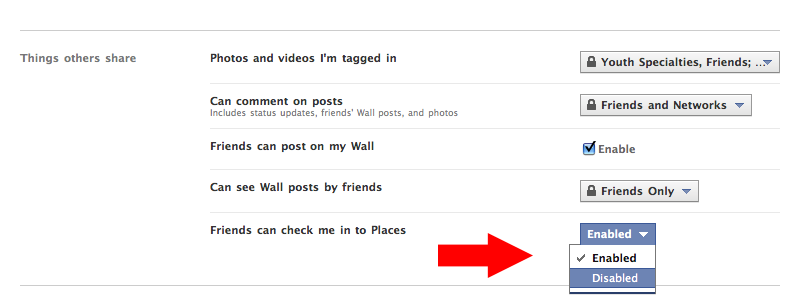
    Step five: Scroll down to “Friends can check me in to Places.This is probably the feature that will get the most people in trouble and will make people the most angry. Say you sit down for lunch at work with a co-worker. You check in and you tag that person as being with you. Now, if you didn’t have that persons permission, all of their friends know that they have checked in at a place because that check in posts to their wall. Also, if they haven’t adjusted their settings in step four, now anyone on Facebook at that location can know they are there. On the other hand, if you feel good about your selections on step three than this is no big deal.
    Done. You can go back to your profile, having adjusted your Places privacy settings to your liking.

    What does Adam recommend?

    Bear in mind that I’m a pretty open person. But I still value some levels of privacy, particularly because I’m a husband and father. Truth is, I don’t even anticipate using this feature unless I’m somewhere cool and want to brag that I am there.

    Here’s my selections for the steps above:

    Step three: I’ve selected “friends only.” I do wish I could select by groups of people. Because I have a friend group labeled “People I Haven’t Met Yet” and I’d prefer that they couldn’t see my location. But until Facebook fixes that, I’m going with “friends only. UPDATE: If you have a friend group you’d like to exclude from your check-ins, you can just type them in the field “Hide this from these people:Here’s what it looks like on my privacy settings page.  I’d recommend NOT choosing “friends of friends” because that basically opens up your location to anyone in the world.

    Step four: I’m a big fan of getting free stuff. So I’m keeping this enabled because it doesn’t bug me and I’ve enjoyed many a free meal. There will soon be lots of iPhone applications that call to this so I want to see where it goes.

    Step five: I feel pretty good about step three. And I also feel pretty good about the places I go and the people I go to them with. So I’m going to keep this enabled for now. Let me tell you though, if someone false checks me in somewhere shady and we’re going to talk. This little feature is going to land a whole heap of people in a whole heap of mess. So, if you aren’t sure about all of your friends, I’d recommend disabling this one.

    Some Places Etiquette

    1. Never, ever, EVER check-in at home. I want to hit people in the shins with a hammer when I see that. Not only are you broadcasting to people where you live, complete with Google Maps directions, you are also telling people that you are home… and when you check-in someplace else, you are tell them YOU AREN’T HOME! Dumb. Dumb. Dumb.
    2. Only check-in at public places. Just like it’s dumb to check-in at your house, it’s really rude to check in at your friends houses. Checking in at a private residence is rude, even if the person says they don’t care. Just don’t do it.
    3. Always ask before checking in your friends. It’s just polite. Maybe they don’t want their friends knowing they had a latte while at work? Just ask.
    4. Check-in sparingly. I know it feels like a game. And games are meant to be won, right? But if you check-in to places 20 times a day you look really, really lonely. My rule is that I only want to check-in places that I think are cool. Sea World? Cool. The local gas station? Not cool. Since I like tiny, family-run businesses… I’m going to check-in at a lot of those because I know it helps them out. I think mom and pops are cool.
    5. Be weary of promotions. With 500 million users and integration into Google Maps retailers are going to go nuts trying to get you to check-in. (As a Google Adwords user, let me tell you… Google is going after us to do promotions!) Don’t be surprised to see deals popping up everywhere. A check-in deal is fine to me. But if I have to tag a bunch of people or write a specific status update to save $5… that’s too far. Don’t subject your friends to that.
    6. Never check-in anywhere after 10:00 PM. Remember when mom said that nothing good happens after 10 PM? If you are out with your friends, it is just better to not check-in. Nothing good is going to come of it.
    7. Remember: Everything you post online is public! All check-ins, all that GPS data, all those tags, all those status updates… they are ultimately public information. You parents can see it. Your boss can see it. The college admissions office can see it. Your significant other can see it. Your future mates can see it. Your children will be able to see it. Even if you’ve made all of your settings private, that data all ultimately belongs to Facebook and they can do with it whatever they want. (And it could always get stolen from them!) If you don’t want those people to see it… don’t post it.
  • Adam’s Rules for Twitter

    twitter-rules

    You’ve seen my rules for blogging. With many people using the social media 360—  blogging, Facebook, and Twitter simultaneously– I thought it would be helpful to share my Twitter rules. These guide my use of the site and I think would act as a good primer for those getting into it.

    Rule #1: Don’t forget the question. The primary use of Twitter is to tell people what you are doing. It’s easy to get lost in conversation and treat Twitter like a chat room. With that in mind I try not to @reply the same person back and forth in conversation. I am quick to take the conversation to a phone call, email, or direct message. The power of Twitter is seeing that all of our lives are fascinatingly mundane. Focus on that and you’ll be fine.

    Rule #2: It’s not about the numbers. There’s a lot of locker room-styled comparisons going on with who has the biggest following. Just like in real life, it’s not size that’s important. (See rule #1) If you are interesting to people you will attract a larger following. Joining a website that promises 10,000 followers or endlessly participating in #followfriday in hopes that you’ll add just 3 more followers is only going to make your use of Twitter less enjoyable and you more annoying to follow. I allow anyone to follow me. But for my personal account I only follow back who I want to follow back. I read every profile when someone follows me… and I follow back just those whom look interesting. For business accounts I follow everyone back who follows those accounts.

    Rule #3: Don’t follow then unfollow just to build a following. Follow only who you want to follow. It is rude to follow someone so they will follow you back only to then go and unfollow them. That’s rude. I can’t tell you how many people do that to me. And they probably think I’m rude because I don’t play along.

    Rule #4: Retweet, @reply, and compliment often. It’s good form to reply to every @reply. On my personal account, I do my best to @reply to everyone who @replies to me. Remember, Twitter can be a fun place for networking, idea sharing, and community. Be aware that @replies help your followers meet and get to know one another.

    Rule #5: Pimp your content, but pimp it lightly. In the early days of Twitter there was backlash when you’d post links to your blog or other content. I don’t think it’s a big deal to Tweet links to your content, just do it lightly. (Mention it once, then move on.) Then again, if all you use Twitter for is posting links to your content… that won’t be interesting enough to draw a following.

    Rule #6: Keep private stuff private. Avoid the social fax paux of over-sharing on Twitter. No one wants to know that you are taking a dump, getting drunk with friends, or just made out with your girlfriend. Sharing where you are eating, who you are out with, or TwitPic’s of your best friend passed out while taking a dump… perfectly fine though. That’s for the public interest.

    Rule #7: It’s OK to have multiple accounts. I know people who have public accounts and private accounts. I have personal accounts, work accounts, and special interest accounts. All of this is fine. It helps people follow only the stuff that they actually want.

    Rule #8: Hashtags are for tracking stuff. It’s OK to use them just for fun or sarcasm. I do it all the time. But if you aren’t at an event or a concert and you use their hashtag just because everyone else is, you look stupid. Even if you are at the event make sure you only tag tweets that are relevant to the event.

    Rule #9: Don’t be a whore. I teach people how to tactfully self-promote themselves. I think that is fine. But don’t sell your account for marketing tweets and don’t use twitter to enter marketing promotions. Since Twitter won’t do anything about this and has allowed bots to create squatting accounts, this is why I think Twitter is the next Myspace.

  • 3 Things Big Name Bloggers Need to Learn from the Little Guy

     I have  a  mixture of blogs that I  read. Some of them, I am their only subscriber and others have thousands of  people whoBlog snob read their  stuff every day. Seth Godin‘s blog apparently has more readership than 95% of all magazines in the United States. In doing this every day I’ve made a couple of observations. You see, while these “blog celebrities” may be online moguls, they are generally not that famous. (Just making a couple hundreds bucks a day from Google to blog… or in Seth’s case, no money to blog as he refuses to have ads.)

    But there are a couple of things I don’t like about the big name bloggers. Even in the Christian world, big named bloggers take on an aura of superiority. They tend to communication that blog rules don’t apply to them when you get to be super big. Here’s three things that big named bloggers need to learn from small named bloggers if they want to remain on top. Because folks like me are getting annoyed and are going to drop you like a bad habit if you don’t straighten up and fly right.

    1. Leave comments on. I’ve noticed that once a blog hits about 1,000 subscribers they like to turn off comments and leave on trackbacks. (Some truly elite turn off both!) In other words, the blog owner wants you to send traffic to them and doesn’t want traffic to go to you. Once you turn off my ability to respond to your blog post it isn’t a blog anymore. Now you are running a consultancy or a business, but not a blog. Some say they don’t have time to respond to comments. They joy of commenting is that you don’t have to respond as your blog will take on a life of its own. I recently noticed a speaker from a conference on blogging who told his audience “If you don’t allow comments you aren’t blogging.” He is now only accepting trackbacks.
    2. Don’t forget you’re a human. One of the things I like about reading blogs is that you get a snapshot of a person’s life. Big name bloggers tend to stop writing personal thoughts, schedule snippets, and other stuff because they think it doesn’t pay well. (Yes, big named bloggers write with the purpose of drawing traffic and getting paid. The big trend now is to write the perfect eye catching subject line.)  One of the reason I am reading your blog, Mr. I Make $200/day on Adwords alone, is because I am curious about you. If you think I just want to read essays that aren’t good enough for your book, think again. Just be human.
    3. Ads are OK, just be upfront about what you are getting paid for. When I read a bloggers recommendation for a book, website, or any other product… I am automatically trying to figure out how that blogger is getting paid. (ebooks are the #1 culprit of this) Amazon affiliates, ad networks, and Google Adwords are all easy to spot. But I’m finding that a lot of these big named guys are getting paid to plug in about half their posts. (Or so it seems) That’s pathetic. Another thing I am noticing with big named bloggers is that they aren’t giving credit for their sources. Not only will they not link to a commenter, now they won’t link to their sources? Why is that? Oh yeah, because big name bloggers only want to link to things that increase their page rank and/or pay them.

    I’m a capitalist and I’m all in favor of new media and I’m perfectly fine with blogs becoming the most powerful medium on the internet. But I want to caution blog readers that while blogs may seem like citizen journalism, you have to be certain to ascertain a bloggers credibility.

    Do you know the ethical standards of journalism? Bookmark this page!

    Here’s the thing… most “big name blogs” are not journalist. They are marketers and they are profiteers. You have to use the same wisdom in reading a blog that you do in watching the news. At least in the news there is some editorial control. Blogs are like the old west of journalism… there are no sheriff’s in Blog County.

    No, I won’t name names. And no, I’m definitely not talking about any youth ministry blogger. In fact, the “big name” youth ministry bloggers that I read tend to be true gentlemen about all of this. Sure, some of them make money off their blogs… but they aren’t crossing the line. (yet!)