Category Archives: Web/Tech

iPhone, Your New Cigarettes

iPhone, Your New Cigarettes

The parallels between the iPhone in 2011 and cigarettes in the 1950s, 60s, 70s, and 80s are stunning.

  • It’s iconic.
  • It’s celebrated as the cool thing.
  • It’s a status symbol.
  • It’s celebrated in the media.
  • It’s manufacturer is getting rich.
  • There are cheap imitations. (Sorry Android users)
  • It’s addicting, but not viewed as a serious addiction.
  • The first thing you do in the morning is light up your iPhone.
  • The last thing you do before you go to bed is put your iPhone out.
  • People step out of meetings to check their iPhone.
  • People huddle around their iPhone while they walk around.
  • They do it in public, to the sneering glare of non-iPhone users.
  • After sex… well, some people light up their iPhone.
  • The price could go up at any minute, but you’d still need an iPhone.

I’m as much an addict as the other millions of regular users. Hopeless. Helpless. And happily satisfied in my addiction.

Just like cigarettes– users are left with the question:

Do you own your iPhone or does your iPhone own you?

5 Things the App Store Teaches Us

A living exhibit of current apps being sold. Photo HT to Sachin Agarwal

More than 1 billion apps have been downloaded from the iTunes app store. Believe it or not, there are lots of people who still don’t think of it as a serious marketplace. A billion is 1,000 million folks. That’s pretty serious.

Here are 5 things that the app store has taught me

  1. Free is a legitimate business plan.
  2. Financial success isn’t so much about profit margins, it’s about price point.
  3. Traditional high margin businesses with complicated business plans can’t compete.
  4. The one hit wonder is just as powerful today as it was yesterday.
  5. Big business will always manipulate a free market system.

Some brief explanations to unpack the list above.

Free is a legitimate business plan

Would you have an account on Facebook, Twitter, or Gmail if it cost you $2.99 each to belong? Of course not. But how did Google, Twitter, and Facebook get to become some of the most powerful companies in the world without charging you a dime? TV has been doing it for years.

Financial success isn’t so much about profit margins, it’s about price point

When I developed my first apps for YS, the content was valued based on the retail price of the book. Consequently, they never took off. People aren’t going to pay the same $7.99 for an app version of a book that they’d pay for a hard copy because the perceived value is different. The question app buyers are asking is, “Will I get the free version or will I pay $.99?” Remember… all of Facebook, Google, and Twitter are 100% FREE! So your buyer wants to know why your app, compared to what they know is already free, has more value to them than that. To pay more than $.99 for an app you have to demonstrate ridiculous value. Consequently, if you lower your price point or eliminate the cost, you will access millions more customers and potentially make infinitely more money as a result.

Traditional businesses with complicated business plans can’t compete

Traditional media and brick/mortar retailers are struggling to figure out how to take advantage of apps. Look for yourself. Retailers apps aren’t really necessary but are just attempts to have “something” in the app store. An online catalog is pointless because of Google. A store finder is pointless because of Google Maps. Most traditional brands apps aren’t adding value– they are marketing. And people are extraordinarily good at sniffing out marketing thanks to the popularity of bloggers like Seth Godin. Companies with simple business plans are beating them in the app store because simple business plans have lower overhead, can take more brand risk, are more nimble, and will rely less on expensive “experts.” (If an app maker is an “expert” than why would they sell your company something for thousands when “experts” are becoming millionaires? Additionally, the counter-intuitive business strategy of free is nearly impossible for traditional business leaders to comprehend.

The one hit wonder is just as powerful today as it was yesterday

Angry Birds is to the app store what Don McLean is to the record business. Except we live in an age when a company that has a one-hit wonder in the app business will get a royalty checks from Apple for millions of dollars per month. Not bad for some college students from Finland, eh? Take that– Mattel or EA or any of the other major players in the game industry! Each of the original creators of Angry Birds will not only make a lot of money off of Angry Birds… they are now solid gold for life.

Big business will always manipulate a free market system

The editors at Apple have always claimed a certain level of editorial control of the app market. In other words the stuff at the top of the pile is at the top of the pile mostly because it is the best in the marketplace. But, in truth, they have allowed that to be manipulated by some levels of marketing of new stuff. Go to the app store today on your iPod, iPhone, or iPad and you will see ads for featured items. That wasn’t free and it is almost always big, publicly traded companies, who have bought that influence. Consequently, some of the biggest selling apps are not, indeed, the best apps in a totally free marketplace. There has been some manipulation.

The rise of the geek class

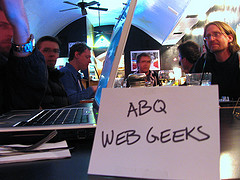
Photo by Chantal Foster via Flickr (Creative Commons)

Last Sunday, I was asked to pray in church for those of us in the tech industry, that we would use our skills as a means to Christ’s mission on earth. I opened my prayer by getting rid of the polite language. “Lord Jesus, be with the geeks and nerds among us. We were once made fun of but now are seen as the hope and solution for our companies. Let us use our new found influence for your glory and not our own. Let us point others to the Solution.

The nerds and geeks have come to rule our nation logistically. We might not hold a lot of political offices but it is headline news when leaders change companies, retire, or even get sick.

Long gone are the days when the rest of the room snickered when I said, “I run websites.” Now they wait for the meeting to end and then ask for my card so they can pitch their project to me.

Becoming geek

What makes a person a geek is that they have thrown away all semblance of generality and become hyper-knowledgeable in their sphere of knowledge.

In some regard we are all geeks. It’s how you become a professional in a field. Last year, I was at a man’s house repairing his PC that had gotten clogged up with Spyware. About every 25 minutes he would come by and look at what I was doing and say, “Man, I’m glad you know how to do that. I wouldn’t have a clue.” After a few rounds of that I stopped him. “You know– this is just my skill. If my toilet blew up or my washing machine got clogged… I’d call you. The world needs both computer nerds and plumbers.” It was an aha moment for both of us.

Geek isn’t just limited to tech. Geek is how you become an expert. And the world ceases to spin without experts.

Lack of balance

As a geek, I am perplexed at how some people judge me. They say it in subtle ways like, “I limit my use of the internet to just at work.” Or “I put up some boundaries so I don’t do that stuff while I’m home.” What they are really saying is that the thing they geek out in, say preparing for 25 hours to preach a 35 minute sermon, is somehow more noble than my task. They judge my expertise through the lens of their life and call for balance.

At the same time becoming a geek at something brings joy and satisfaction far beyond a paycheck or acclaim.

That’s the difference.

Being a geek at something is the absence of balance. It’s really an acknowledgement of letting go of a desire to maintain balance as a generalist and completely go after one thing.

Becoming a geek is making something others view as ignoble, noble.

Some say I waste a lot of time observing and participating in all sorts of things. At the same time, I don’t waste a lot of time reading books or watching mindless television.

No shame in geek

That’s the nature of geek. Going after one thing in a completely unbalanced fashion. Geeking out for hours trying to figure out how something works, how you can improve it, how others worldwide have taken it to new heights, and trying to predict when your geek-subject will go in the future.

May we stop judging and start embracing and supporting the complete lack of balance of the geek class. Stop trying to change them because, in the end, they will change you.

Two quick updates from McLane Creative

A fun outlet for me is building WordPress sites, consulting, and social media campaigns at McLane Creative. Since it’s a creative outlet I tend to be pretty picky with who I work with. Here are three quick slogans I use to describe my work there:

  • Guaranteed to be on budget and past deadline.
  • I tend to chose you more than you chose me.
  • I pick projects that matter to me, regardless of budget.

Interestingly, this tiny business has continued to grow through 2009-2010. And with marketing slogans like that… how could it not?

I’ve fallen into a pace where 7-8 projects per years is just about right. Any more or less and it’s just not worth it.

Two quick structural updates:

  1. I’ve moved all of my hosting from Bluehost to 6sync. More importantly, I’ve moved from a shared hosting environment which lead to some unexplained downtime and nasty malware, to a VPS environment where I’m much more in control. More on this move.
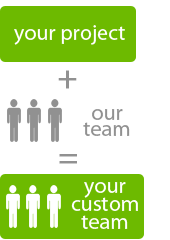
  2. I installed a client collaboration tool. The way MC works is that I build a custom team of freelancers for each project. This is an ultra efficient model of web development for the client… but the pitfall is that it requires that I manage a bunch of people working together for the first time over and over again. The new client area (powered by Collabtive) centralizes the teams communication with the client. More on this move.

Under the hood of YSpalooza.com

For the last month I’ve had my head under the hood on a brand new event for YS called, “YSpalooza.

Over at the YS blog I’ll talk a little more about what the event is and why we are excited about it.

But here I wanted to take readers behind the scenes to show off some of the nerd-factor I added to the website.

  • The site is fully HTML5 compliant. (No flash or plug-ins required to view the site, it looks great on mobile phones. All the hover overs and what-not works the same on a computer which it does on a phone.)
  • Since Internet Explorer isn’t HTML5 compliant, we had to learn a lot of hacks and workarounds for the world’s least functional browser.
  • This is our first big event to use Eventbrite for registration. I’ve used Eventbrite for a number of things and I totally love it. I especially love how it integrates with Mailchimp.
  • This is the first site in FOREVER (like maybe ever) that I build just in HTML/CSS without a content management system. It was like learning to ride a bike all over again. I love the customization level I was able to achieve by going this direction… but when it comes to managing content, there’s a reason you go with a CMS!
  • Building a site in this way has an aesthetic to it all it’s own. It’s a slow and methodical method. But I have a much more intimate connection to the site than I typically would. I have spent a ton of time on each of the 50+ pages.
  • Dave Luke was a freaking wizard. I’m not very good with coding websites and fortunately for me… Dave is formally trained. I broke stuff and he fixed it.
  • With no SQL databases or feeds or anything like that, the site loads super fast. Really, what you see is what you get.

This was a fun project to work on. For one thing, it’s a brand new event. So we were creating a lot. Typically, I manage a group of freelancers who all do 1-2 pieces of the pie. For this one it was a blast to do it in-house, with coding help from Dave.

How to adjust privacy settings for Facebook Places

What is it?

Facebook describes it this way:

Places is a Facebook feature that allows you to see where your friends are and share your location in the real world. When you use Places, you’ll be able to see if any of your friends are currently checked in nearby and connect with them easily. You can check into nearby Places to tell your friends where you are, tag your friends in the Places you visit, and view comments your friends have made about the Places you visit. Use Places to experience connecting with people on Facebook in a completely new way. link

In other words, its a bigger and instantly more popular version of Fourquare, Gowalla, and Yelp. With 97 million American teenagers owning a mobile phone, this has the potential to be huge.

Facebook has a very well done FAQ are for Places, I’d recommend checking it out and educating yourself.

How to Adjust Privacy Settings

For most people, your default settings are going to be fine. By default, you can use a mobile device to tell your friends where you are at. Additionally, by default you are allowing Facebook to point you to other people who are checked in at the same place.

For people into social networking, this is fine. I actually like that if I check-in at Starbucks I can know who else is there because I might actually like to have a conversation with them. It doesn’t creep me out that I could check-in at Ikea and 20 other people in Ikea who aren’t my friends could know I’m there.

But a good majority of people don’t use Facebook for social networking. They use it for existing friend connections. In other words, while Facebook is designed to help you expand your network by meeting new people, there are tons of people who want to “protect their privacy” and not network with anyone outside of people they know if real life.

That’s a personal choice and Facebook allows for that. (Even though its outside of the original design of Facebook, they’ve made concessions.)

Now, let’s adjust those settings!

Step one: Go to the Privacy Settings tab in your account settings. Here’s the link. This is an overview of all of your general settings.
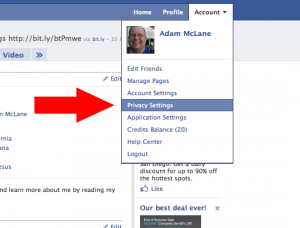
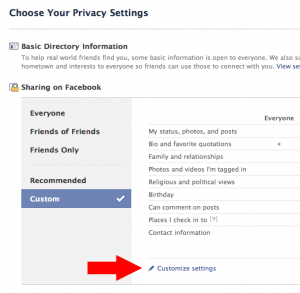
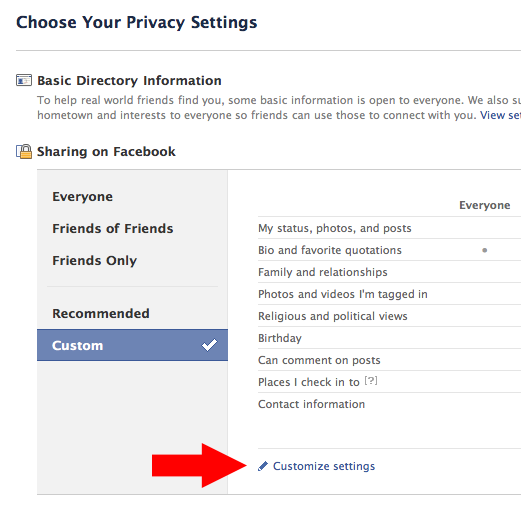
Step two: Click on “Customize Settings.

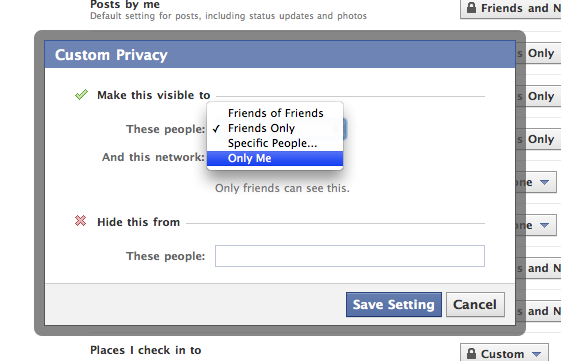
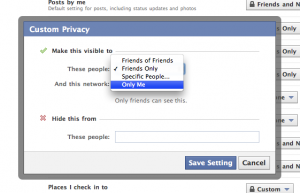
Step three: Scroll down to “Places I Check In To” and click “Customize.” This will bring up a box where you can select exactly who you want to see where you check in at. If you just want to play with it to get used to it, but don’t want other people to see it, change it to “Only Me.” Changing it to “Only Me” is as private as it gets if you want to check in places. You’ll notice you can also block specific people from seeing where you check in at. Think about who you want to block specifically and list them there. When you are done click “Save Setting” and you are done with this step.
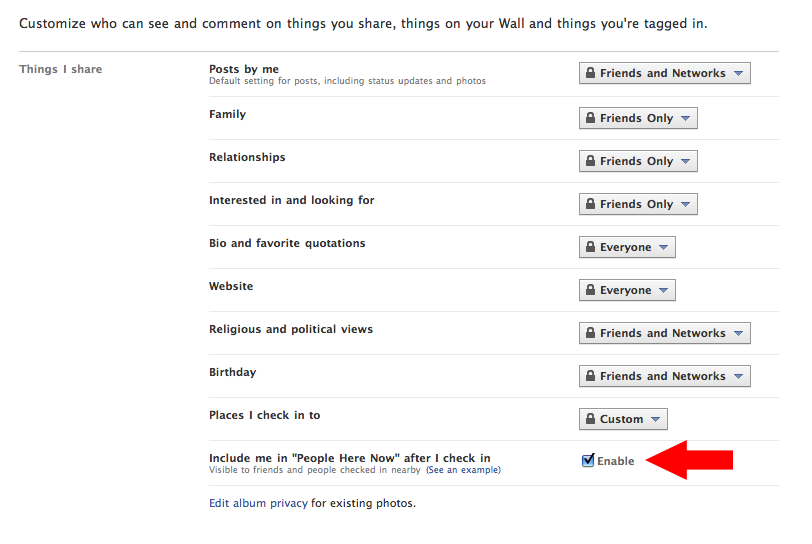
Step four: Enable or disable the “Here Now” feature. If this whole thing creeps you out, I’d suggest disabling this setting. But also keep in mind that if you want any of the cool freebies that retailers/restaurants may come up with for checking it, you’ll need to keep this enabled. (I’ve gotten plenty of free stuff by checking in via Yelp and even Twitter.)
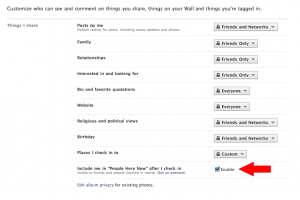
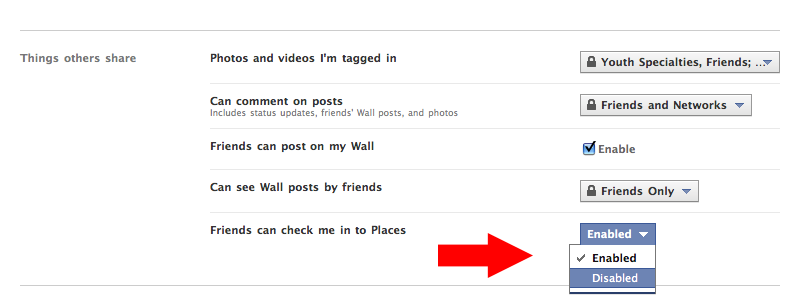
Step five: Scroll down to “Friends can check me in to Places.This is probably the feature that will get the most people in trouble and will make people the most angry. Say you sit down for lunch at work with a co-worker. You check in and you tag that person as being with you. Now, if you didn’t have that persons permission, all of their friends know that they have checked in at a place because that check in posts to their wall. Also, if they haven’t adjusted their settings in step four, now anyone on Facebook at that location can know they are there. On the other hand, if you feel good about your selections on step three than this is no big deal.
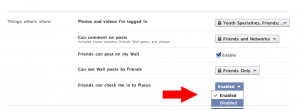
Done. You can go back to your profile, having adjusted your Places privacy settings to your liking.

What does Adam recommend?

Bear in mind that I’m a pretty open person. But I still value some levels of privacy, particularly because I’m a husband and father. Truth is, I don’t even anticipate using this feature unless I’m somewhere cool and want to brag that I am there.

Here’s my selections for the steps above:

Step three: I’ve selected “friends only.” I do wish I could select by groups of people. Because I have a friend group labeled “People I Haven’t Met Yet” and I’d prefer that they couldn’t see my location. But until Facebook fixes that, I’m going with “friends only. UPDATE: If you have a friend group you’d like to exclude from your check-ins, you can just type them in the field “Hide this from these people:Here’s what it looks like on my privacy settings page.  I’d recommend NOT choosing “friends of friends” because that basically opens up your location to anyone in the world.

Step four: I’m a big fan of getting free stuff. So I’m keeping this enabled because it doesn’t bug me and I’ve enjoyed many a free meal. There will soon be lots of iPhone applications that call to this so I want to see where it goes.

Step five: I feel pretty good about step three. And I also feel pretty good about the places I go and the people I go to them with. So I’m going to keep this enabled for now. Let me tell you though, if someone false checks me in somewhere shady and we’re going to talk. This little feature is going to land a whole heap of people in a whole heap of mess. So, if you aren’t sure about all of your friends, I’d recommend disabling this one.

Some Places Etiquette

  1. Never, ever, EVER check-in at home. I want to hit people in the shins with a hammer when I see that. Not only are you broadcasting to people where you live, complete with Google Maps directions, you are also telling people that you are home… and when you check-in someplace else, you are tell them YOU AREN’T HOME! Dumb. Dumb. Dumb.
  2. Only check-in at public places. Just like it’s dumb to check-in at your house, it’s really rude to check in at your friends houses. Checking in at a private residence is rude, even if the person says they don’t care. Just don’t do it.
  3. Always ask before checking in your friends. It’s just polite. Maybe they don’t want their friends knowing they had a latte while at work? Just ask.
  4. Check-in sparingly. I know it feels like a game. And games are meant to be won, right? But if you check-in to places 20 times a day you look really, really lonely. My rule is that I only want to check-in places that I think are cool. Sea World? Cool. The local gas station? Not cool. Since I like tiny, family-run businesses… I’m going to check-in at a lot of those because I know it helps them out. I think mom and pops are cool.
  5. Be weary of promotions. With 500 million users and integration into Google Maps retailers are going to go nuts trying to get you to check-in. (As a Google Adwords user, let me tell you… Google is going after us to do promotions!) Don’t be surprised to see deals popping up everywhere. A check-in deal is fine to me. But if I have to tag a bunch of people or write a specific status update to save $5… that’s too far. Don’t subject your friends to that.
  6. Never check-in anywhere after 10:00 PM. Remember when mom said that nothing good happens after 10 PM? If you are out with your friends, it is just better to not check-in. Nothing good is going to come of it.
  7. Remember: Everything you post online is public! All check-ins, all that GPS data, all those tags, all those status updates… they are ultimately public information. You parents can see it. Your boss can see it. The college admissions office can see it. Your significant other can see it. Your future mates can see it. Your children will be able to see it. Even if you’ve made all of your settings private, that data all ultimately belongs to Facebook and they can do with it whatever they want. (And it could always get stolen from them!) If you don’t want those people to see it… don’t post it.