I can’t wait to play with this around the office.
$78. Here.


In the latest edition of Immerse Journal I have an article called “Technology Swiss Army Knives” that’s all about apps that help you spend less time in your office and more time with students. I’d actually like to see apps for youth ministry get to the point where we could ditch our offices altogether. It’s not like any of us went into youth ministry hoping to maintain office hours. More on this concept later…
Clips is one of those apps that is a great resource for on-the-go youth workers, small group leaders… even parents.
It was created by one of my long-time youth ministry network guys from Detroit, RJ Grunewald. He’s a middle school pastor who fell in love with the iPhone and started dreaming about how to use his phone for ministry. Back in 2008, fiddling around after church, he created an app that farts. (Perfect for middle schoolers!) He submitted it to the iTunes store as the WhoopieCushion app and it blew up. (Get it, blew up?) I actually heard about it because RJ called me for some advice about starting a business. It was perfect timing because YS was just starting to think about apps for ministry, too. Long story short, RJ built the MyGuitar app and Tough Topics. (Both successful, but now retired.)
It’s really simple. You’ll be mad you didn’t think of it. If you have a set of Videos that Teach in your office– this is an updated and mobile evolution of that. (I’ve bought at least five sets of Videos that Teach over the years, it’s my most stolen resource.)
The app has a library of popular movies with amazing and powerful clips. The app suggests a clip and provides Bible-based discussion questions and some suggested Bible verses. You can search by movie name or topic. You can save things as favorites so you can come back to it, stuff like that. In a future version he’s opening it up to the community a bit more by allowing users to suggest clips to include in the app. But there’s enough there to last you quite a while.
It’s a great idea. And for any youth worker who is an app junkie, it’s a must-have. It’s available now in the app store for $2.99.
It’s a resource you’ll want to make sure is in the hands of your small group leaders and parents, too. Help them turn movie time into worthwhile discussion. Tip: Use the iTunes “gift this” button and you can send it to the youth workers in your ministry. If you need a raise… gift it to your senior pastor.
Last thing, I love the fact that RJ owns Clips. So literally, buying this app is supporting RJ and encouraging him to not only make this app better, but to make more apps like it.
Full-disclosure — RJ is a client of The Youth Cartel.

I’m as much an addict as the other millions of regular users. Hopeless. Helpless. And happily satisfied in my addiction.
Do you own your iPhone or does your iPhone own you?
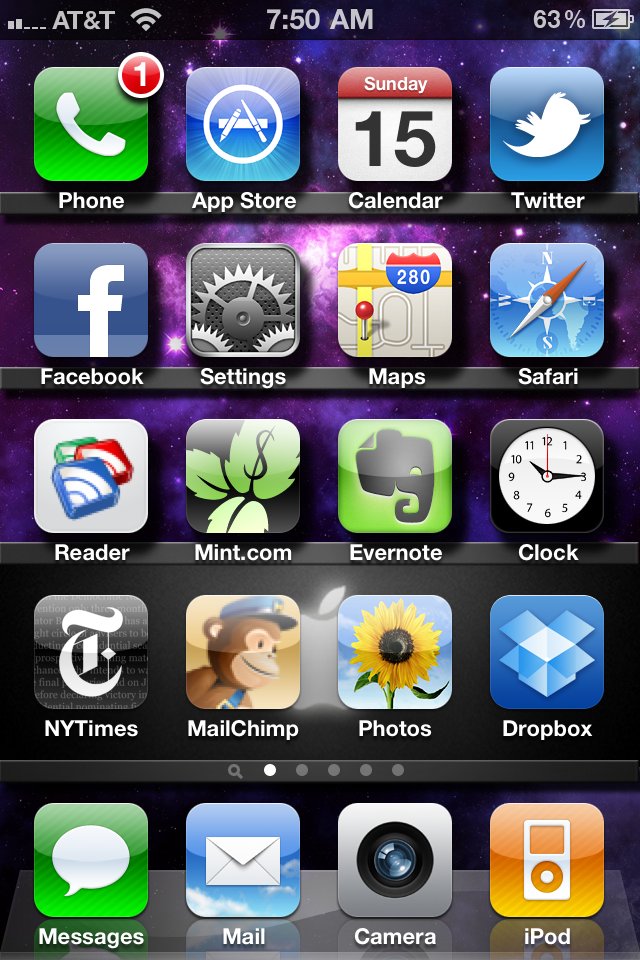
I almost never use my iPhone as a phone. Maybe 150 minutes per month. But I use it as a mobile computer constantly.
To make it to the home screen of my phone an app has to truly be utilitarian. Rather than flipping through pages or searching or digging through folders, a home screen app is something I want easily available.
The are sacred spots. And a non-Apple app has yet to get there. Texting, email, camera, music. These are my most used items.
Phone – I leave it on the homepage so that it still feels like a phone. But for a left-handed guy this is the worst spot on the home screen.
App store – I’ll admit it. I check the app store a lot. I like to get updates, what can I say?
Calendar – That thing runs my life. It synchs my work calendar and my Google calendar together. I don’t know how it works, but it is magical.
Twitter – I’m still bitter that I paid a few bucks for Tweetie 2 and then Twitter bought it and made it free. But this is, by far, the best and most stable Twitter app I’ve used. It’s a lot faster on iPhone 4. Which helps because I check Twitter several times per hour.
Facebook – I like the app almost as much as I like the web version. The app is solid. I just wish I could do more page admin functions.
Settings – I’m always playing with settings. Turning a notification on or off. Or, more likely, helping someone figure out their settings.
Maps – I use Google maps a lot. Why? Because I suck with directions.
Safari – Yeah, this thing has a web browser. Crazy, I know!
Google reader – I like to keep up on the blogosphere. For time managements sake I often look at Google reader while I’m on the train or in transit from point A to point B. I wish it had a simple “save to Delicious” plug-in. One day.
Mint – Mint tracks all of my families personal finances. This app and the service itself just keeps getting better.
Evernote – Any time I think of something that I am afraid I’ll lose, I jot it down in Evernote. Blog posts, shopping items, to-do list, product ideas, things to say, and the early alpha of any idea… all get put in Evernote. Once I synch the notes from my phone to the cloud, I can then get that same note in the desktop app for my Mac. Love it!
Clock – I set timers for myself constantly. I know, I’m weird.
New York Times – I love the Times and I love their app. I use a bunch of news apps that I keep in a folder. But the Times has earned its spot on my homepage.
MailChimp – Are you kidding me? Mailchimp is my right leg. It has quickly become one of my most valuable tools as a social media guy. They’ve got another app coming out soon that just might replace this app… or maybe the Chimp will have two coveted spots?
Photos – I like to take pictures and videos with my phone. So keeping this app handy is practical.
Dropbox – When I work on my laptop, most of my valuable documents get stored in Dropbox. Dropbox is a cloud-based (free) application that allows me to have my important files on my computer, on my phone, and in the cloud… available whenever I need them, however I need them.
It might look like I don’t buy apps. I do. I just haven’t found a paid app that could replace these that are currently on my home screen. I like to keep the home screen full of utilities. So things move around based on what I’m doing in life. Traveling a lot? Tripit is going to sneak up there. Football season starts? I’m going to guess the Notre Dame app will be back on the home screen. You get the idea.
What are apps that you use that I should give a try?
He who gets wisdom loves his own soul;
he who cherishes understanding prospers.
Adam’s translation
Wanna sleep at night? Chase after wisdom with all you’ve got. But don’t just chase wisdom, put it into action.
For the past couple of months I’ve been living in Proverbs. Sure, I do a lot of tweeting and Facebooking on my iPhone. But I’ve also been giving the Bible app (and my snail Bible) a workout. And almost all of my reading has been in Proverbs. On the trolley. At the office. At the dining room table. At football games. Backstage during sessions at NYWC. On planes. Over coffee. You get the idea.
Again and again, I find myself blown away by this stuff. This was recorded a few thousand years back and it is just as relevant today as it was back then.
Here’s a sampling of the verses I’ve bookmarked in the last 3-4 days:
Proverbs 14:15 “A simple man believes anything,
but a prudent man gives thought to his steps.“
Proverbs 14:23 “All hard work brings a profit,
but mere talk leads only to poverty.“
Proverbs 15:18 “A hot-tempered man stirs up dissension,
but a patient man calms a quarrel.”
Proverbs 15:23 “A man finds joy in giving an apt reply—
and how good is a timely word!“
Proverbs 16:19 “Better to be lowly in spirit and among the oppressed
than to share plunder with the proud.“
Proverbs 17:5 “He who mocks the poor shows contempt for their Maker;
whoever gloats over disaster will not go unpunished.”
Proverbs 18:6 “A fool’s lips bring him strife,
and his mouth invites a beating.“
Proverbs 18:12 “Before his downfall a man’s heart is proud,
but humility comes before honor.“
Proverbs 18:24 “A man of many companions may come to ruin,
but there is a friend who sticks closer than a brother.“
Proverbs 20:19 “”A gossip betrays a confidence;
so avoid a man who talks too much.“
Proverbs 21:5 “The plans of the diligent lead to profit
as surely as haste leads to poverty.“
Proverbs 21:21 “He who pursues righteousness and love
finds life, prosperity and honor.“
What one thing you do you when you are faced with tough times and hard decisions?
It’s well documented that I like managing projects… but I love finishing and releasing projects more than anything. In the last 24 hours, two little babies were released into the wild. I hope they both flourish.
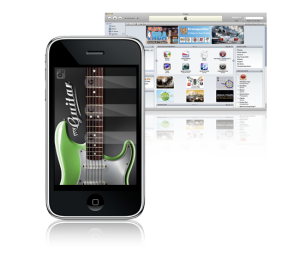
1. Myguitar iPhone app. This is the second application we’ve published from YS, with a few more deep in the process of testing and stuff. This one was fun for two reasons. First, it’s stinking fun to play guitar on your iPhone. My favorite feature is that I can play the guitar along to my favorite worship artist, David Crowder. My life would be complete if he would try it. Then again, my adoration for Mr. Crowder’s work is well-documented so that should be no surprise.
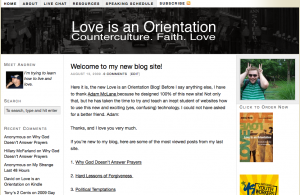
2. Love is in an Orientation. Speaking of adoration, I’ve also documented my admiration for Andrew Marin’s work in bridging evangelical and the GLBT cultures. More imporatantly, I’m lucky enough to count him as a friend. So when he asked me to help him get a “real blog site” I was happy to jump in and help out.
I don’t want to sound obnoxious. But this is turning into a whale of a year for me. Lots of great projects. Lots of nice things said. And lots, lots more where this stuff came from.
Since I spend so much time thinking about and managing iPhone apps getting developed, I thought it would only be fair if you saw the types of apps I use on my phone.


Sidenote: This is a repost. For some reason the post from 6/30/09 disappeared. It may looks as though I deleted 20+ comments from yesterday, but my server ate them. Sorry about that.
As they say, my dock is full. Kristen and I have been iPhone users for a couple of months now. So far we love it! One unintended consequence of using iPhone is that our monthly cell phone bill actually went down. Never expected that.
Like most users, I actually use the phone part of the iPhone very little. That said, I use the iPod and wireless device parts all day. As of right now, here are the 5 apps I use the most.
 Tweetie. I should clarify. Up until last night my most used app was Twitterfon. But Twitterfon was stupid and decided to drop a bunch of ads on their latest upgrade. I hate silent upgrades that dump in ads. I mean, I get it that they need revenue and all, but don’t ruin an app to do it! Anyway, Tweetie is a great Twitter app. It allows me to manage all my various accounts.
 Yelp. I already use Yelp to post quick reviews of stuff as well as read up on places I want to visit. Now when I’m on the go I can use Yelp’s community driven review sites to chose places to eat… and even find addresses to places that are hard to find. (I like stuff that’s way off the beaten path!)
 Mint. Kristen and I use Mint to track all of our finances. So having a Mint iPhone app is a total bonus. This allows me to keep an eye on our accounts, spending, budget, and investments anywhere I am. If you are a an iPhone user but don’t use Mint… you should really think about checking it out. It is pretty powerful.
 Google Reader. Technically, I don’t think this is an app. But if you bookmark it in Safari it becomes this sweet little app on your dock. I use Google Reader all day, everyday for my job. So being able to scan through endless vanity searches, twitter searches, and of course blog posts is essential. I love being able to read, share, and comment on stuff no matter where I am. As a few friends have pointed out… they can tell when I’m on the trolley because I’m sharing a lot!
 Facebook. What social media person wouldn’t love to have a mobile Facebook that is, in some ways, better than the web version? I love posting pictures and changing my status with my iPhone. So much less clutter.
A few people have asked me to put together a list of apps for youth ministry. Give me a few weeks and I’ll definitely be posting about that.