Category: social media

  • Table Project moves to private beta


    I’m pretty excited to see my friends at the Table Project have gone to the next step in their application development process, private beta.

    What the heck is the Table Project? It’s hard for me to describe, exactly. At first blush it’s easy to call it a social networking site for churches. But  it’s more than that. To label it as that would cheapen it.  I’d called it a social networking utility for churches.

    Most churches have an assortment of inter-connected people. There are people in the pews, an email list, a Facebook page, a website, a youth group list, a group of knitters who meet at the church but no one is sure why, and some sort of database for tracking member information.

    These are all separate things that the Table tries to bring together to make life a bit simpler for churches.

    Since the Table is a ministry launched from YouthWorks, I’ve gotten a chance to spend time with the developers… poke holes in their theories… and share Coke’s over head-spinning “what if” sessions.

    Over the months, in my skepticism, we’ve tossed quips back and forth. I’ve said, “Are you guys just another Jesus-flavored Facebook rip-off?” And they’ll fire back, “What’s your solution? Create a forum and charge people to join?

    Zoinks. Touche`.

    With this big milestone, I want to point out a few things about the Table and invite you to check it out.

    1. They have a stellar philosophy… they call it a manifesto. (The Unibomber would be proud)
    2. This service is free and open to others building apps on top of it to make it better. (Free and open… two of my favorite words.)
    3. They are a non-profit ministry. Some have said that the ownership thing doesn’t really matter. I think it does, and something tells me churches will think so too. (If money didn’t matter, how come all those investors invested?)
    4. They’ve got a great video explaining what the Table is all about.
    5. This phase of private beta is open to 50 churches, they have a fun little contest going if you’d like to join now.

    My disclaimer: Youth Specialties and The Table Project are both parts of the same organization. But no one has asked me to blog about their project. I’m just doing it because they are friends of mine and I’m excited about it going to the beta test.

  • Google honors John Lennon

    One of the most fun jobs on the internet must be to be on the team that plays with Google’s logo. I love this little doodle. Maybe I’m in love with the style or maybe the music? All I know if this is just too cool.

    I want to be a dreamer, forever.

    ht to Michael Novelli

  • Control and Social Media

    All day yesterday I got hit up by people excited about Facebook’s announcement of their new groups feature. (Actually, this is a very old feature with some newish features.) Mashable wrote about it. Techcrunch wrote about it. And tons of youth workers were left saying, “This thing is going to be great for youth ministry.

    Here’s what I’m thinking. No one, not even the creators of Facebook, can predict what the next cool feature on Facebook will be.

    Mini-rant about Mashable, Techcrunch: These are now just hype factories for the big social media companies. I’m tiring of their private parties and exclusive access. All that tells me is they are all in bed together. Other than publishing social media companies press releases, their utility is gone for me. My trust for those sites impartiality has vanished.


    Open Theory Never Works in Closed Systems

    When it comes to social media hype never equals mass appeal. The best you can do is create something and hope people discover it and like it.

    • Google spent plenty on Buzz and it has largely been a failure.
    • Apple spent plenty on Ping and it remains to be seen if its anything but a music version of LinkedIn.
    • Tumblr never intended to be the new Xanga but it is.
    • Formspring.me never intended to be hot with middle/high schoolers, but it was on fire last year.

    That’s the funny thing about social media. Open system theory defies hype and that’s what makes it amazing. Big companies and their R&D departments [and overhead and patents] simply can’t predict what will be hot. (And almost always shoot themselves in the foot because they need ROI when the only way to grow is to acquire customers.) So the game isn’t now, never in recent history has been, about creating cool things. It’s about masses of people (cough, 12-19 year olds) adopting the technology as their own and it spinning out of control in unexpected uses.

    Closed system thinking implies that you can control how your users interact with your product. Apple is really the only organization on the planet that gets away with this. They decide what features you will like and they force them on you and you like it. But every time Facebook tries it they get hammered by user backlash. Microsoft learned the hard way that this just forces customers to another product like Apple or Linux. Their latest media campaign is a direct attempt to lie to you by convincing you that their ideas are really your ideas. “I’m Adam and Windows is my idea.” Windows isn’t your idea. If it were it’d be free.

    Open system thinking implies that users control how they interact with the product and the owners/app developers respond. This is the secret ingredient for Apple’s recent success. Twitter will be the first to tell you that they do everything in response to how users utilize their app. To some extent, this is why Facebook has survived to date because the app developed on their open API have people hooked on crap like Farmville. (Their growth of late has been in middle-aged folks using Facebook for gaming, largely at work.) I’ve done dozens of consults with ministries and businesses trying to make a name for themselves with a new technology– I tell them all the same thing, which they balk at. “If you want to be big, build a Facebook app that your audience will love. Then, when you have their trust (and personal information) launch your own site. It’s about users, not money.

    This is why I teach social media principles and don’t do a lot of tutorials

    I don’t know if Facebook groups will be hot among high schoolers. But I do know that the same principles I’ve used to engage people online for more than 10 years will always work, no matter what the technology.

    Principles are timeless while technology is is an ever-morphing magma of response.

  • How to write consistently for your blog

    I’ve written a series of articles for Immerse Journal describing a digital ministry philosophy for youth workers. The first article, called “Be Consistent” brought a lot of questions because I spent all 800 words talking about “why” to be consistent and it left many struggling readers with a burning question, “How can I be more consistent in this area?”

    Here’s my process for daily blogging

    1. I’ve made it a daily habit. To put it in Christian terms I’ve added it to my daily devotions. I consider writing a major discipline of my spiritual life. It’s a daily exercise for my brain. I belive it’s one of the ways the Gospel works its way both into my life and into the lives of the people around me. Since its part of my daily routine I don’t find the time to blog. The time to blog has found me.
    2. I constantly capture ideas for blog posts. I have two distinctly different methods for doing that. Everywhere I go I have a journal and my iPhone. If something comes to mind, a sentence or thought or paragraph, I capture it. (If you spend time with me you may have seen me do it, though you may have thought I was just checking my email.) Sometimes its a visual sketch that I draw out or write out. But typically, its any idea that pops into my head or flows from a conversation and I capture it. (I use Evernote for that. Synchs from my phone to the cloud to my laptop.)
    3. I have a list of blog posts for future writing. Periods of inspiration come and go. So I maintain a list on Evernote called “blog posts” — Just a raw list of things I want to blog about at some point. Right now, that list has 11 posts titles/concepts. Sometimes it has as many as 30 and sometimes it has as few as 5. Each morning, as I sit down to write, I open up Evernote and decide if I want to write about one of the things on my list or something else that just came to mind. (It’s about 50/50)
    4. I write on a timer. Since I ride public transportation to work I have a firm departure time from my house. If you could see  the time stamp of most of my blog entries you’d see it is right around 8:00 am Pacific. DING! That’s when I have to leave for work. So my blog post has to be done even if it’s not perfect. I start at around 7:00 am and I have to press “publish” by 8:00 am. That means I have to write, edit, do artwork, publish, and push the links out to Facebook & Twitter in that hour.
    5. I process concepts in outline form. That may sound weird but it is how my brain is trained to work. If you were to look the concepts I capture on Evernote you’d see a formula: Concept; list of supporting items. That’s why so many posts are often lists or bullet points. I’m starting with that and wrapping an intro and a conclusion. If I have more time each supporting item may be a paragraph. But typically, like this post, those supporting items are bullet points or numbered points.
    6. I allow myself to slip in other posts. Each day I have my “main blog post.” This is the one I get up and write in the morning. But if something pops up and I want to post it later in the day, I do it. Typically, that drop-in post takes me a few minutes instead of an hour. It’s a thought or image or video or life nugget or reaction to something I read. But I’ve found allowing that to flow allows me to have still have that consistency of one thing I’m writing each day.
    7. I don’t punish myself for days off. I don’t have a scheduled day off from the blog. But sometimes, typically a weekend, I just don’t post and I don’t worry about it or force myself to write two on one day to catch up. Or sometimes I’ll skip the morning ritual to take the dog for a walk and in the process of walking him I will generate 3 new ideas. It’s also typical on weekends that I don’t have a “main post” but I’ll just push out two drop-in posts of quick thoughts, videos, family updates, etc.
    8. Blogging isn’t really always on my mind. I’m not sitting there, having coffee with a friend, and thinking… I’m so blogging this. This process actually allows me to NOT do that. It frees my writers mind to be fully present in my daily life. That’s hard to explain– but I think I’m just wired to write and writing in the morning kind of gets it out of my system so I can be productive in my day without thinking about things to write.

    So, that’s how I do it right now.

    My process is one-part analytical, one part self-discipline, and a pinch of artistic desire. You could even call it a little bit manic.

    And if I’m really honest with myself. Part of the reason this process works for me is that it brings order, control, and discipline to my scattered mind– writing a blog is more for my benefit than yours.

  • How to adjust privacy settings for Facebook Places

    What is it?

    Facebook describes it this way:

    Places is a Facebook feature that allows you to see where your friends are and share your location in the real world. When you use Places, you’ll be able to see if any of your friends are currently checked in nearby and connect with them easily. You can check into nearby Places to tell your friends where you are, tag your friends in the Places you visit, and view comments your friends have made about the Places you visit. Use Places to experience connecting with people on Facebook in a completely new way. link

    In other words, its a bigger and instantly more popular version of Fourquare, Gowalla, and Yelp. With 97 million American teenagers owning a mobile phone, this has the potential to be huge.

    Facebook has a very well done FAQ are for Places, I’d recommend checking it out and educating yourself.

    How to Adjust Privacy Settings

    For most people, your default settings are going to be fine. By default, you can use a mobile device to tell your friends where you are at. Additionally, by default you are allowing Facebook to point you to other people who are checked in at the same place.

    For people into social networking, this is fine. I actually like that if I check-in at Starbucks I can know who else is there because I might actually like to have a conversation with them. It doesn’t creep me out that I could check-in at Ikea and 20 other people in Ikea who aren’t my friends could know I’m there.

    But a good majority of people don’t use Facebook for social networking. They use it for existing friend connections. In other words, while Facebook is designed to help you expand your network by meeting new people, there are tons of people who want to “protect their privacy” and not network with anyone outside of people they know if real life.

    That’s a personal choice and Facebook allows for that. (Even though its outside of the original design of Facebook, they’ve made concessions.)

    Now, let’s adjust those settings!

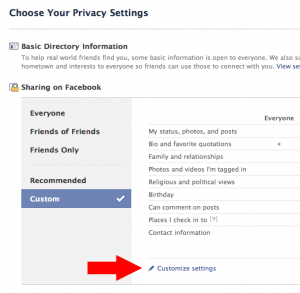
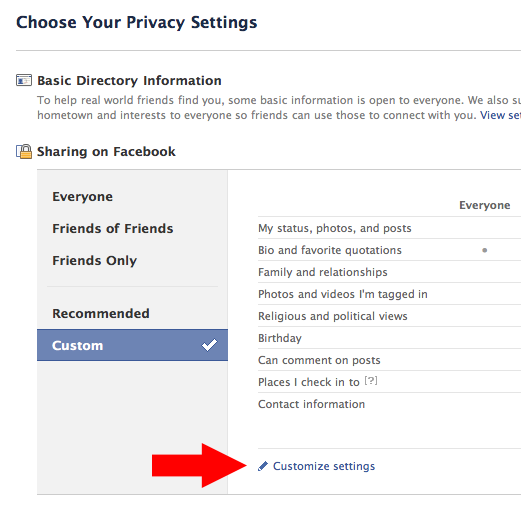
    Step one: Go to the Privacy Settings tab in your account settings. Here’s the link. This is an overview of all of your general settings.
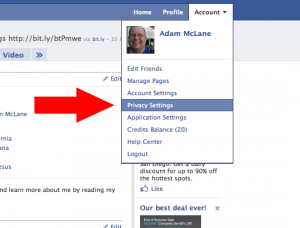
    Step two: Click on “Customize Settings.

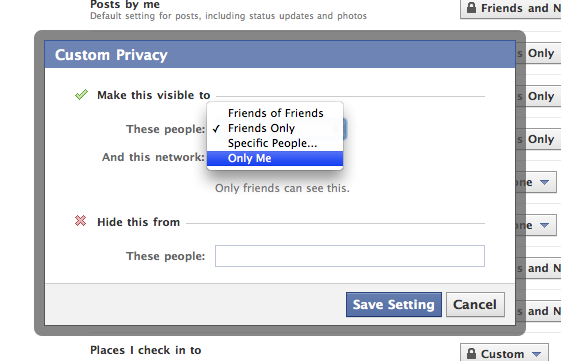
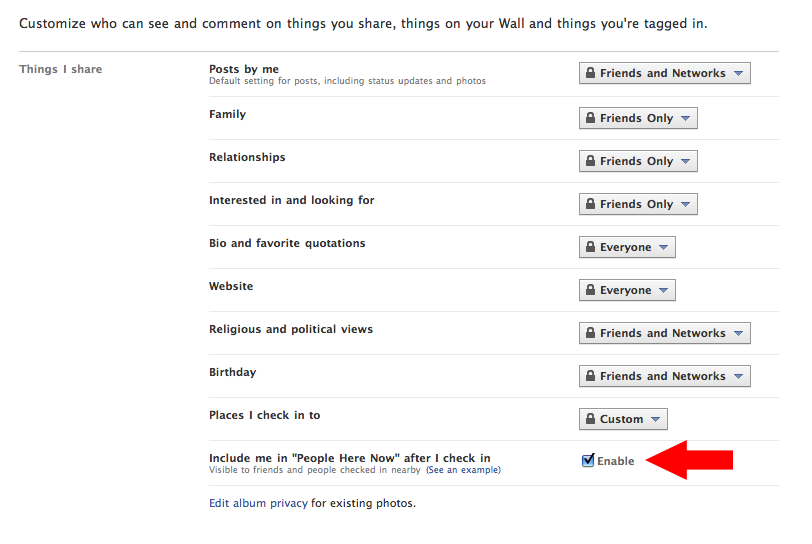
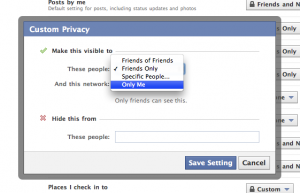
    Step three: Scroll down to “Places I Check In To” and click “Customize.” This will bring up a box where you can select exactly who you want to see where you check in at. If you just want to play with it to get used to it, but don’t want other people to see it, change it to “Only Me.” Changing it to “Only Me” is as private as it gets if you want to check in places. You’ll notice you can also block specific people from seeing where you check in at. Think about who you want to block specifically and list them there. When you are done click “Save Setting” and you are done with this step.
    Step four: Enable or disable the “Here Now” feature. If this whole thing creeps you out, I’d suggest disabling this setting. But also keep in mind that if you want any of the cool freebies that retailers/restaurants may come up with for checking it, you’ll need to keep this enabled. (I’ve gotten plenty of free stuff by checking in via Yelp and even Twitter.)
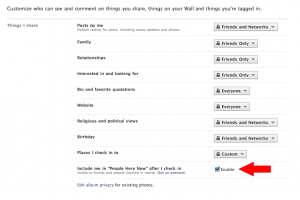
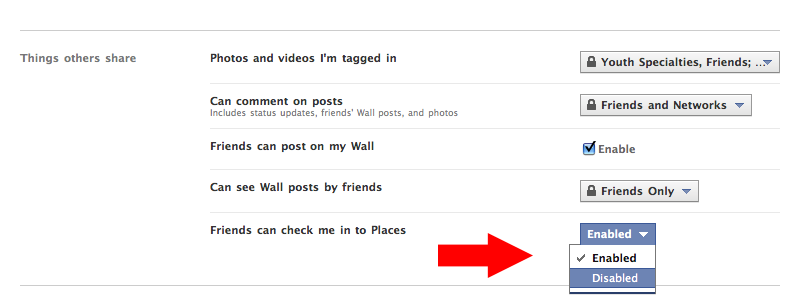
    Step five: Scroll down to “Friends can check me in to Places.This is probably the feature that will get the most people in trouble and will make people the most angry. Say you sit down for lunch at work with a co-worker. You check in and you tag that person as being with you. Now, if you didn’t have that persons permission, all of their friends know that they have checked in at a place because that check in posts to their wall. Also, if they haven’t adjusted their settings in step four, now anyone on Facebook at that location can know they are there. On the other hand, if you feel good about your selections on step three than this is no big deal.
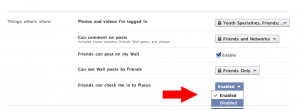
    Done. You can go back to your profile, having adjusted your Places privacy settings to your liking.

    What does Adam recommend?

    Bear in mind that I’m a pretty open person. But I still value some levels of privacy, particularly because I’m a husband and father. Truth is, I don’t even anticipate using this feature unless I’m somewhere cool and want to brag that I am there.

    Here’s my selections for the steps above:

    Step three: I’ve selected “friends only.” I do wish I could select by groups of people. Because I have a friend group labeled “People I Haven’t Met Yet” and I’d prefer that they couldn’t see my location. But until Facebook fixes that, I’m going with “friends only. UPDATE: If you have a friend group you’d like to exclude from your check-ins, you can just type them in the field “Hide this from these people:Here’s what it looks like on my privacy settings page.  I’d recommend NOT choosing “friends of friends” because that basically opens up your location to anyone in the world.

    Step four: I’m a big fan of getting free stuff. So I’m keeping this enabled because it doesn’t bug me and I’ve enjoyed many a free meal. There will soon be lots of iPhone applications that call to this so I want to see where it goes.

    Step five: I feel pretty good about step three. And I also feel pretty good about the places I go and the people I go to them with. So I’m going to keep this enabled for now. Let me tell you though, if someone false checks me in somewhere shady and we’re going to talk. This little feature is going to land a whole heap of people in a whole heap of mess. So, if you aren’t sure about all of your friends, I’d recommend disabling this one.

    Some Places Etiquette

    1. Never, ever, EVER check-in at home. I want to hit people in the shins with a hammer when I see that. Not only are you broadcasting to people where you live, complete with Google Maps directions, you are also telling people that you are home… and when you check-in someplace else, you are tell them YOU AREN’T HOME! Dumb. Dumb. Dumb.
    2. Only check-in at public places. Just like it’s dumb to check-in at your house, it’s really rude to check in at your friends houses. Checking in at a private residence is rude, even if the person says they don’t care. Just don’t do it.
    3. Always ask before checking in your friends. It’s just polite. Maybe they don’t want their friends knowing they had a latte while at work? Just ask.
    4. Check-in sparingly. I know it feels like a game. And games are meant to be won, right? But if you check-in to places 20 times a day you look really, really lonely. My rule is that I only want to check-in places that I think are cool. Sea World? Cool. The local gas station? Not cool. Since I like tiny, family-run businesses… I’m going to check-in at a lot of those because I know it helps them out. I think mom and pops are cool.
    5. Be weary of promotions. With 500 million users and integration into Google Maps retailers are going to go nuts trying to get you to check-in. (As a Google Adwords user, let me tell you… Google is going after us to do promotions!) Don’t be surprised to see deals popping up everywhere. A check-in deal is fine to me. But if I have to tag a bunch of people or write a specific status update to save $5… that’s too far. Don’t subject your friends to that.
    6. Never check-in anywhere after 10:00 PM. Remember when mom said that nothing good happens after 10 PM? If you are out with your friends, it is just better to not check-in. Nothing good is going to come of it.
    7. Remember: Everything you post online is public! All check-ins, all that GPS data, all those tags, all those status updates… they are ultimately public information. You parents can see it. Your boss can see it. The college admissions office can see it. Your significant other can see it. Your future mates can see it. Your children will be able to see it. Even if you’ve made all of your settings private, that data all ultimately belongs to Facebook and they can do with it whatever they want. (And it could always get stolen from them!) If you don’t want those people to see it… don’t post it.
  • 5 Types of Engagement With Each Blog Post

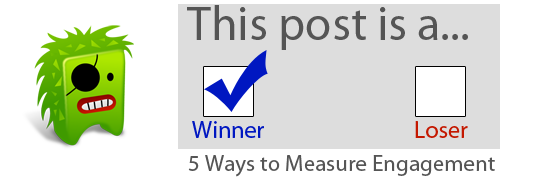
    I’m an engagement preacher. No other stat matters in social media quite as much as engagement. Likes, Retweets, Trackbacks, Comments. These are the things that show that your content isn’t just getting read– it’s getting shared.

    Here are five ways each of my blog posts is engaged with.

    1. Comments (On the blog itself, on Facebook, and on Twitter)
    2. Facebook like and shares (I have a limited reach. But through my reach I have unlimited viral capabilities.)
    3. Twitter links and retweets (Did someone like you post enough to post on their Twitter account? Did anyone retweet the link?)
    4. Private discussion (I get a lot of e-mails, Twitter direct messages, and Facebook messages with each blog post. I even tally the number of times people see me in person and mention something I’ve written. That’s all engagement.)
    5. Blog excerpts (Getting a paragraph pulled from a post and having it create content for another blogger/online magazine is awesome engagement. It’s like an annotated recommendation.)

    What are ways you engage with your audience?

  • Blogging Etiquette

    The last two years has brought a dramatic shift on the axis of the blogging community. With the wide adoption of social media consumption there are a lot fewer daily bloggers and a lot more micro-bloggers.

    The net result is a world full of newbies posting things online.

    With this huge shift comes a need to re-educate folks on etiquette.

    1. Observe the basic rules of the online world. Understand that there is no privacy. And anything you post can/will be used against you in the court of public opinion.
    2. Properly cite your sources. Provide a link to your source. If you are quoting a blogger, mention their name and link their name to the blog post your are quoting. (At the very least, link to their Facebook or Twitter account.) Make sure you spell their name correctly… I can’t tell you how many times I’ve been quoted on a site with my name spelled incorrectly. How rude.
    3. Understand the relationship between blogger and reader is reciprocal. The blogger gives you something to read and think about. If you take the time to read it, the reader should either respond with a comment, “like” the post so your friends can see you like it, retweet it, bookmark it, or share it on your favorite RSS reader.
    4. Give credit where credit is due. Were you inspired to write something from another blogger? Than give a hat tip in your post. (You see this as HT to name. It’s also fine to say, “Adam McLane recently wrote about ____.”) Bloggers know what they’ve written about recently. Trust me, it’s rude to see people using your ideas without giving you credit.
    5. Be careful when using proper nouns. That may sound silly, but you have to be conscious that your online rant may impact someone’s online reputation. (Or business or organization) I’m not saying it’s rude to call someone out… just be careful about it.
    6. Don’t steal images. Just because you found something on Google images or Flickr doesn’t mean it is free for you to use!
    • Use your own images.
    • Create your own.
    • Use images published under a Creative Commons license, properly cited and linking back, from Flickr. (Share and share alike. If you use CC images, make sure to post some as well!) Just make sure to read the usage rights… typically using an image for commercial purposes is a no-no.
    • Buy stock photography from iStockphoto or something similar.

    Just like in a sport– there aren’t always dramatic consequences when you breach etiquette. But there are social ramifications! Trust me, people are watching what you do online. They are making judgements about your abilities and character. Just like you try to act polite and use proper etiquette in the physical world… you are responsible for your own actions online.

    Have an etiquette question? Leave a comment and I will add to the list as needed.

  • 7 Steps to Building an Online Personality

    This video covers that basic principles very well. If you can get through the weird music break in the middle, the second half is excellent in providing examples.

    HT to Dave Luke

  • Some McLane Creative Jives

    There’s a lot going on with the funkier side of my life. That is, the fun projects I take on to fill my waking moments and force me to learn new skillz about all things design, social media, and WordPress.

    Here’s the last three:

    San Diego Spiritual Directors Association | WordPress theme

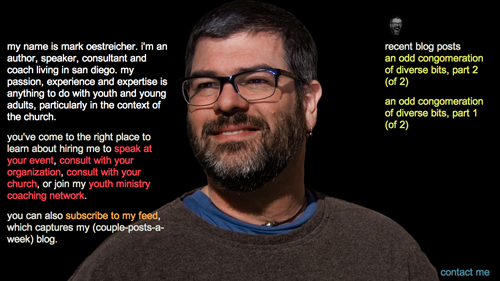
    markoestreicher.com | WordPress theme w/custom landing page which we’ll continue to morph

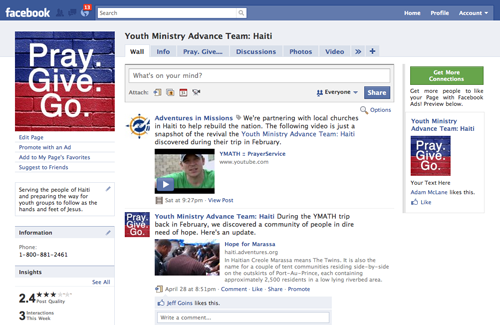
    Youth Ministry Advance Team: Haiti | Social media strategy & branding

    What’s next? I have a couple more smallish projects that will wrap-up by the end of May. Beyond that? I’m open. I’ve learned that although there are way more people looking for WordPress design, social media strategy, and other design stuff… I need to be picky. If I’m not energized by a project than I just have no enthusiasm to do it. Since this is what I’m doing as a hobby– I’m not tempted to do projects I don’t give a hoot about.

    In general, McLane Creative (it’s not just me, I’ve got friends who I sub-contract with) can handle 2-3 projects per month. Any more than that and it stops being fun.

    If you’re looking for someone to do a WordPress theme or do some general web design or talk social media strategy, head over to my contact page and we can chat.

    Just a note: I love helping people fix their broken WordPress blogs. If you regularly bust your blog and want my occasional help, I’m happy to put you on an annual retainer. (aka My kids college fund)

  • How to add the Facebook “like” button to the Thesis WordPress theme

    Earlier this week I started noticing the Facebook “like” button popping up on some of my favorite sites. And then, my co-worker Jonathan installed it on our site at work.

    When I saw that… I knew I had to have it on my blog. Plus I knew I had to master it for some of my McLane Creative clients.

    It took some fiddling around but here is how I’ve gotten it to work. Follow these steps and you can set it up in about 10 minutes.

    Please note: These instructions are for the Thesis theme for WordPress. If you’re looking for a completely customized WordPress theme you can build yourself, I recommend purchasing Thesis.

    Step 1: Download and install the free Thesis OpenHook plugin.

    Step 2: After activating the plugin, go to the settings link for Thesis OpenHook. On my blog it looks like “/wp-admin/themes.php?page=thesis-openhook/options.php”

    Step 3: Scroll down to the hook you’d like to install the code at. I’m using “after post.” But here’s a list of all the hooks and what they are.

    Step 4: Paste the following code into the hook you’d like use.

    Step 5: Click the checkbox “Execute PHP on this hook.” This is important, you will get an error if you don’t click this checkbox!

    Step 6: Press the “Little save button.

    Step 7: Like and retweet this post, telling everyone what a swell guy I am.

    Bonus:As you can see I’ve also added a couple Tweetmeme buttons to the same location. You can download my code for that, just put your Twitter name in the [twitter_user_name] spot and you’re good to go.

    Click here to download –> [download id=”6″]