Category: Tech Tuesday

  • A Review of Nest Cam

    A Review of Nest Cam

    Now that we’re homeowners again I’m in the midst of a whole litany of home improvement projects. (I’m even writing today in my half built Tiny Office to get a sense of where I’ll want furniture, install outlets, and stuff like that.)

    Along the way I’m testing out home automation gadgets, trying to find some balance between playful stuff, home safety & security, and energy efficiency.

    What is Nest Cam?

    Here’s the official description. 

    Meet the Nest Cam security camera.

    24/7 live streaming. No dead batteries. No missing moments. This is what a security camera should be.

    Features

    • 24/7 live video streaming – See your home on your phone in 1080p HD. And control Nest Cam from anywhere
    • Alerts on your phone – Get motion and sound alerts so you know if anything happens
    • Night Vision done right – See the whole room at night – not just a limited spotlight view
    • Talk and listen – Hear the baby. Or talk back to get someone’s attention
    • Quick, easy setup – Plug in Nest Cam and download the Nest app to get started. No hub needed
    • Don’t miss a thing – Subscribe to Nest Aware to get 24/7 continuous recording and powerful cloud algorithms that give you personalized alerts. Every camera comes with a free 30-day trial

    Adam’s description

    It’s a $200 web cam with a $100/year subscription service. 

    The Good

    I’ve been testing Nest Cam for about a month. So far, so good It’s easy to install, easy to use, and works as advertised.

    Nest Cam was originally developed by a startup called Dropcam, acquired by Google Nest’s Labs in summer 2015. Google, Amazon, and Apple all seem to be fighting to get a foothold in the emerging market of home automation things called The Internet of Things. So for Google, acquiring Dropcam probably just made sense and they wanted to get it before their competitors did.

    Installation
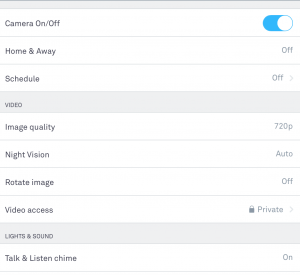
    Screen Shot 2016-01-26 at 9.20.04 AMOut of the box Nest Cam comes with a few physical installation options. It comes mounted on a well-weighted metal stand with a magnetic base. It’s good looking, nice enough to just plug it in, stick on a shelf, and forget about. The stand is easy to aim in whatever direction you’d like. There’s also a wall mount that’s easy to install, the camera then snaps to the base with a magnet.

    The software is also super easy to install. You install the Nest app on your phone or tablet (iOS | Android) then plugin the camera. The only hitch for me was that I had to then create a Nest account on my phone when doing so on the website would have been a lot easier for my fat fingers. Following the instructions in the box you first pair the camera to your phone and then the phone app helps you install the Nest Cam onto your home wifi. This process takes about five minutes and then you’re up and running.

    Features I Like

    It’s a good camera that’s simple to use, set it and forget it. We use it to broadcast at 720p but you can also use it at 1080p or 360p. We chose 720p because it was clear enough for our needs but didn’t bog down our wifi. We found 1080p did.


    I like that the corresponding app (and website) is easy to use, you can toggle features on or off based on your preferences.
    I like that we can set it up on a schedule or remotely turn it on or off, etc.
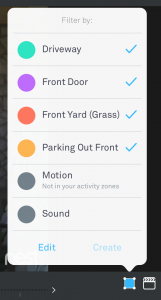
    Nest Cam Alert Areas
    Nest Cam Alert Areas – You create zones and toggle which you’d like to receive alerts about.

    I like that you can set alert areas. One of the key features is that you can chose to get a notification if there’s motion in an area you define. This is pretty simple… you just go into your account on the website, draw a picture around what you want to monitor, and indicate that you’d like to get an alert if there’s motion in that area. That’s helped us cut down on some of the annoyance we had with it originally, which I’ll share below.

    I like it’s portability. While we have ours permanently mounted on the exterior of our home I’ve seen other users who move it around, even using it as a cheap and easy way to broadcast meetings, events, etc. That’s pretty cool!

    I like that it’s efficient. We have one mounted outside of our house in a place where we don’t have power. So we’re actually using a Jackery Giant (USB battery pack) to power the camera, each charge lasting about 20 hours.

    I like that it works with other Nest products. In the future I’ll write reviews of Nest’s other products, their thermostat and smoke detector. But, so far, we really like that all of those devices work together and are accessible from the same app.

    I like that Nest is providing a way for other manufacturers and developers to interact with Nest products. I’m using things like IFTTT to automate a whole bunch of stuff around the house, more on that in another review.

    The Bad

    The first is the most obvious. It’s too expensive for what it is. I recently purchased web camera’s of similar quality for about $30 at Wal-Mart. Is the fact that it has a wifi capability and an app worth an extra $170? For me it was. But for lots of people I don’t think it is. I have a feeling that it’ll drop to about $99 before Christmas 2016 and that they’ll release a new $199 version about the same time.

    I don’t like that it’s not waterproof out of the box. It’s not rated for outdoor use, per se. But let’s be honest… most people are going to want to use it outside. It makes no sense that you have to buy aftermarket accessories to make it waterproof. This reminds me of the first few versions of GoPro where you bought the camera and then you spent three times that on accessories just to get the silly thing to work. We added a $20 waterproof case from Dropcessories that allowed us to mount them outside where they might get wet. That’s $20 to fix what is otherwise a design limitation.
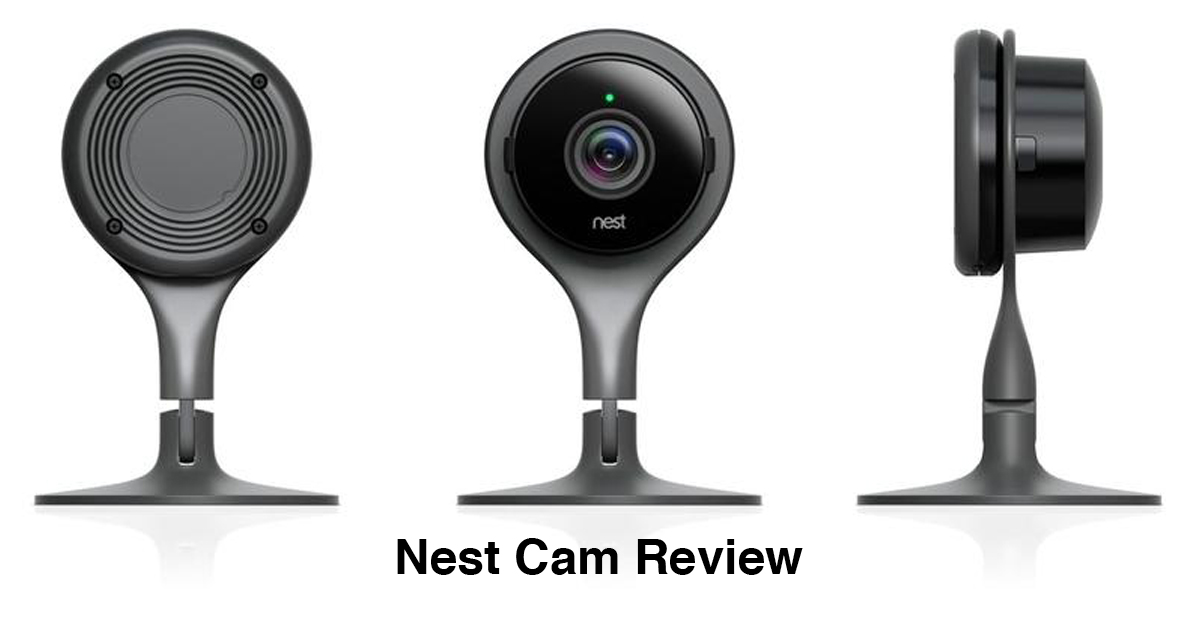
    Nest Cam Review
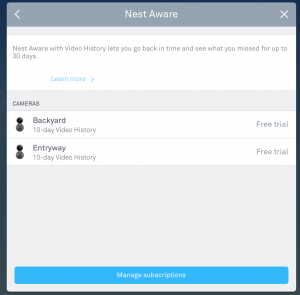
    $100 per year for one camera, $150 per year for two cameras.

    I don’t like that you need to pay for Nest Aware. To get all of the features of Nest Cam to work you really need Nest Aware, their subscription service that records live footage. Basically, without Nest Aware you can’t go back and look at things your camera has recorded. Say… someone prowling your home. Without the Nest Aware subscription you could get the exact same thing with a waterproof GoPro Hero 4 Session and their native app.

    What About Data Security?

    “But Adam, you’ve long said that anything you post online is not private, it’s public. How is this different?”

    Well, first of all it’s definitely in the best interest of Google to protect the data of Nest users. Since they are investing billions of dollars in home automation, you better believe that they want to keep this stuff secure from hackers.

    Second of all, the way that we’re using Nest Cam… to capture video of outside of our home… is not technically “our private space.” The Supreme Court has affirmed that things that happen outside of your home are not assumed to be private. Just like I can take a picture of you on the trolley without your permission, I can video things that happen outside of my house without needing anyone’s permission. (For non-commercial purposes, that is.)

    Third of all, while I’m OK with the perception that what we’re broadcasting is indeed private, I’m aware that it potentially is not. I’m 100% aware that my privacy is a perception in a lot of ways. (After all, I carry around a recording & tracking device in my pocket all day…)

    I would be more concerned about Nest Cam streaming 24/7 inside of my home. I’m sure that my account is somehow vulnerable to hackers (or government’s prying eyes) and I just don’t think it’s a great idea to make it easier for someone to see what’s happening inside my house are even pick up the audio of people in my house talking.

    But the things that we’re using with Nest Cam (and the thermostat) aren’t directly tied to our house from inside of the account. For instance, while the thermostat is recording a lot of information about our house… it’s benign information like humidity levels, outside temperature, stuff like that. When/if we start using Nest for more sensitive stuff… I’d at least like to see my Nest account protected with 2-factor authentication. 

    The Money Line

    We really like Nest Cam. While we initially were infatuated with it we’re finding it to fit into our household rhythm. We’ve used the advanced features to make the notifications work for us, so instead of alerting us of every car that drives down the street or every time the wind blows a tree… we’re getting adjusting it so that it’s only alerting us when we want to be alerted, like if someone is at the door.

    Is it worth $200? I don’t know. What’s the cost of being able to check in on your house when you’re away? What’s the value in knowing who is poking around in front of your house when you’re not home?

    I think $200 is buying us a little bit of assurance and, at least for now, it’s worth it.

  • David on Tinder

    David on Tinder

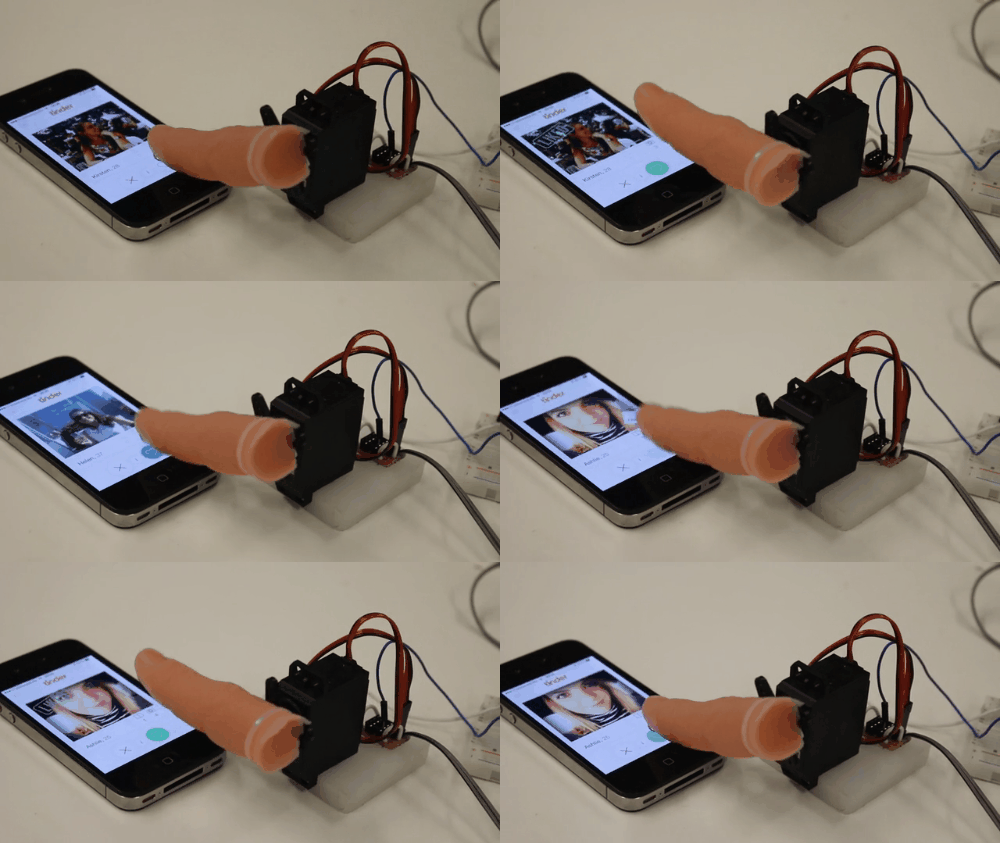
    One evening David got up from his bed and walked around on the roof of the palace. From his phone he saw a woman, the woman was very beautiful, and David swiped to the right. She came to him, and he slept with her. Then she went back home.

    2 Samuel 11:2-4, on Tinder

    I’ve been thinking a lot about teenagers and relationships in a social media saturated culture lately.

    On the one hand, I attended the Association of Youth Ministry Educators annual conference this past weekend, and the topic was Technology and Transformation. There I heard lots of presentations about adolescent life and the role technology is playing. Stuff which I’ll be unpacking in the weeks to come here on the blog.

    On the other hand, I’m engaged with lots of real life adolescents regarding issues of technologies is bringing to their life over and over again. One of which is a fundamental shift in how people meet one another romantically. The vast majority of young adults are meeting people for the first time online. Their parents? They didn’t do that. Most of the people in their life are suspicious of dating people they first met online. It’s a practice with lots of upside, but also lots of downside. Think about it: Judging purely on looks or the ability to create a profile… how many married people would have ever met their spouse in that context? Likewise, what does it feel like to have your romantic prospects judged purely on looks alone?

    Women are seemingly left with endless choices.

    Men are like…

    tinderbot

    And both, from what I can tell from talking to people, are left feeling shallow. Even people who are allegedly looking for a cheap hook-up encounter are really looking and hoping for something more.

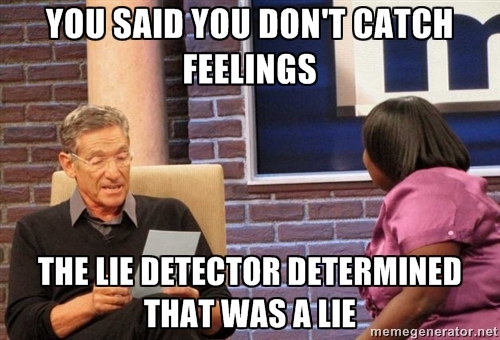
    There’s a great meme floating around about “catching feelings” for someone you’ve hooked up with or have a “friends with benefits” arrangement with.

    50568042

    It’s as if there’s an assumption that you can have emotionless sex. Becoming attached to someone isn’t just a thing rooted in morality or religion, it’s rooted in biology.

    Can the Bible help? Do Christians have a message of Good News for our Sexuality? Do we have anything to say in a world of ever-evolving attitudes about sexuality? This was the question Adam Mearse asked a room full of Christian educators yesterday.

    I believe we do. 

    But I think we’re going to have to deal with our own selves first. We’re going to have to set aside the crap we taught in the 1980s, 1990s, held on to during the 2000s, and clung to in the early 2010s like it’d somehow come back.

    Ready to get started? Start by checking out Amanda Linhart’s latest research at Pew Internet, Teens, Technology, and Romantic Relationships

  • The House of Things

    The House of Things

    I got home from Open Seattle Sunday afternoon. And I’ve been consumed by the move ever since. Yesterday, I worked a half a day and spent the rest of the day moving stuff across the street one load at a time. I’m using “I” like I’m doing all of the work. In reality, Kristen has moved a lot more than I have as she got started on Thursday and I was kind of worthless to the process until Sunday afternoon.

    Two prevailing thoughts as we move from a long-time rental situation to our new, permanent home across the street.

    Holy Smokes We Have Stuff

    By my count we’ve moved 10 times in 18 years of marriage. But we had lived in our last place since Spring 2009. A lot has happened in our lives since then. We had a baby, our older kids entered adolescence, we both started working at home full-time, hobbies have come and gone, on and on.

    The result is that we’ve got a ton of stuff. Back and forth we go across the street and with each trip we make a decision: Move, sell, donate, or pitch.

    We will be doing all of that in the next 10 days as we close out and clean the rental house. (A new family is moving in across the street November 1st!)

    Let’s Make the New House Cool

    The Internet of Things was the theme of last year’s Consumer Electronics Show in Las Vegas. While we were renting I didn’t have much interest in this, it all seemed kind of silly. But now that we’re homeowners again I’m looking at all of that stuff again.

    Sure, we’re going to make some physical changes over the next few years to invest in our investment. (We’ve got a big list!) But I also want to see if there are new technologies out there which will help with that.

    So, as often as I’ve avoided product reviews here on the blog, I think that it’s time to test out some of these things to see if they are just a gadget or if they can actually make a house better.

    I’ve got my own curiosity… but I have a feeling that I’m not alone, that there are other folks who read my blog who also want to know if these things are just gimmicks or if they can really save you time, money, and provide some level of assurance.

    Here’s what I want to test:

    • Efficiency tools – Devices that monitor our utility usage.
    • Environmental monitoring – Stuff that measures, logs, things like temperature, carbon monoxide, smoke, pollen and warns us about potential hazards. (I’m a dork, I’d love a weather station)
    • Remote monitoring and security – Did you know there are apps that unlock your door as you walk up to the door? Or apps that control your garage door? Yeah, I want to see if that stuff really works. Plus, both Kristen and I are kind of OCD about remembering to turn things off. If there were a way to know for sure that our oven was off or that we remembered to lock the patio door… we’d like to test them out.
    • Family-specific stuff – We’re a digital family. Our kids have lots of devices, I have lots of devices, so we are always looking for things to keep track of all of that, keep an eye on who is doing what, and keep everything charged & running smoothly.

    What do you want me to test?

    Fellow readers. What are the things you’d like to see me test for you? Leave me your ideas in the comment section below.

    Want me to test your thing?

    Drop me a contact and let’s connect.

  • Why is Snapchat addictive?

    Why is Snapchat addictive?

    Tech Tuesday question from Aaron R. 

    Snapchat. I feel like I am using it too much. I’m not worried about Snapchat not really deleting my pictures. I just feel that I’m using Snapchat to seek something else. I feel bad when I have all these stories and it looks like I am bragging but everybody does it so I think it’s okay. I Snapchat everything and I wish I could stop.

    You’ve made a great observation, Aaron. What you are talking about is important for anyone that uses any app, not just Snapchat.

    Sometimes we all need to take a step back and remind ourselves that we own the phone, the phone does not own us. 

    Why is Snapchat so addictive?

    Long story short, the app is designed to trigger a response in your brain that makes it so that you check the app without even thinking about it. (It’s not just Snapchat, virtually every app does this.)

    Any time you get a new snap or scroll through stories or send a snap, your brain’s reward system is triggered. Getting a message or like or even sending a message feels so good at a sub-conscious that your brain just can’t get enough… kind of like your favorite candy… you don’t know why you ate the whole bag, but you did.

    I first wrote about dopamine and interrupting the loop in 2012 in this post, Notifications are of the Devil, please take a few minutes to read that.

    With something like Snapchat, which often might include flirtatious or even sexual content, it kind of “double triggers” your brain. You have the dopamine effect found in receiving any type of notification PLUS you have the normal hormonal response found in any potential sexual encounter. It doesn’t matter if you’re 13 or 39 or 99… if something sexual might happen, your brain will give it your full attention.

    What can I do to make Snapchat less addictive?

    I’m not a Snapchat user, but I do use other apps that are equally addictive. (Instagram, Facebook, Twitter, YikYak, etc.) Here’s how I take control of my usage… well, at least get better control of my usage:

    • Disable push notificationsHere’s how to do that for Snapchat.
    • Schedule Do Not Disturb to block out hours where you need to concentrate (work, school, sleep) – Here’s how to do that for iPhone and Android.
    • Only use your phone in public spaces of your life – Over the last 20 years of working with individuals and families I’ve learned that most addiction problems occur when internet connected devices are used in private. (Bedrooms, basements, bathrooms, etc.) No one sets out to get addicted to an app, online gambling, porn, etc… but it happens when we use the device in isolation for long periods of time. If you form a habit that you’re not going to use the device in private, you’ll eliminate most internet-related addiction problems.

    Have a tech related question? Drop me a note on my contact form or send in your question via the form on the sidebar of my blog.

  • Tech Tuesday Questions about Snapchat, high school graduation, and big data

    Tech Tuesday Questions about Snapchat, high school graduation, and big data

    For the past month or so I’ve had a form in the sidebar of my blog. The intention is for readers to submit their questions about anything tech related. Here’s a few questions that have been submitted.

    Question

    How do I get in contact with Snapchat? I’ll track these mfs down and then snapchat and my friends can be safe!!

    Emma in Australia

    Answer

    Dear Emma, you can always contact Snapchat directly with your user questions and concerns. You could also follow their CEO, Evan Spiegel, on Twitter and connect with him that way.

    And if something has gone wrong, let’s say a law has been broken, I’d encourage you to contact your nearest law enforcement agency so they can work with Snapchat to investigate. (Law enforcement can refer to this handy guide)

    Question

    Can you recommend any books for teenagers entering adulthood, geared towards a 17 year old turning 18 who is making really life changing choices and not good ones?

    LaRie in the United States

    Answer

    Sure, over at The Youth Cartel we released a book for exactly that age group called The Amazing Next. It was written for precisely that age.

    Question

    How do internet companies know so many things and know so much information? Do they make all theses phone apps for kids just to see what there doing and to post there information?

    Sasha in Michigan

    Answer

    Sasha, the first part of your question is actually pretty easy… you can find out lots of information about various things and people specifically because they openly and freely share it. Most people don’t read the terms of service to create accounts. But in most cases, you’re agreeing that the information you share on a website or app belongs to the service provider and they can do with it whatever they want within their policies.

    The second part of your question is a bit more nuanced. Most developers would argue that their app is about it’s utility… they really want to help people connect with their friends or want their app to help people navigate to where they are going. And the data they collect is merely a byproduct. Most will claim that the sale of that information is merely a secondary market for them… but it’s a $50 billion secondary market annually!

    Big data is big business for a lot of reasons, nearly all of them are commercial. Right now, predictive information is what’s hot. Companies want to know what people are talking about today so they know what they’ll buy tomorrow. They buy traffic information so they can know what kinds of people drive by their store. Even hospitals are tapping into big data to predict how many people will visit the emergency room.

    I don’t think people really care about Big Data as it’s macro. We don’t care because it’s kind of about us but not about us specifically.

    The reason I teach healthy social media habits to parents and teenagers is that it’s not Big Data that gets you in trouble. Instead, it’s bad habits that ruin relationships and it’s micro “Little Data” that can lead to personal problems like you losing your job or your teenager not getting a scholarship.


    Got a Tech Tuesday question for me? Head over to my blog and submit your question using the sidebar form. 


  • The Power of Self-Service

    The Power of Self-Service

    Back in the old days, 2005 to be exact, I had a problem. I needed an email template to send our very first newsletter for Youth Ministry Exchange.

    Email marketing was starting to become a thing and I wanted to send an HTML-based template that looked like I knew what I was doing. (Even if I didn’t.) Back then, we sent email with a little program that ran off our webserver using the PHP mail() function. It was archaic, at best, and usually shut our server down in the process. But it’s what I had and I was determined to make it look as professional as I could.

    As I continued to look at templates I kept ending up at a little website, MailChimp.com. It was a paid service, I didn’t want a paid service, but they were offering free templatesfor them, this was an early entry into the SEO game… and it was working by drawing me in.

    I started using their templates. I’d copy/paste their code into my HTML editor, add our content, then copy/paste their template into our software, and send it out to our customers. Then our server would shut down… and people would freak out because the forums were down or the articles I was linking to weren’t visible because I’d have to call Bluehost and get them to reboot the server, again. On top of that headache I had to create and manage forms for people signing up for our newsletter as well as manually manage people opting out. It was a royal pain.

    By early 2006 I’d had enough.

    Even though we really didn’t have the money to pay for any service I knew that I could sell an ad on the forums that’d pay for MailChimp. But the downside of paying for something I had been doing “for free” on our webserver was easy to overcome when I could get more uptime for the forums, less complaints, and MailChimp would also offer me some basic reports, handle the opting in and opting out, all of that.

    And so, MailChimp became my email marketing platform of choice. They were still kind of small at that time, they had something like 11,000 customers. (They have more than 7 million customers now)

    Pretty soon I had questions. Something didn’t work right or I couldn’t figure it out, so I’d hop on live chat or send in an email to ask my question. And instead of “just fixing it” they’d often times point me to their support documents which told me how to fix my problem.

    They’d roll out a new feature, I’d try it in my next message, if there was a problem I’d email them, they’d send me a link to a document and I’d fix it. This little loop would continue for the next year or so. With each message I sent I got a little better, our emails got a lot better, and we were rocking and rolling. (Open rates of like 45% were the norm!)

    Then in summer 2008, Patti and I sold little YMX to another company and the next thing I knew I re-entered the dark ages as I began working for the larger company on their email marketing.

    All-in-all, the emails we were sending at the new company were prettier– the copy was much more snappy. But the open rates were terrible– less than 10%, the click rates virtually non-existent– less than 1%, the lists were full of spam and duplicates, we had a very hard time showing how emails created leads/sales, and we were spending lots and lots of money sending email messages with an array of contractors and over-priced, out-dated systems.

    Worse yet, when something went wrong, or we wanted to do something different… the answer was always either no, more money please, or that’s not in our contract.

    In 2009, I finally convinced this new company to move to MailChimp. And you know what? Our open rates, click rates, and every other measurable skyrocketed. (Not to mention we saved boatloads of money.)

    Self-Service = Power for the User

    Here’s what I learned in this:

    • Most expensive can mean something is the best, but not necessarily.
    • When you empower your users to help themselves, your cost of doing business per customer drops to almost zero.
    • When you empower your users to help themselves, the value of your product increases in the eyes of your customer.
    • When you empower your users to help themselves, they become your evangelists because they make themselves better by using your product.

    The Problem of Religion

    It’s not just MailChimp that’s taped into this. If you think about it, the driving force behind much of the current internet/app crave is that power has shifted from CEO dictators who control every aspect of how a product is used with their greatest weapon being restricting access to CEOs who act like anthropologists and data-driven analytics monsters whose greatest weapon is granting near limitless access.

    YouTube makes very few videos but their platform and reach is massive. Apple’s iPhone struggled until they publicly released the software to build apps and make the entry point for submitting apps just $199. (Android was built from the ground up on this principle.) WordPress is an open source product that runs nearly 1/4 of all the websites on the planet. Want to contribute? Anyway can help make WordPress better.

    On and on, most of the most powerful technology companies today have empowered their users to build their own platforms.

    This shift in power, from a small group to the masses, presents a problem for the church. Culture demands the power to create, transform, remix, reimagine, innovate.

    And the Christian leadership establishment is terrified by this.

    Their entire model of subsistence depends on large gatherings where a guru speaks to the masses. Power is equated by how many people listen… a church is deemed as being more powerful if the guru speaks to 10,000 people versus a church of 100.

    The challenge for the Christian establishment is to quickly pivot from an organization who finds it’s power/influence in culture where everyone listens to the guru to becoming a place that empowers believers see the local church as a place to become equipped to influence their network wherever they are and with whatever they do.

    Fortunately, there’s a playbook. The first century church faced nearly the same challenge as they pivoted away from a Temple-based, hierarchical priesthood to empowering every believer as a priest. The less control the leaders had, the more individual believers were empowered to live out their faith, the faster the church grew.

    If you want to know what to do right now to see the local church impact a culture where old-school power doesn’t work, read the book of Acts.

    Photo credit: MailChimp Vinyl Toy by Tomos via Flickr (Creative Commons)
  • What’s the deal with Burnbook?

    What’s the deal with Burnbook?

    Last week, San Diego county schools went coo coo for cocoa puffs about the social media app Burnbook.

    Megan, our 8th grader, missed school on Monday. When she came home on Tuesday she said the joke on campus was an assembly she missed on Monday. “No one had the app or had even heard of Burnbook. What is it?

    Yeah, this is what I mean when I say… “Don’t educate 99% of students about something 1% or less are doing.

    Face meet palm. Seriously. 

    I see schools do this all the time. And it’s why my social media talks are based in principles instead of a single app… let’s educate the 99% about good, healthy habits, and deal with the 1% of problematic students in the counseling office.

    So what’s Burnbook?

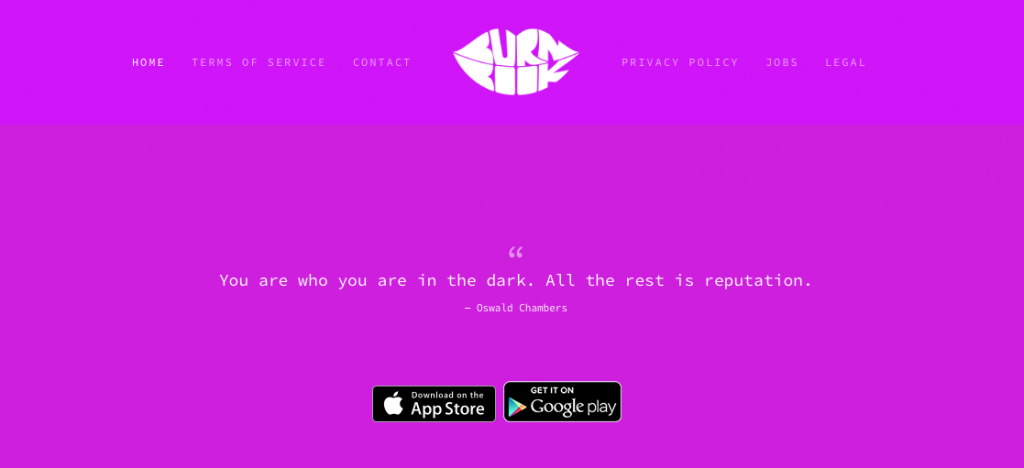
    burnbook-homepage

    Basically, Burnbook is Yik Yak for middle and high school students with a couple plot twists.

    Plot Twist #1

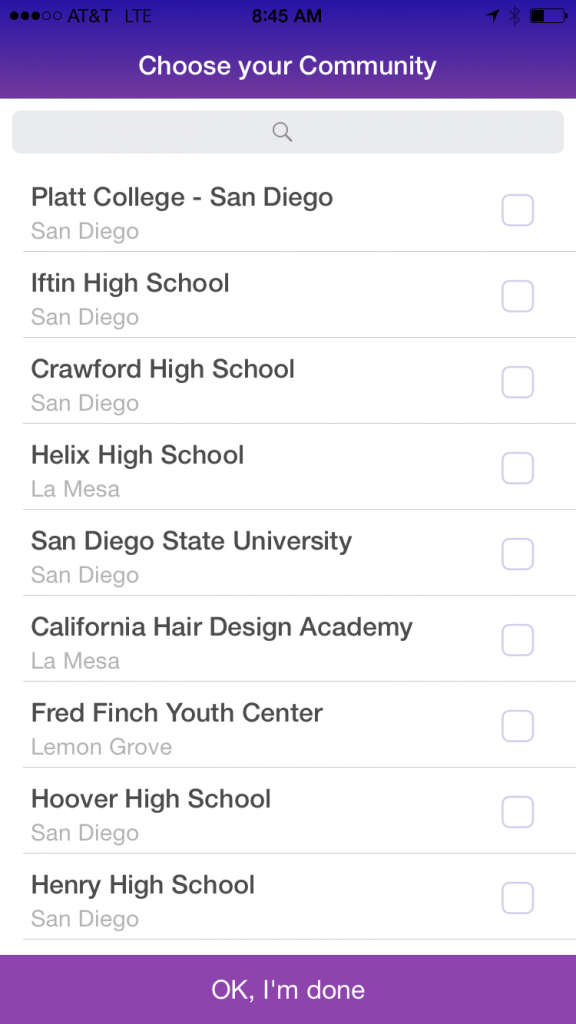
    You opt into a community whereas Yik Yak merely implies a community based on your geolocation.

    So when you open the app, you create an account and you pick your community. (Most users would pick their school)

    burnbook-nearby-communities

    The plot twist is that you can pick a different school…

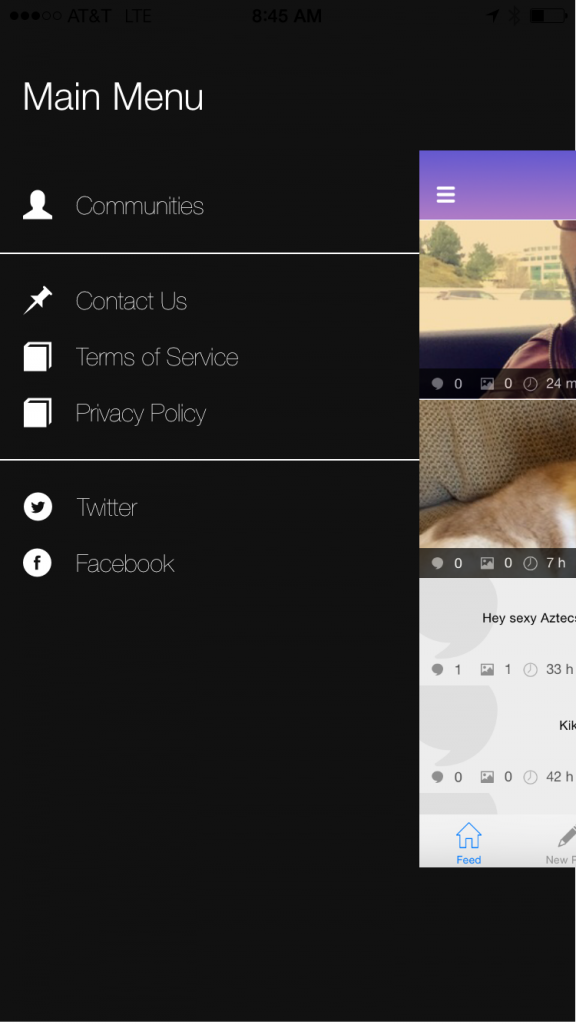
    Just go to the menu, click on Communities, and you can move from one high school to another, or a college or whatever.

    I think this is a problem. Particularly for high schools. You don’t even have to be part of the school to talk about it or be in that community? Moreover, you can just hop from rival school to rival school and post whatever you want?

    Meh, not a fan of that. I’d rather you picked a community and the app made it hard to switch to another one. Maybe only allow you to do that weekly? Seems like the current model allows for and encourages trolling.

    burnbook-menu

    Plot Twist #2

    App administrators are unashamed about monitoring communities.

    Don’t get me wrong, every app does this to some extent. But the Burnbook crew is intentional about trying to moderate things by being visible, correcting bad behavior, highlighting the behavior they want to see on their other social channels, etc.

    For an anonymous and ephemeral app… this is unique. I like that idea. It’s a little old school but in a good way.

    Don’t be fooled. All of the other anonymous apps do this one way or the other. For instance, Yik Yak has paid community people on college campuses which make sure the “Yik Yak game is on point”. But Burnbook seems to have a rather old school mindset of community management from the forum days. They are around and real people. It’ll be interesting to see if this can scale up as the app takes off. But I’m sure that’s something Team Burnbook would see as a good problem to solve.

    Plot Twist #3

    They aren’t interested in geofencing off schools. 

    Last year, Yik Yak very clearly made the decision to target their app at college students by geofencing off every high school and middle school campus in the United States.

    I had a brief chat with Burnbook’s creator Jonathan Lucas about his app last week. Flat out, his philosophy is that school campuses are in need of a way for people to say what’s on their mind. He feels like they can help moderate and sell the idea that this is possible… that teenagers won’t just melt down into being a community that bullies or harasses people online… but that anonymity can and will lead to something positive.

    So when I asked him if he had plans to geofence schools based on pressure from school administrators… he didn’t have any interest in doing that. Instead, he said that they are doing anything they can do to work with schools/law enforcement to rat out the bad stuff in an effort to highlight the good stuff.

    “The majority of people are good,” said Lucas, but you have to “design the app with the most sinister person in mind.”

    To that end, Lucas has implemented several key tools for Burnbook. The first, and most effictive, is a simple down vote system wherein five down votes (perhaps 3 soon!) automatically removes a post. 2-4% of posts are destroyed this way.

    He also has a “blur” option for every photo to protect people’s identities.

    Source

    How big is it?

    This launched in September 2014. It’s really small. That’s part of why it was so odd that San Diego county schools freaked out about it. I mean, compared to Snapchat it’s tiny. (And Snapchat is tiny compared to Facebook… even among teenagers who say they don’t use it.)

    As of right now they are reporting 400,000 users. (.9% of teenagers in America) Snapchat is about 5.4 million teenage users according to Pew. (13% of teenagers in America) Facebook is well over 50%.

    What do I need to know?

    There’s a few little side stories which I think are interesting.

    First, I got clued into Jonathan Lucas’s faith before I spoke to him… he has an Oswald Chambers quote on the homepage of his app. (see screenshot above) He grew up in a Christian home, in many ways he’s a typical student from any of our youth groups. All of that helps me view what he’s trying to do with Burnbook through a certain lens. He’s a newbie to the development world, he taught himself to code, he’s built a small but very interesting little company. All of these are endearing qualities to me. Maybe it shouldn’t– but it makes me a little less judgmental about the whole thing.

    Second, Burnbook is a sapling in a forest of ephemeral, anonymous apps. I’m not saying it won’t make it but I’m not sure it should really be on anyone’s radar at this point, while gaining steam it’s also tiny. What I see in the app and the organization is still beta. But who knows? It could be the next big thing and Jonathan might be on next years Forbes list like Snapchat’s co-founder, Evan Speigel?

    Acquisition seems far more likely than it becoming a big thing. (Whisper, Secret, After School, on and on) That’s a fine exit plan for a first time developer.

    Third, I’m not sure the idea itself is realistic or helpful or developmentally possible. I’m on the fence about it.

    The name Burn Book is a Mean Girls reference. It strikes me as weird that the app has an idea that good can come from anonymously sharing things on a school campus when the app is named after something that happened in Mean Girls.

    It’s kind of an obvious clash of narratives. According to Wikipedia (the collector of all truth… ha!) the Burn Book is “a notebook filled with rumors, secrets, and gossip about the other girls and some teachers.

    Geez, I wonder why this would make administrators nervous?

    What do I do?

    This is the easy part. 

    Keep reminding the teenagers in your life that there is no such thing as anonymity, only perceived anonymity.

    In the end, Burnbook is no different than all of the other ephemeral and/or anonymous apps out there. I like to tell teenagers, “The only one that thinks it’s anonymous is the users.

    Burnbook does a better-than-average job at telling students that their posting are linked back to them via their phone number and that they will absolutely cooperate with law enforcment if you do something dumb, like post a bomb threat. [You click OK to several acknowledgements when you create an account with your phone number, there are reminders… maybe too often.]

    But, in the heat of the moment, it’s easy for anyone to forget that that tiny bit of gossip or bragging about an indiscretion ultimately points directly back to you.

    There’s no such thing as privacy online.

    There’s not such thing as anonymity online.

    There’s only the perception of anonymity or privacy.

    Repeat that. Often.

  • Wearable Technology and the Internet of Everything

    Wearable Technology and the Internet of Everything

    What’s Wrong with Apple’s Watch?

    Yesterday was the big keynote for Apple, announcing the sale date and prices for their new product, Apple Watch.

    I’m being more cautious about the watch than I was about the iPad. I thought the iPad was a joke but it turns out to have been a great idea. They created a desire where there was none and now everyone has one.

    Personally, I just have zero desire to wear a watch. It wasn’t the technology I ditched, it was that I didn’t like having something on my arm all the time. Even now, when I dress up sometimes I’ll slip on my old fancy watch, and it just bugs me. I can’t imaging having something on my arm that might get hot because it’s connecting to things or having to remember to charge it.

    But that’s not what worries me about the watch. I’m convinced that people will buy it, especially next year when they release a $99 version. (That’s their habit.) What concerns me about the watch, for Apple, is that they have a monster inventory issue that will eventually kill them.

    Think about it like this: They used to have one phone, the iPhone. And in the United States it worked only with AT&T. Great… it’s easy to make and inventory something. This is the Henry Ford model of mass production. (A model that is driving the growth/success of Southwest Airlines, by the way.)  But the iPhone 6 has tons of models and options. You can chose different colors, different storage sizes, and different mobile carriers. It’s confusing for customers because they can’t just walk into a store and ask for the latest iPhone… now they have to make a lot of choices. And it is incredibly expensive to stock. Imagine being a retailer… to sell the iPhone 6 you have to stock tens of thousands of dollars in iPhone’s in all of your stores. Think about that from a global perspective and you’ll see that Apple must have BILLIONS of dollars in inventory for products that their own system is constantly making obsolete. (People only want the latest phones.) As an investor this huge shift in business model in the post-Steve Jobs Apple keeps me away from buying their stock. It’s popular. But boy is it risky. 

    Into that comes the Apple Watch. There are 25 different models currently available, with nearly unlimited options.

    Take the case of Best Buy

    Best-Buy-follows-Yahoo-and-cancels-working-from-home-programImagine the risk as the buyer at Best Buy? You have 1050 stores and your customers are going to expect each store to have all 25 models on day one. So let’s say you place and order for all 25 models, starting with 50 units of each of the 25 models at an average wholesale cost of $175. Each store will be starting with $218,750 in inventory on the Apple Watch. That’s an initial order of $229 million to cover just U.S. stores. Sure, that’s the potential for $500 million or more in sales. But that’s a ton of risk for Best Buy because they just have to take a guess at which models will be most popular to customers.

    For a retailer, even one as large as Best Buy, putting $229 million on the line for the potential of $500 million in sales is a lot of risk. In 2015, they’ll do about $40 billion in sales… a $229 million risk on just one of their products in their store is a big, big risk.

    And that’s just one retailer. 

    Now imagine you are Apple worldwide? You have to manufacture for orders to sell to thousands of retailers like Best Buy while also serving your own retail Apple Stores and your online customers.

    All of that means that they are paying to build billions of dollars in Apple Watch’s various models without ever really knowing if customers are going to buy them. If it works, the world’s largest company just got bigger. If it doesn’t? You’ll have to account for that loss to stockholders.

    In my opinion, even for a company that seems bulletproof like Apple, it’s a very risky step.

    I’ve had Apple in my personal portfolio in the past. But right now? That’s too much risk for me as an investor.

    The Internet of Everything

    Maybe you’ve heard this term, the Internet of Everything? It’s kind of a buzz word and the unofficial theme of this years Consumer Electronics Show. Essentially, the trend is to get everything in your home to connect to the internet so that you can monitor it and control it with your phone. There are funny examples… like a device that let’s you know how many eggs you have in the fridge to more serious devices that control the thermostat or your home security system.

    The Apple Watch is part of a movement of “wearables.” Companies like Garmin, FitBit, and JawBone have been making devices that people wear for fitness purposes or to talk on a cell phone. It’s big business and no one is blaming Apple for getting into it, even if they are a little late.

    The simple reality is that our phone and these devices are starting to track all of our movements, our purchases, or plans, our calendars, and now that we’re connecting our homes and bodies to them… it’s getting to be a lot of data. You, as a user, are literally a network of everything.

    How Much is Too Much?

    Last week, I listened to a fascinating conversation on NPR about wearables and the data they collect called, “Sure you can track your health data, but can your doctor use it?

    The quick answer is… “No.” Your doctor doesn’t want that data as they aren’t trained to use it, don’t know if it’s accurate, and if you are transmitting data to them they somehow become liable for that data legally.

    But it brings up a larger, more important question: Where is all of this data going?

    I don’t mean literally. Literally, the data is going to servers and it won’t be long before advertisers and marketers are able to purchase all sorts of data about you that you willingly share so that they can hit you with an ad on iTunes Radio just at the time of day you normally take a break and walk over to Starbucks. That’s literally what is happening.

    But, more figuratively, what are you doing with that data yourself? And if we’ve gone from desktops to laptops to mobile phones/tablets to wearables… it won’t be much longer until we’re talking about Apple’s new device, an edible / embeddable device charged by the electrolytes in Gatorade that lives in your large intestine.

    I mean, neuroscientists are already perfecting technology that can read your thoughts! It won’t be too much longer until the internet of everything is literally, the internet of everything. Won’t it be interesting to have your phone play a song embedded with an ad for your favorite taco shop because your stomach is starting to tell your brain that you’re hungry for lunch?

    I don’t know. All of this is starting to feel like too much. And, as I’m out talking to teenagers around the country, they are getting tired of all of it. I am not saying that the technology won’t be there and I’m not saying that I don’t think people will adopt wearables or even ingestibles… I’m just saying there’s going to emerge some questions about how much data is too much data?

    Is This Good or Bad?

    I don’t know. But I do know the whole thing is interesting.

    And as much as I can’t imagine why I’d need the Apple Watch. Apple has proven, over time, to speak my language and market things to me I don’t really need but eventually want.

    Something tells me I’ll be standing in line for a watch sometime in the not-so-distant future.

  • A Brief History of Blog Gimmicks and The Problem of Cheap Traffic

    A Brief History of Blog Gimmicks and The Problem of Cheap Traffic

    This history of blogging is full of gimmicks to draw cheap traffic. And I’ll be the first to admit that over the last 10 years I’ve been influenced by these gimmicks, tried them out, and ultimately gotten better at recognizing that they aren’t part of my strategy.

    What is “cheap” traffic?

    Cheap” blog traffic is non-organic traffic to a blog drawn by gaming the system to get more pageviews while failing to convert visitors to invested readers.

    Cheap traffic” impresses for all the wrong reasons. It’s all numbers and no real impact or quality. On the surface, it’s easy to get impressed with a blog boasting 100,000 daily readers. But when you look into the actual analytic data you’ll see that most of those visitors are coming to a single page and not returning. Often times visitors aren’t even staying long enough to have actually read the post they are visiting.

    Let’s say there is a blog post drawing 90,000 daily readers via referrals from Facebook. That is great, right? Maybe. But if the article is 1200 words and the average visitor is staying 9 seconds, only visited that single page, and then went back to Facebook, they didn’t read it and you didn’t gain a new reader. What did you get? Cheap traffic.

    A Brief History of the Blog Gimmicks

    • Blogrolls – Before search engines really gained popularity there was a ton of effort to get people to link to one another in blog posts. You still see historical remnants of this on a lot of blogs. Bloggers would create a page or a sidebar that had links to all of their friends. (WordPress didn’t depreciate their link manager until December 2012)  These were basically recommendations. You’d read your favorite blogger and in their sidebar you’d discover and visit their friends blogs. There was a social dynamic to it because you always wanted to get linked to from someone’s blog. Why? That “recommendation” meant traffic. As this took off as a source of traffic people became more and more interested in making sure their blog got attributed in as many other blogs/websites as possible. Soon, tools were developed and companies started providing services to get your blog mentioned. But as soon as it shifted from an “organic” link in a blog roll or trackback to something “paid” people stopped trusting that blogrolls were legit and the inbound traffic from people’s blogrolls diminished greatly.
    • Blogrings – In the midst of the blogroll boom Blogrings emerged as one of the first sources of cheap traffic. One of my very first toes dipped into the youth ministry world came when I managed a blogring of youth ministry bloggers. How it worked was that you could submit your blog to the blog ring if you met the groups criteria (being a youth pastor) and agreed to post the blogring’s code snippet in your sidebar. So someone would read Marko’s blog and they’d click to the next person in the youth ministry blogring and land on another person’s youth ministry blog. The “cheap traffic” part started to emerge because of human behavior. People would just keep clicking without really reading. So bloggers would get excited that they were getting tons of traffic, but it wasn’t really good traffic, it was just blogring traffic. Really, blogrings were pretty important as far as gimmicks go. And why did you want to manage one? You got to game it so that your blog got the most traffic from the ring… DUH!
    • Google & Relevance – This is really when search engines started to take off. The internet was truly a web of somewhat arbitrarily socially connected websites and blogs. But then Google came along and their technology started to crawl servers, cataloging everything, then sorting content into an order based on relevance. They defined relevance democratically… if a lot of people linked to a single source, it must be the most relevant page on that topic. So when you searched “youth ministry” you landed at “Youth Specialties” because they had the most links for the word “youth ministry” on the entire web. So then the game became, how can I get the most relevant site to link to me… so that my own blog will show up higher in search results. This lead to trackbacks.
    • Trackbacks – Because Google was indexing things based on relevance and links, linking to a source became more than a recommendation… it became almost life & death for bloggers. You wanted to write something that other people had to respond to or write about… and then link back to you. Trackbacks (still part of WordPress core) were a way of your blog automatically alerting another blog… and posting a link back to you… that you’d mentioned their blog. This was a HUGE source of cheap traffic for bloggers in the mid-2000s. I’d read something on USA Today and write a quick response to it with a link back to the USA Today article. That trackback would appear above the comment section with a title like “Why ____ matters to the church” and I’d get hundreds of inbound links from visitors who wanted to read that response. I can’t tell you how many times I did that, sometimes on purpose and sometimes on accident. Trackbacks were crazy because sometimes your blog would even get mentioned on air as some radio host blabbed about the USA Today article. On a smaller scale, trackbacks became about etiquette. It was considered good form to mention several other bloggers in each post and if a blogger mentioned something you wrote or said, you expected a trackback. And, as Google became “the Google” links became more and more important.
    • Backlinks – About the same time that Trackbacks became important, backlinks took off. Marketing companies, aware that Google placed a high value on who was linked to whom, started providing services where they could guarantee that your blog would get linked to by a more relevant website, theoretically meaning your blog would appear higher in search engine results. There was a lot of money exchanged over backlinks. I never really got into this because I always felt it was a little dishonest. But “organic” backlinks became social currency. You could get people to backlink to you with a small gift or service. So you’d agree to review a book if the author and the publisher linked back to you. Within a few years, Google started differentiating between organic and paid backlinks, punishing paid backlinks with lower search result relevancy… so this was a gimmick that was SUPER IMPORTANT for a short period of time, made a lot of people a lot of money, and got a lot of brands hooked on cheap traffic.
    • SEO – The next logical step of Google’s power over search engines had to do with Search Engine Optimization or SEO. There are lots of people (myself included) that think it’s important that your website/blog be optimized to take advantage of all that Google offers by making sure your site gets the right information to Google. That’s not what I’m talking about when I refer to SEO as a gimmick. Where the gimmick comes in is people adding content to their site solely driven and informed by search results. In the youth ministry world, the late 2000s saw several youth ministry bloggers emerge statistically simply because they learned to game Google’s search engines by writing content based on what youth workers would Google. So they’d use a various keyword tools to determine what youth workers were searching for and then write blog posts to capture that search traffic. This gimmick lead to endless blog posts on “youth ministry game ideas” or “youth group mission trip rules.” Again, this wasn’t about having something relevant to say or even writing something worth reading. It was simply about capturing cheap traffic by gaming what people were googling. It was a short-term strategy… and most of those people made good money on the reason Google was tracking keywords… placing ads for you to click on. And as Google has become less important you’ve seen those blogs fade.
    • Blog Contests & Reviews – Overlaying the SEO gimmick was contests and review sites. As brands began to see that cheap SEO traffic wasn’t impacting their bottom line, the pendulum swung back to desperately trying to get recommendations. They found a host for this gimmick in the mommy blogger community. Virtually overnight, small groups of moms who blogged suddenly had conferences at 5-star resorts paid for by Proctor & Gamble. There was no vetting to this whatsoever and no one seemed to ask if you were interested in a product or even if you wanted it. (We know this because Kristen was on a lot of these mom blogger lists, we got TONS of free stuff sent to us.) A company would send you two copies of a product, one for you, one to give away. You’d offer up a short review and you’d post a contest on your blog. Leave a comment and pick a winner. It was completely ludicrous! Kristen would receive 2 toys in the mail that were $200 each. She’d write a blog post about it, list her contest on a blog contest site, and several hundred random people would enter. She’d get TONS of traffic, it’d be fun, and that would be it. It’s funny, but this gimmick is alive and well. It has matured a little in that it most often now requires you to join an email list… so at least companies get something. But when it was hottest in the late 2000s it was a straight up gimmick.
    • Viral Lift – All of this gaming of Google, backlinks, SEO… it leads to where we are right now. The cheap traffic gimmick of viral lift. BuzzFeed is the king of viral lift. They aren’t interested in Google, it’s web crawl is too slow for them. Instead, their entire site is built on two principles: Link bait & social sharing. Literally, instead of gaming Google they are gaming your brain to get you to link to them on social media. So they’ll create a title like, “21 Kitchen Gadgets You Need to Buy Right Now.” Is that important? Nope. But BuzzFeed has learned that they can get you to click on something by mixing keywords and your inborn curiosity. It’s a genius gimmick. And while I tend to believe that it’s author, Tabatha Leggett, loses just a tiny bit of her soul wondering out loud… “I went to Cambridge for to write about banana slicers?” she is actually winning the cheap traffic gimmick war right in this moment. She’ll continue to write stuff like that because it works in the moment and BuzzFeed only cares about the moment.

    What Does This Mean for Bloggers?

    As bloggers, we are all influenced by these trends. Whether we intentionally do it or not, these trends continue to emerge and we find ourselves mimicking stuff that seems like it works.

    My point in bringing all of this up is to point out that if you are in this to write and establish a long-term relationship with your readers, you need to remember who your audience is. Getting hooked on drawing cheap traffic to look at an image or enter a contest or get “quick ideas” isn’t cultivating an audience that’ll convert into long-time readers. It might seem like it “could” but it doesn’t. I’ve simply seen it too much in both my own work and the work we do for our clients.

    My advice is always the same: The biggest reward in blogging comes when you play the long game. Just write good content and the rest will take care of itself. 

    What Does This Mean for Businesses?

    You really have to know your business. Very few businesses can survive without establishing relationships. Sometimes you need a quick burst of energy that a promotion can generate. And sometimes you do need to do things just for branding or list building.

    But long-term growth in almost any field has to do with excellence. A gimmick is just that. Look at a gimmick like Thanksgiving door busters. How many of those people who come at 5 AM to buy a cheap TV also buy something else? How many of those people come back in 2 months to buy something else? How many of those people are your best customers? How many of them become your best customers.

    Just like I don’t see “cheap traffic” on blogs converting to long-term readers of a blog, you have to see gimmicks as a short-term strategy and a sign that something is wrong. A healthy business-owner isn’t opening up his shop at 5 AM the day after Thanksgiving. A healthy business owner is sleeping in, giving his workers the day off, and enjoying time with his family.

    What Does This Mean for Churches?

    Somewhere along the line churches started believing that “cheap traffic” days were opportunities for growth. With the Lenten season upon us we’re only days away from churches “announcing” their Easter gimmicks.

    Just because you have high attendance on Easter doesn’t mean you have an opportunity.

    But before you do that… stop and ask yourself three important questions:

    1. Where are the people you attracted with last years gimmick? If they are in your pews… awesome. But don’t mistake getting someone to show up one time with making an actual impression on them.
    2. What are you doing to make sure that your engagement is at an all time high… instead of all the attention on your gimmick? Just like the blogger can’t expect people to come back because they gamed Google, what makes you think someone will come back?
    3. What’s your real motivation for the gimmick? To draw traffic or to convert? No one thinks poorly of BuzzFeed for drawing endless millions on cheap traffic. But I think that in a post-Christian world the public cares a lot when they see churches pulling off the latest gimmick to draw an audience.
  • Tracking Anonymous Social Media Accounts Back to the Source

    Tracking Anonymous Social Media Accounts Back to the Source

    You aren’t the NSA and you have a problem

    Do you have a hater? Is someone anonymously posting things on social media that are driving you crazy or disrupting your school? Is someone posing as you?

    In many cases, it might seem like you can never figure out who these people are. And, usually, they aren’t doing anything illegal so there’s little the police could do about it.

    I’m going to share a simple way that you can catch most online creepers. Most aren’t that sophisticated, most are just idiots who think they are being funny.

    Last year I shared how I deal with trolls, this year I’m sharing how I track not-so-anonymous accounts back to their source

    A Rat ALWAYS Returns

    I went to a college where pranks were big. It was a conservative Christian college that didn’t allow students to have sex or drink alcohol. We weren’t even allowed to dance or go to movies. With all that extra time, pranking folks was a form of currency.

    And there I learned an important thing that applies to annoying anonymous accounts: A Rat ALWAYS Returns.

    In other words, the fun for the prankster (or troll or bully) is seeing your reaction. This curiosity will point you back to the culprit 99 times out of 100.

    Let’s say someone put something in our microwave for an hour and it burned, causing a nasty smell that brought everyone out to inspect the problem in the kitchen. The person who was there who didn’t fit in… or the random person who walked by “because they smelled something” was usually the person who did it. They were the rat.

    The exact same behavior is true when someone is anonymously tormenting someone on social media.

    You don’t have to be the NSA to track down the culprit because 99 times out of 100, all you have to do is look at who is looking and it’ll point to your rat.

    Mapping Users

    Step 1 – Identify the account

    Might seem too obvious. But you need to isolate the account. Go to it’s profile page, it’s a wealth of information.

    Step 2 – Map the users they engage with

    Looking at the offending profile, start taking notes on who are they engaging with? Grab a piece of paper and identify the first 10 people the account followed or became friends with. Next, identify who they most frequently engage with. Look for social activity like favorites, retweets, mentions, things like that.

    Step 3 – Identify Related “Accounts of Interest

    Once you’ve done that, order the accounts that they engage with the most from #1 – #10. Chances are very high that your culprit is one of those accounts OR they are, at least, friends with them. These are your “accounts of interest.”

    Why? Because this behavior is about social power. And there is nothing to be gained unless other people know you are doing it, can watch it, etc.

    Map the Context / Language

    Step 4 – Isolate the Context

    I find it helps to get the text/images/videos out of the actual app and into another format.

    Create a Google/Excel spreadsheet with a new tab for each incident when the offending account posted something. Create a column for each of your 10 “accounts of interest” associated with the anonymous account. (So row 1 is the names of all the accounts) Next, copy/paste any post from those users around the time that something was posted. Note mentions of the offending message or the person being targeted. Anything that could be in context.

    The point in doing this isn’t that you are going to identify your offender. But you are most definitely going to be able to identify the friend group of the offender(s). You can assume that these people are either together or texting/messaging one another about the anonymous account.

    Take careful note about who is promoting the account to other people. They are vested in other people discovering the account, sharing it as funny or asking other people to check it out/follow it.

    As you sift through this you will see a few accounts who are the closest to the action. These are the most interested parties. They might not be the offender, but they know who it is.

    • When were things posted?
    • What were they talking about before and after?
    • Were there references to what they were doing? Where were they?
    • Were they referring to contexts of things that limited people know about? (Something that happened in a class, for instance.)

    Remember: Social media happens in real time. Context is very important. Circumstances often lead to the timing of what is posted, when.

    Mapping Location

    Step 5 – Map Mistakes

    I can’t believe how often this points directly back to a source. 

    Most smartphones have a built-in GPS. And most social media apps, unless you turn it off, will tell you a location. Scroll through the offending account to see if you can spot any of that.

    Step 6 – Map Images

    If they are posting images they’ve taken, their goose is cooked. Seriously, this is too easy. Download the images to your computer and look at the properties of the image with the image viewing applications included with your computer for free. (In my case Preview) Open the image, click Tools>Show Location Info

    Here’s information about a picture I took at a local grocery store of some duck eggs. 

    If you have this information, you can establish exactly where that person was when the image was taken… but you can also tell the exact model of their device. If you have 10 people you’re looking at, how many of them have a black iPhone 6? Your circle just got a lot smaller.

    Face-to-Face Pressure

    Step 7 – In Real Life

    Let’s say you are an administrator at a school and you need to know who is impersonating a teacher or who is bullying a student. Now that you have this information you have a pretty good idea who to talk to.

    The last step is the confrontation. If you’ve followed the steps above, chances are very high you’ve identified 3-4 people you need to talk to as well as created a paper trail as to why you are talking to these individuals.

    Likewise, let’s say that this behavior has crossed a legal boundary. The information above is easy enough to share with an investigator to give them a fast-forward on doing a criminal investigation.

    Did this help you? Leave me a comment or drop me a note via my contact form.


    This post relates to my social media principle #2: There’s no such thing as privacy online, only perceived online privacy. If you’d like to learn more about that please check out my book, A Parent’s Guide to Understanding Social Media.