Category: Web/Tech

  • E-mail that costs you a billion dollars

    As far as slip ups with technology go, this one is pretty major. A lawyer for drug manufacturer Eli Lilly thought she was sending an email to her co-counselor on a billion dollar case.

    Unfortunately, her co-counselor shared the same last name as a person doing a story on the matter with the New York Times. He already knew about the deal but didn’t have enough sources confirming the story to make it public. That is, until he received the mistaken e-mail.

    The story exposed details of a billion dollar private settlement that would have otherwise remained confidential.

    Here’s the story.

    What’s the lesson here for your personal email, business email, and super-duper-uber private messages?

    HT to NPR

  • Another live video channel

    I’m testing out Y! Live. This is Yahoo’s knock-off of ustream.tv.

    Here’s what it looks like.

    I will say this, it uses a lot more CPU than Ustream.tv seemed to. I turned it on and within 1 minute I could hear the fan kick on with the MacBook.

  • Purging Google Reader

    As much as I love reading things on Google Reader, there are just some feeds that had to go. Over the last several days I’ve been weeding out some feeds that I no longer find useful or who were just plain getting on my nerves.

    Here’s how I use Google reader: I subscribe to a bunch of blogs, websites, and news sites with stuff that I like. During my morning routine I read through these articles with the goal of getting my balance down to “0.” The problem was that each morning I was starting with about 200… and that was simply more than I wanted to sort through. In fact, there were some that I noticed I stopped reading altogether and just “marked all as read.”

    So, who got cut? No one that I personally know. But feeds that were sending 10-30 articles per day… they had to go. Feeds that sent 3-10 per day but all of them required me to click on their link to see the whole article… they had to go.  Feeds that send out a lot of articles that are good, but will get picked up and re-released by Boing Boing had to go.

    What was the result? I’m down to about 70ish posts to read in the morning. That’s much more manageable.

  • Sick

    sickI don’t think anyone relishes being sick. I hate it. I have so many things to do and I’m sitting here freezing to death in 3 layers of clothes, a stocking cap, and my slippers trying to pound out some stuff I need to get done. I hope I feel better for Sunday and Monday but I have a sinking feeling that I’m just headed into this cough and not coming out of it for a while.

    In other news: I installed Joomla 1.5 today for the first time. I am a huge Joomla junkie. Almost all of my sites either use WordPress or Joomla and switching from version 1.0.13 to 1.5 is a pain in the neck. For example, you have to completely delete your existing site. Which scares the snot out of me when it comes to the church website and YMX.  I spent most of the day installing a site for a friend, getting the template all pimped out, and starting to look for the components he needs.

    easy buttonI have to say that I really like the new version. It is going to rock once I get past the migration issues. I am going to put off migrating YMX for as long as possible. I’m really hoping for an easy button but I don’t think one is coming.

    To make matters more fun, I still have stuff to do to get ready for the services tomorrow. Which means in a few minutes I’ll be making my weekly late Saturday night trip to the church get stuff done.

  • K9 Web Protection: Protecting your kids eyes on the net

    k9 web protectionA common question I get from moms is “How do I filter out some sites from the internet so my kids can’t see them? (Honestly, I’ve never had a father ask me that, wonder why? Think about it and get back to me.)

    My first response is always the same. Ultimately you can’t keep someone who wants to see something from seeing it. Teenagers are very savvy about disabling filters and if they want to look at something when you aren’t around the filter isn’t going to do much for a child beyond 11-12 years old.

    What a filter can do is keep someone from stumbling on a porn site. And that’s what we want to keep our kids from doing.

    So, this is K9 Web Protection is worth checking out. It’s free and it’s based on some very powerful stuff.  Here are some quick facts:  (quick  summary:  it’s good and it’s free) (more…)

  • The Mac Switch Continues

    macbook blackI was waiting until MacWorld to make a purchasing decision on my next laptop. And while Macbook Air is really cool it isn’t powerful enough for what I need. So, I went ahead and got this bad boy. It’s not the most powerful Mac, but I got a great deal on it and it is a proven performer. Later tonight I’ll be boosting it a little more when I order a 4 gb upgrade to the RAM. (I remember having a 4 GB hard drive on my first laptop in 1999.)

    So, in a few days the conversion to Mac will be underway. I am planning to run boot camp on this computer so that I can use some of the great toys we have at the office. The iMac did a good job of teaching me how to get things done in Leopard. Now it’s time to put that into production. It’s going to be an interesting ride. 

  • Secure Homepage: I’d pay money to use it

    igoogleI love iGoogle. It is a homepage that is extremely functional for me as I use it to manage everything from my work tasks to my blog feeds to my Jon Stewart quotes.

    And yet it lacks the one thing I really want. I am left dreaming of a homepage that offers these things, plus some more things that I look at all the time. I would love to have more powerful Google homepage. In fact, if another company could develop what I am looking for I’d actually switch my homepage to another service.

    I want a homepage that offers both my typical stuff I have today and secure information. I want to go to my homepage and see my bank account balance, IRA portfolio, AdSense earnings, status of my Amazon.com orders, my PayPal balance, and just about anything else I want to turn into a widget.  And I expect it to be secure.

    I’m a big boy. I can handle the power. Would someone please develop this?

  • Geek Tool: Turn your smartphone into a mobile wireless router

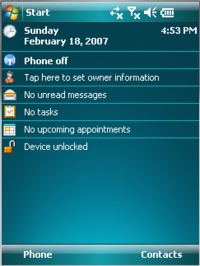
    Windows Mobile 6I have an ultra-swanky Smartphone. You know, one of those devices you see people carry around and you think… I’d like to be surfing the internet too!

    It takes 2 megapixel pictures, connects nicely to my Outlook, and a whole bunch of other nice features.

    But there was one thing it didn’t do that I’ve always wanted to do. I’ve always wanted to be able to  be able to use my cell phone’s mobile internet connection to hook up my laptop. You know, you’re out on a boat in the middle of the lake and you just can’t browse the internet or post to YouTube or even blog quite like you’d want to. More importantly, I’ve been traveling and needed to do important things on my laptop and not had access to wireless. (Or not wanted to pay $10 for crappy wifi at an airport or conference center.)

    Well, now I can. I just installed a tiny program on my phone which allows me to convert my phone into a mobile wireless router.  This means that for the extra $20/month that I pay AT&T for my mobile internet connection I can now use my laptop too. Sure, it won’t be blazing Wireless N or even Wireless G. But it is basically Wireless B.

    This could even be a fix for folks who live rural and can’t get anything faster than broadband where they live. (Well, satellite… but that’s about the same speed as this for 1/2 the cost.)

    If you have a Windows Mobile 6 equipped Smartphone. Go here and try it for yourself. It’s a free program too.

    So next time you’re somewhere with me and you want to use your laptop to do stuff, just tell me to turn on my mobile router.

    HT to Make Magazine

  • Mario Galaxy: The best game for the Wii

    Mario GalaxyThe day after Christmas I went to my local GameStop to buy a video game. I was itching to buy Madden 2008 and was really disappointed that they didn’t have it in stock.

    I asked  the clerk, “Of the games you have in stock, which is the best?” The clerk looked at me and said, “You want Mario Galaxy, it’s the best game for the Wii, period.

    It was the “period” that he said that was connected to my credit card. I bought it and brought it home.

    Within 10 minutes my kids were hooked. Not only is it a fun game to play with loads of levels and a 3 dimensional world of play, it’s also easy for kids to play as player 2. Get this, the main player controls where Mario goes with the Wii remote and nunchuck accessory. But with the second Wii remote a second player can help Mario pick things up. Best yet, the second player can help you but not hurt you. The result is that Megan (6) and Paul (4) feel like they are playing the game… and they really are helping! It’s brilliant.

    On top of that cool feature, the game is a blast to play. For anyone like me who grew up with Super Mario Brothers (OK, I played Donkey Kong too) this is a throwback experience on steroids.

    If you’ve got a Wii, you need to look into Mario Galaxy. It’s the best game for the Wii. 

  • 25 Video Tutorials for WordPress Users

    word pressI’ve helped dozens of people switch to WordPress. (The blogging platform I use for this site.) It has the easiest learning curve of any blogging software on the market, but it can still be daunting for people new to online publishing. (For the record, I prefer the self-hosted version. The WordPress.com version is just so-so.)

    In the course of helping people I end up doing a lot of basic training… which I don’t mind but I am left repeating myself a lot. The other day I came across a series of great video tutorials that give just enough information to be useful. They are produced by ListPipe, which seems to be some sort of content source for bloggers.

    Here they are, 25 video tutorials for WordPress