Category: Mac
-
Six new iOS apps I actually use

I’m assuming you’re already using my 3 favorite apps, Evernote, WordPress & Dropbox.
Here are sixapps I’ve started using recently that I think you should try out.
Wunderlist (iPhone, iPad, and Mac) – I’ve finally found a to-do list app that I love! It has a nice and simple interface, reminders, and syncs with all of my devices.
Skitch (Mac, iPad) – If you ever need to do a screen capture this is your app. Easily capture, make notes, draw on the screen, and share it with whomever you need to share it with. I love the iPad app… it’s really so easy to use that it’s fun! They just got bought by Evernote, so I expect to be able to sync it to my notebooks easier soon.
ESPN Passport – (iPhone) This is a fun little app for sports nuts. If you’re watching a game, whether in the stadium or watching on TV, its allows you to talk smack with other people watching the game. It links to your ESPN account so it pulls in your profile and all of that stuff. (You can win badges and stuff like that, too) You can also share your smack talk via Facebook/Twitter. But I just like to take pictures of me and my kids at games.
Square – (iPhone, iPad) As a small business owner I sometimes have the need to swipe a credit card and charge someone on the spot. Square is drop dead easy and the credit card rates aren’t that bad if you figure in that a merchant account isn’t needed, no monthly contracts, etc. You sign-up for free, they send you a little Square reader, and you’re good to go.
Redfin – (iPhone, iPad) I’m not really in the market to buy a house but I do like to know what property in my area is going for. This app is sexy. It shows you all the houses available based on your parameters. And then it has a very simple, elegant layout to show you the properties. (And all the really important info, like taxes, schools, comps, etc.)
Editions – (iPad) An AOL app that doesn’t suck? It surprised me too! This little app is gorgeous. You tell it your news preferences and each day it goes out and aggregates all the news you want. Then it lays it out like a magazine designed just for you. It’s beautiful, too.
Bonus#1: Mustache Me (iPhone) I blame Brian Berry for this one. Instant fun. Add a mustache to any picture, share, beauty.
Bonus #2: car2go PRO (iPhone) Car2Go is a car sharing service that is taking off here in San Diego. Basically, they are these little electric cars you can rent for $.35/minute to get around town cheap. The app helps you find and reserve them… which is super easy and fun!
-
POLL: Are you willing to pay to read news online?
From subscription to free to subscription and back
Quietly, newspapers are starting to charge online visitors subscription fees for full access to their sites. In just a few days, The New York Times, will noticeably switch from a free system to a 3-tiered pay system.
I believe The New York Times Company, like Rupert Murdoch from News Corp, have been emboldened on this concept by The Wall Street Journal’s alleged success with online subscriptions. News Corps brand new iPad-only newspaper, The Daily, will cost you $39.99 per year. I download the iPad app, and while it is brilliantly beautiful, the reality is that it the actual news is just news I can get on CNN.com or USAToday.com for free.
Also, in a weird twist of fate, the iPad versions are actually more expensive and just as ad filled as the print editions. (I get the print edition of Wired for less than $1 per issue. Why would I pay $3.99 per issue to get it on my iPad?) This messes with people’s internal cost vs. benefit analysis and stops them from buying more than one “curiosity” edition. Conversely, subscription rates are going down and not up for iPad versions.
At the end of the day I don’t think this strategy will last very long. When the payment gateways pop in on folks current sources for news, eyeballs will shift from paid content to free content, and the big news companies will re-evaluate their strategies. (At the same time giving lesser known sources of news incredible new levels of traffic.)
Think about it: When you hit a payment gateway when looking for a news story, what are you going to do? Google it and find a free version of the same story. Duh.
The Tortoise and the Hare
What’s really interesting here is that the big news companies will lose money on a silly, short-sighted strategy. They are going to spend big money building these gateways and even more money trying to market these new ideas. Whereas, the smaller companies who might want to go to a subscription model, but just not have the capital to make it happen, will likely be the big winners.
A better idea
My opinion? Why in the world are these companies asking individuals to pay? Why not force the ISPs to pay, like ESPN did with ESPN3.com? That’s where the money is. Even if cable companies raised rates on their customers to cover these new costs, we wouldn’t whine because we are addicted to high-speed internet.
All of this begs the poll above. Are you willing to start paying for news that you get for free today?
-
Three New Mac Apps
I’ve got three quick apps for the Mac to share. All of them are free , freemium, or stinking cheap. Maybe they will be useful for you, too?
 If you are anything like me– your work computer is a bit of a mess. I’ve got all sorts of work files mixed in with personal files, mixed in with stuff that I just used for a blog post or something like that. Keeping it all orderly and seperate is a big problem. But I think I’ve found something to help!
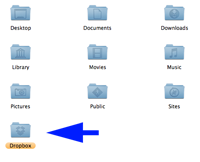 Dropbox basically installs a remote drive on your computer for storing files online instead of on your computer. There are other things, namely MobileMe, Mozy, or even a webdisk installed through your hosting service that can do the same thing. But I’ve found them to be either too expensive for what I need or cumbersome. (i.e. Not friendly to the Mac) But I like Dropbox because of its apps. Once you install the free software on your computer (mac or pc) and link your account it basically just runs in the background as a folder on your computer. When I put a file in the folder, it copies it up to the secure server, and copies it down to other linked computers. This all happens automatically, no tech skills required. If you are sharing an internet connection with people you can even throttle it. Once set up, I can access the file on another linked computer (like my home computer) or even my iPhone. I can even share files through the app… I just select the file or folder I want to share and it emails the person with a link. It’s a pretty rad little tool. Up to 2 GB of storage is free. (Plently for me.)
 I need to show people screenshots all the time. Whether I’m updating someone on the progress of a design, or putting together a tutorial, or if I just want to show someone something from the internet… I’m doing screenshots all day long. Command-shift-3 has long been both my friend and enemy. I could screen grab easily, but I’d always have to open up PhotoShop to clip out stuff I didn’t want/need the recipient seeing.
I picked up TinyGrab as part of a recent MacHeist. This little beauty basically allows me to screen grab only what I want, and in the same action automatically uploads it to a server and gives me the link. By doing a command-shift-4 shortcut I get a little cursor that allows me to highlight what I want to grab. When I’m done it snaps the picture and uploads it. An instant time saver!
 You may have noticed my recent fascination with time lapse movies. I think it’s a profound and fun way to capture the worlds movements. (more coming!) I’ve wanted to get software to do this with my Nikon for quite a while. But it was tough to justify spending $180 for Nikon Camera Control 2. It’s not like I had a real reason to do this… I just thought it’d be fun!
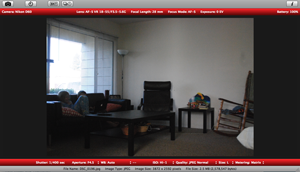 That’s why I was so stoked to discover Sofortbild. It’s essentially the same thing– and it’s free! (Sorry Canon freaks, this is just for Nikon right now. And it’s just for Mac.) Basically, I can set up my camera where I want to shoot, connect the USB cable, and then completely control the camera with my computer. When the pictures are taken (either remotely or manually on the camera) the images are transfered directly to a folder on my computer. You can shoot directly with your computer, manually, do a timed picture (like for a family portrait) or set-up intervals (time lapse). It’ll even import right to iPhoto! Now if it had an iPhone app where I could start or stop interval shooting remotely, that’d be crazy cool.
So, there you go. Three quick new apps for you Mac users to try out. They are all free, freemium, or cost just a couple bucks.
What are some new apps for the Mac you are discovering?
-
Repairing a Wet iPod Touch
 The other day our youngest son had his mom’s iPod Touch with him as he headed to the bathroom. Resting the device near the sink seemed safe. That is, until he started washing his hands. Moments later he came back out and handed a soaking wet iPod to his mom.
Fearing the worst we fired it up and were happy to see that it was still working. But on further inspection it was clear that there was some moisture under the screen.
Never fear, we have a fix for that! Actually, this works for iPods, cell phones, and pretty much any small electronic advice that’s a little bit wet. Put this tip in your arsenal.
Step One: Power off the device as soon as possible. For an iPod that just means shutting it down. But if it has a battery or is connected to a power supply… turn it off quickly!
Step Two: Dry it off as well as possible with what is visible to you. Don’t take anything apart. Don’t shake it. Just get it dry as possible with a towel.
Step Three: Wrap it in a paper towel and place it a ziplock bag. Don’t seal the ziplock bag! That’ll just make things worse.
Step Four: Place the bag in a window sill or on the dashboard of your car.
Step Five: Give it some time. A day usually seems to do the trick.
Step Six: Take it out of the bag and fire it up.
Typically, this process will remove moisture from circuitry. If it doesn’t fire up it’s safe to say that you have cooked a board or something like that. You can try the process again but if it doesn’t turn on at all it’s not looking good. For us, this process has fixed several phones and, we’re happy to report, removed moisture from mommy’s iPod screen.
What if this doesn’t work? If there is a major problem and this didn’t work I’d suggest talking to my friends at The Pod Drop. Seriously, these guys are better than Apple repair. Typically, Apple will just give you a new one and if isn’t under warranty they will tell you to buy a new one. I’ve seen it myself, the folks at The Pod Drop can bring back almost any DOA iPod. Even better, if they look at it and it can’t be repaired they will likely buy it from you for parts and apply that towards the purchase of a new one.
-
How Apple Handles Viruses
As a recent convert to Mac, I truly enjoy the simplicity of our computers. When I say “convert” I also mean that literally. We went all out. I have an iMac, MacBook, and MacBook Pro in my house.
With that many Macs in our house I try to keep up on the latest news. And any time Apple tells me to update my computers I do it right away.
But I’ve also learned to read between the lines as I have a suspicion that Apple sees the release notes of their updates as public relations. Look how they describe how the latest security update fixes a hole in their software for a virus.
A design issue exists in the Open Scripting Architecture libraries when determining whether to load scripting addition plugins into applications running with elevated privileges. Sending scripting addition commands to a privileged application may allow the execution of arbitrary code with those privileges. This update addresses the issue by not loading scripting addition plugins into applications running with system privileges. link
That’s all a lot of jargon. Let me translate. “Open Scripting Architecture allows hackers in.” And by sending out a fix it makes it pretty clear that somewhere a hacker has been exploiting Mac users. I don’t have evidence for that theory, but this statement would imply that.
A Prediction: Mac OSX will be in the news because of a major virus in the next 12 months. Here’s a few reasons why I say that:
#1 Mac users are arrogant about their operating system. They brag how their machines don’t have viruses. I’ve heard people say that Mac is immune to viruses. You’re telling me that Mac is absolutely perfect? Um, they send out updates all the time. And last time I checked it was a company run by fallible humans.
#2 Macs popularity has exploded. There are new users everywhere you look. It was said before that the reason Macs weren’t a target of viruses before was that they represented so few users. I’ve seen my web traffic increase from 3% in 2005 to 15% in 2008 from OSX. That’s a much larger target worth hitting.
#3 Hackers are also arrogant. Believe me… there would be high 5’s all over hackerworld for a person who exploited Mac in a big way first. It’s a big huge target and someone is going to hit it. They know that a growing population of new users are the perfect targets because their ignorance and arrogance has made them lazy about security.
#4 Being a user and a fan makes you blind to reality. Apple has built such a strong brand that their fans vigorously defend the smallest slight towards their perceived perfection. You’ll notice Apple says very little and their fans talk endlessly. It’s a blessing and a curse for the computer maker if you ask me. Look, I have 3 of them in my house and I know they aren’t perfect. But don’t tell hardcore fans that. This is the perfect reason for a hacker to target Mac! Hackers will celebrate the crushed egos of Mac users.
With all that said I ran that security update and I’ll run all the updates Apple tells me. Let this be a reminder to my fellow users to run Time Machine often.
-
I love my Mac, but it’s not perfect
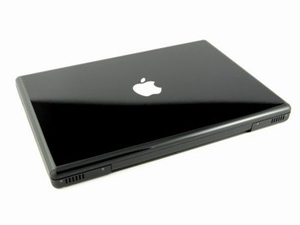 In December and January our household made the move to Mac. It wasn’t any easy decision nor a cheap one. We moved to Mac because we wanted to… pure and simple.
I am a power user as I do nearly everything on a computer… video editing, web design, desktop publishing, podcasting, graphic design, small business accounting, and of course web browsing.
So when I switched I had to make a fast transition. My task list waits for no one! With the clock ticking in my head and meter running with stuff to complete I had to to figure everything out and figure it out fast.
Why? Because I’m not just a single user… I’m also one of those people whom everyone comes to with their tech problems. Not only do I end up having to figure out my own computer dilemmas, I get 2-3 people a day asking me to fix their computer issues. (And cell phones, video cameras, projectors, sound systems, and about anything else that dings, beeps, or is portable.) So adding the OSX platform to my repertoire was a big deal!
Here’s my advice to people considering the change. If you are going to change EVERYTHING you do to Mac OSX and never have to interact with people outside of Mac OSX, go for it. You’ll love it. But if you have to live in a Windows world, do business with people who use Windows, or otherwise depend on your Mac OSX work to work seemlessly with users on Windows… don’t do it. I have found the “everything a PC can do a mac can do too” story to be a lie. It can’t and it doesn’t.
I’m a pretty smart cookie when it comes to computers and I’m finding it more frustrating than problem solving. I can generally find a work-around. But time is money and who has time to fiddle 5 extra steps?
Here are a few things I am still not thrilled about with our Mac transition.
- Our macs network wonderfully with one another, but really suck in networking with Windows machines. It very sporadically connects to our Windows Exchange server at the office. I can generally connect via Finder only. But I can almost never connect to the network through Photoshop or Office programs. And it took hours of fiddling around to get my Windows machines to connect to my Mac OSX machines. If you have XP Home… forget it. It doesn’t work. Mac blames PC and PC doesn’t care.
- My macbook is horribly slow. There. I said it. If I have more than 2-3 applications open (and I do all the time) it lags forever in opening files. I still have the standard amount of RAM, 1 gb, and need to upgrade to 4 gb. But I have to be honest… my 3 year old Dell laptop with 512 MB of RAM is a lot faster than my snazzy new macbook. I almost always have Firefox, iTunes, PhotoShop, and an email client open… on PC this was no big deal. On Mac OSX this results in programs lagging forever or crashing. And that is annoying.
- Most peripherals work great, but not the ones that I really need. Mac OSX handles printers like a champ. It is also fantastic when I plug in a random video camera or digital camera. But I can’t connect my phone (HTC Smartphone) to my laptop and that sucks. I loved that I could plug my phone into my old laptop and it synced my calender, email, contacts, music, etc. I miss this horribly.
- I’ve lost, for now, all the benefits of an exchange server. Entourage connects to server… but it doesn’t seem to be able to accept tasks, calendar invites, or any other cool stuff from exchange. And that’s annoying!
- I hate that I have to buy $30-$50 plug-ins for everything. Reality is that I have to interact with a Windows world. For my most important tasks, getting stuff prepared and ready for Sunday morning services, I need to transfer my work from my macbook to our PC-based presentation programs. So I bought Quicktime Pro because I read that it would allow me to convert stuff I made in iMovie into Windows formats. That was a total rip off! I can only export a 30 second clip in .wmv format without buying an additional $50 add-on from Windows. That was the only feature I needed to work… so Quicktime Pro was a total waste of money for me. Exporting to .avi is what all the mac-heads suggest. But those files are sickly massive. A 20 MB file in Quicktime will convert to 600 MB in .avi and often times I lose a ton of the quality in the conversion.
- Mac doesn’t have nearly the freeware that PC does. For instance: I have a very cool, free program for Windows that converts video files to Flash video. (FLV) Without buying Adobe Flash I haven’t found a single program in Mac that will do this for me. In fact, I am often left taking my swanky Mac-produced video files and putting them on a PC to convert from .m4v or .mov to a usable Windows format or web-ready format. Mac OSX simply doesn’t have the programs I need. (Which I can generally find for free for Windows)
These are my honest and true frustrations. I am committed to this transition… I ponied up the money for an iMac and a Macbook… so I’m not just some naysayer. Yet I want to be honest, transitioning to Mac OSX has come with a lot of frustrations. If I had it to do over again I probably wouldn’t have done it. I would have saved myself half the money and just bought good XP Pro machines. Sure, I look cool at the coffee shop. I look cool when I go to conferences. I can do a lot of things better on Mac than I could on my XP machines… but it isn’t perfect. It isn’t as I expected. And no matter what people say a transition of operating systems is anything but seemless.
Thank God I have great friends who use Mac OSX. If I didn’t I would have given up!
At least I know how to use the keyboard now.
-
Steve Jobs Keynote in 60 Seconds
Imagine if we could do a sermon like this.
-
The Mac Switch Continues
 I was waiting until MacWorld to make a purchasing decision on my next laptop. And while Macbook Air is really cool it isn’t powerful enough for what I need. So, I went ahead and got this bad boy. It’s not the most powerful Mac, but I got a great deal on it and it is a proven performer. Later tonight I’ll be boosting it a little more when I order a 4 gb upgrade to the RAM. (I remember having a 4 GB hard drive on my first laptop in 1999.)
So, in a few days the conversion to Mac will be underway. I am planning to run boot camp on this computer so that I can use some of the great toys we have at the office. The iMac did a good job of teaching me how to get things done in Leopard. Now it’s time to put that into production. It’s going to be an interesting ride.