 A lot of businesses are successful for reasons they don’t quite grasp. They’ve just stumbled upon something that works and they’ve gone from there. Krispy Kreme is that company in my mind. They had something rare, people showing up with a light comes on for hot & fresh donuts. It was a uniquely southern thing. They’d grown for a generation. They had strong fundamentals.
Tag: mailchimp
-
Data Points
-
Learn from me on December 3rd
If you live in Southern California (or are willing to come visit) I am hosting 2 classes on December 3rd through a brand new website, Skillshare.
 Growing your business with Mailchimp
How to get started with Mailchimp, set-up and grow your lists, and grow your business
Mailchimp is an amazingly powerful tool. Whether you are a small start-up, a restaurant, a band, or a non-profit– Mailchimp can help you grow your business. In this 2-hour class we’ll quickly cover the basics of the service and quickly dive into unleashing the power of this amazing email marketing webapp. We’ll talk about lists & groups, templates, integrations with tools like Eventbrite, Facebook, and Salesforce, and email marketing strategy.
Cost – $25 Register here
 Blogging 101
Learn how to start a blog from scratch, build an audience, and have fun while doing it!
This class will be laid back but full of experience, practical application, and practice. As a full-time blogger and blog coach I’ve helped countless bloggers get going for their own blogs and even launch small businesses.
Topics covered: (But not limited to)
- Getting started for free
- Choosing the right platform
- Customizing your blog
- What to write about
- How to write for response
- How to build a tribe
- Intro to analytics and other measurement tools
- Principles of social media interaction
The class will be two hours. But the format is loose and I won’t leave until I’ve answered all of your questions. My goal is that you walk away with a firm understanding of what to do AND ready to get started. In true McLane Creative form, after class the teacher is buying the first round next door at the Mission Brewery.
Cost – $25 Register here
-
Slides: Doing youth ministry on the move
This is a presentation I made last month at the East County Youth Workers Network meeting. Maybe it’ll be helpful to you.
Here’s some of the content that goes with it.
Slide 1:
With the rapid adoption of smart phones, iPad, and hundreds of thousands of cheap/flexible apps being developed, I am quickly seeing youth workers realize that they can do more on the go than ever before.
My prediction is that we will begin to see more and more youth workers go officeless in the next five years.
For years we have lamented that we didn’t go into youth ministry to be a desk jockey. Finally, the technology is there (and affordable) to the point where we can be in the field full-time, working with teenagers where they are.
Slide 2:
This stuff isn’t going to go away. So rather than whine about the impact of media, I recommend going on the offensive and doing our best to educate parents and students on best practices of a digital life.
For students:
- Technologies that take off for students are really all about them and their life. From an adult perspective that sounds entirely selfish. (Because it is self-centered) But we need to remember that adolescents are developmentally limited to only think about life from their perspective. So when talking to students about technology, bear this in mind. Teach them things that will make them look good.
- Trend-wise, I’m still seeing tons of activity amongst students on Facebook. At the same time, text messaging is infinitely more private and infinitely move mobile-friendly. So texting is still king. But I’m also starting to see pockets of students taking to Twitter. They aren’t using it in the way adults are though. They tend to have tight-knit clusters of friends who all have private accounts. For them, it’s a group texting service.
- Lastly, it’s important to realize that students are students… they are still learning. Which means you need to teach them what to do and why. There’s been a lot of talk about sexting, I think a big reason it is getting so many people in trouble is simply ignorance about how digital files can go viral and how something so innocent and sweet can do a lot of damage to you for a long time. Yes, I said “sweet.” I think a lot of guys/girls are exchanging pictures to flirt. They just don’t have the same boundaries you or I do.
For parents:
- Technology is not bad. By it’s definition, it is neutral. It’s what you do with it that makes it good or bad.
- This stuff isn’t going away. You don’t have to be an expert to be a good parent. But you can’t pretend it’s not there any more than your parents pretended they didn’t know what to do with your beeper.
- I’m not a big fan of filtering the internet. I really feel like that creates a false sense of security for parents. And if you ask any kid over about 10 years old, they know how to disable the filters at school. I’d rather see parents focused on teaching good practices like only using computers/smart phones in public areas of the house.
- There’s an assumption that if you don’t know more about the technology your children are using that you can’t teach them how to use it appropriately. That’s just not true.
Slide 3:
Let’s turn from technology use to how you can use technology to become more a productive youth worker.
Slide 4:
If you want to ditch your office, you’ll need to transition to cloud-based applications. All that means is that your data no longer lives on a single computer in your office or on your laptop, instead it is stored in a web-server and is accessible anywhere you have web access, on multiple devices. (Phone, laptop, even a guest computer with an internet browser.)
Here are some cloud-based tools I’m using right now that make me more mobile:
- Evernote – A note-taking app that syncs with all of my devices. I’ll never say “ugh, that Word doc is funky” ever again.
- Springpad – This also has a note-taking feature. But I use Springpad for bookmarking web-content I want to come back to later. (Here’s my account) This is also amazingly helpful for event planning, meal planning, shopping lists, etc. It’s HTML5 based, which is just nerd-speak to say that it’s built to work with any web-enabled device and isn’t limited to iPhone or Android on the mobile side.
- Dropbox – I store all of my important files on Dropbox. It allows me to not only access them from anywhere, it also makes it super easy to share. Dropbox is great if you have multiple people working on a worship service or something like that. Everyone can just save their work in the same folder and everyone can continually have access to the same stuff. I never use our work server anymore. Everything is on Dropbox.
- Google docs – The original big player in the cloud-based app world. I use Google docs for any document I’m going to collaborate with others on. It has all of the same features as Microsoft office, except it lives in the cloud, is free, and you can add multiple authors in a jiffy.
Slide 5:
Larger ministries tend to move quickly into a project management mode. This just means that one person isn’t responsible for an entire project… they have to collaborate with multiple people. Most of my work at Youth Specialties and McLane Creative is tracked through project management software in an attempt to keep all of the knowledge out of our email system!
Here’s three that I’ve used.
- Basecamp – This is the gold-standard project management utility. It has lots of deep features, is mobile-friendly, and if you are working with outside contractors there is a good chance they are familiar with how to use it. Everyone uses it! The downside is that it isn’t free.
- Google groups – Google groups has many of the same features as Basecamp. It has just never taken off in the project management world. I don’t really know why. You can use it in much the same way, and it’s free.
- Collabtive – I use Collabtive at McLane Creative for project management. It’s very similar to Basecamp, is free (open source) and lives on my webserver. That said, it’s not a novice utility to administrate. So if you don’t have someone confident with PHP, mySQL, and available space on a webserver, it won’t work for you.
Slide 6:
Last but not least, here are some other service worth looking at to improve your communication with parents, students, and your team.
Text-based
- Groupme – Groupme is a free, group-based, text messaging service. I’ve used it a little and really like it. Essentially, you just add people to a group, the group is assigned a phone number, and people can text the groups number and instantly notify everyone else in the group. The upside is that it’s free and full of potential. The downside is that it’s “reply to all.” If you wanted to try this out I’d recommend trying it with your adult volunteer group first. It could get crazy with a large group of students… fast!
- Google voice – This is basically an alternative to giving your students your phone number to text. Google voice is 100% free, has a mobile and web interface, and works great. Another cool use for this for youth workers would be that it’s pretty easy to share responsibilities for responding to texts with your team.
- Tatango / SimplyTXT – Both of these are fine if you are looking for more of a professional grade group texting service. Both are great and both cost money.
Other online communication apps for youth workers
- Facebook groups – Groups recently got an overhaul. There are some cool features there for you. It’s basically a profile for your ministry. The upside is that there’s a high likelihood all of your students are already on Facebook a lot and familiar with it.
- Mailchimp – Email is not dead. Mailchimp is the industry leader in email marketing. What I love about Mailchimp is that it isn’t just an amazing application… it’s free for lists under 2,000! (Which would be nearly every youth group in America!)
Got questions? I’ve got answers.
-
A few blog updates
 Most people read my blog via RSS or Facebook these days. (Roughly 50%) So if you are one of those people you won’t notice a few of these changes to my blog. Here’s a few updates, nothing death defying.
- Added an FAQ and Free Downloads page under the “About me” tab. I love that people are using my contact page more and more. But I thought I’d just put the most obvious stuff there.
- Swapped out the Feedburner email form for a better looking daily email from Mailchimp. Here’s a look at the archive. If you want to switch, simply opt out of the Feedburner email next time it comes and fill out the form in the right sidebar.
- Also new to the sidebar, I’m feeding my Delicious account. So if you want to see what I’m bookmarking in the adolescent research and youth ministry categories, that’s right there.
- It seems like people have figured out all of the Twitter and Facebook sharing, liking, and retweeting stuff at the bottom of every post. Thanks for that.
- A few people have emailed that they missed the monster. I’ve taken note of that, so you’ve been seeing him appear in some more content lately.
I’m always adding and playing with stuff on my blog. This is kind of my test site for all the other sites I manage. So if something looks funky from time-to-time, now you know why.
-
5 Things I Love about Mailchimp
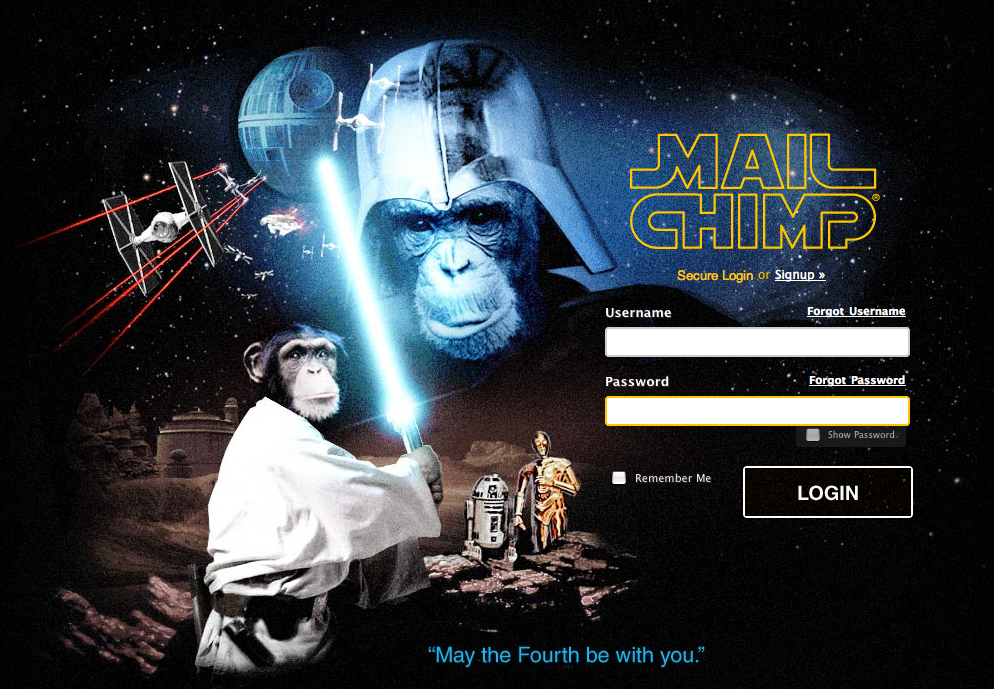
I’ve been a Mailchimp customer since July 2007. And unlike most web apps, my love for them is growing over time! I joined them because I loved their user interface and fun loving attitude.
Here are 5 quick things I love about Mailchimp.
- Easter Eggs. Today was the perfect example. The picture above is their login screen. I wasn’t expecting it and it made me giggle. There’s also some funny stuff built into the site that will keep you laughing. I use Mailchimp several hours per week… it never gets old.
- Geo-location emails. Lemme tell you. As a guy who manages some big email lists I adore this new feature. If I’m doing a meet-up or an event, I can very easily send to users within 50, 100, 0r 150 miles. No more zip code segmentation!
- Easy autoresponders and mail merge tags. One of the reasons why people hate getting email marketing is that it feels so canned and impersonal. Mailchimp makes personalization and follow-up, even in an automated way, super simple. So I can set-up autoresponders to go to people who just signed up for my mailing list, have an upcoming birthday, or even haven’t opened emails recently. Love. Love. LOVE IT!
- Templates galore. When I first started using Mailchimp I was impressed that they had 30-40 templates to chose from. This is now basically infinite. They have tons of free stuff to use as well as the ability to easily import custom designs… or even turn ANY webpage into an email template. The chimp that came up with that needs an extra banana.
- Customer service. I’m a royal pain-in-the-neck customer. I’m always pushing the envelop and trying to use their service to its fullest. These folks are amazing. They take it all in stride. They bend over backwards to help. And they have a philosophy of educating their customer as opposed to just fixing stuff for you. For a bunch of chimps, they are really friendly. When we were doing NYWC in Atlanta last fall they were even polite enough to open up their offices to let me walk around and be a fan for a while.
I didn’t even mention the price. If you have a list under 500 subscribers, they are free. Even for bigger lists (like my Youth Specialties stuff) they are super cost-effective.
And since I am on a roll. There are some incredible power-user features. They seamlessly integrate with Google docs, Eventbrite, Salesforce, Highrise… and a few other things I haven’t even explored yet.
-
Customer Service Matters
When it comes to customer service, it matters. It is one of those things that I have always been quick to notice… and lately I’ve come across some amazing examples of it.
In the past 30 days I’ve received remarkable, incredible, stellar…. unbelievable service from several companies I have new relationships with. Stunning!
Observation: Start-ups have better customer service because they have to. They see the connection between a happy customer and their bottom line. They know that a happy customer will tell their friends about a fantastic experience. Conversely, they know that a bad customer experience will spread like wildfire. Incredible customer service is a cheap marketing strategy!
But start-ups aren’t the only ones with great customer service. That’s what makes AT&T and Apple such a crazy combination for the iPhone! AT&T has has had horrible customer service for decades and they are so big they don’t care one ounce. They know for every 10 customers they lose to bad customer service there are 10 more who will create a new account. And Apple has created a culture of stellar customer service to the point where people will spend an extra 1000 for a laptop just because they know if they ever have a problem they can take it back to the store.
Southwest Airlines is another long-standing company with stellar customer service. I’ve purchased tickets with them before, not read the rules, and had to call to ask a refund… even though I didn’t deserve one. Not only have they given it to me, they’ve always done it happily even though it was my mistake!
Why does stellar customer service matter? In today’s marketplace a purchase is all about the experience. If you go the extra mile your customers will love you forever. They will wear your t-shirts and brag to their friends that they are your client.
Customer experience is the next great wave of marketing.
-
Maintaining Stellar Customer Service
In the last 30 days I lead a big change in how we send emails at work. We ditched our old email delivery service for MailChimp. One small part of the decision was that MailChimp offered a better price. That was important– but the selling point for me was stellar customer service.
There have been a couple of times recently when they lived up to that expectation. Last week I was trying to do something and couldn’t figure out how to make it work. So I dialed up their live chat and explained what I needed. The person told me that their system couldn’t do what I needed it to do, but it should. So, while I waited, they created a solution for me. Yeah, that’s unheard of!
So I wasn’t surprised to see that MailChimp had earned a 5-star rating for customer service from their customers. My question for them was, “How do you keep it up?” Check out the comment that Ben, one of the head chimps had to say:
His philosophy is, “Don’t just answer. Explain.”
Explain what’s happening, so the customer learns something. People like to learn, so you just made them happy. The bonus, when you explain, is they won’t do it again.
So everything we do is based on “explaining things.”
All departments are focused on the customer experience. Here are some of the strategical things we’re doing in each department.
Design:
– Build the product so it “explains” while you use it. That’s ongoing and never ending. Help text, hints, intuitive interfaces, usability tests with customers. We’re hooked on clicktale, crazy egg, google analytics, yslow.Hiring:
– Only hire people who are smart and who like to explain. No call center drones.Marketing:
– This, IMHO, is the biggest one. Do our best to only attract customers who like learning, who have a good sense of humor, and who like to tinker. We call them “power users.” Scare away customers who need too much hand-holding (either because they’re too new to email marketing, or they think they know everything, but ironically, demand account executives to help them with everything). Big giant monkeys on our home page, and saying stuff like “reports that’ll make you poop your pants” tends to do the trick. If you attract the wrong people with the wrong expectations, they will never, ever be satisfied.
Webinars:
Weekly webinars that go over all the basics. Right now, Dan does them. Soon, every member of the customer service team will do them. Terror and stage fright keeps things fun.MailChimp Academy:
– Videos teach people how MailChimp works so they can learn on their own time. They’re on mailchimpacademy.blip.tv, but also peppered throughout the product.There are a million other things the customer service team is experimenting with, but that’s sort of a high level view of our strategy.
The question is… how does this philosophy work in the world you work in?