See more of these at Illusion Sciences
HT to Cory

See more of these at Illusion Sciences
HT to Cory
As they say, my dock is full. Kristen and I have been iPhone users for a couple of months now. So far we love it! One unintended consequence of using iPhone is that our monthly cell phone bill actually went down. Never expected that.
Like most users, I actually use the phone part of the iPhone very little. That said, I use the iPod and wireless device parts all day. As of right now, here are the 5 apps I use the most.
 Tweetie. I should clarify. Up until last night my most used app was Twitterfon. But Twitterfon was stupid and decided to drop a bunch of ads on their latest upgrade. I hate silent upgrades that dump in ads. I mean, I get it that they need revenue and all, but don’t ruin an app to do it! Anyway, Tweetie is a great Twitter app. It allows me to manage all my various accounts.
 Yelp. I already use Yelp to post quick reviews of stuff as well as read up on places I want to visit. Now when I’m on the go I can use Yelp’s community driven review sites to chose places to eat… and even find addresses to places that are hard to find. (I like stuff that’s way off the beaten path!)
 Mint. Kristen and I use Mint to track all of our finances. So having a Mint iPhone app is a total bonus. This allows me to keep an eye on our accounts, spending, budget, and investments anywhere I am. If you are a an iPhone user but don’t use Mint… you should really think about checking it out. It is pretty powerful.
 Google Reader. Technically, I don’t think this is an app. But if you bookmark it in Safari it becomes this sweet little app on your dock. I use Google Reader all day, everyday for my job. So being able to scan through endless vanity searches, twitter searches, and of course blog posts is essential. I love being able to read, share, and comment on stuff no matter where I am. As a few friends have pointed out… they can tell when I’m on the trolley because I’m sharing a lot!
 Facebook. What social media person wouldn’t love to have a mobile Facebook that is, in some ways, better than the web version? I love posting pictures and changing my status with my iPhone. So much less clutter.
A few people have asked me to put together a list of apps for youth ministry. Give me a few weeks and I’ll definitely be posting about that.
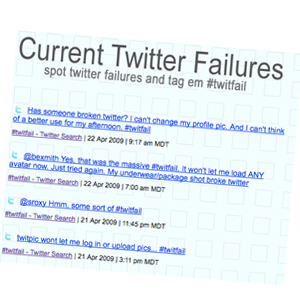 I suppose it’s no surprise to know that I like to play with things on the internet. A few months back I bought a domain on a whim, TwitFail. I am a fan of FailBlog.org and I thought it might be fun to capture some of the stupidity that people post on Twitter or it’s picture sharing friend, TwitPic.
So, while I’m not done with this site by far… here’s the first serious shot at it.
 This morning I lead my first webinar. Like a lot of things right now I felt like I was breaking new ground and this first one felt pretty bumpy. I was pretty confident that the content I had was solid… but my use of the delivery system was awkward. Audio issues, PowerPoint issues, user feedback issues, stuff like that. These are all little things I want to get ironed out because it’s a platform I want to master. A co-worker asked me how it went and I said what I thought at the moment, horrible! He assured me it wasn’t as bad as I thought. But I’m not happy with a mediocre performance!
Why are webinars so hot right now? Here are my thoughts.
#1 The software is getting better and cheaper. We use Gotowebinar (or Gotomeeting) and its very slick. If it allowed live video streaming I’d like it a lot more… but I’m sure that’s coming.
#2 People need specialized training despite limited travel budgets. It’s no secret… lots of companies used to spring for people to fly all over the place for specialized training. With technology better and more accessible, it’s really more cost effective to grab people out of their routines for a couple of hours as opposed to travelling.
#3 People are getting used to it. It’s not that this type of thing hasn’t been around for a long time. Conference calls, teleconferencing, stuff like that. But I’m noticing a big uptick in the amount of it people are jumping in on.
I also want to point out that you don’t have to spend a ton of money. You could just as easily host a webinar on UStream.tv or Justin.tv and share your presentation on Google docs. Likewise, I am confident that there will be a much better webinar interface soon. The two big options out there now are GoToMeeting and WebEx. Both are expensive… and I’m positive something in the free or nearly free category will come on the scene soon.

I am daring you and your staff to take this challenge. I promise you it isn’t as dangerous as it sounds. In fact, I think it may just fundamentally change the way you interact with the people in your ministry.
Here’s the dare.
Lock every staff person out of your church building for a work week. From the senior pastor to the part time guy to the janitor. Instead of going to the office and doing your normal thing for 7 work days I am daring you to put all that “work” aside for a work week and a couple of days to spend that time getting to know 10 people who go to your church in their native environment.
Here’s how it works.
1. Instead of getting up and going to the office, split your day in half. In the morning you’ll spend a half-day with a first shift office worker and in either the afternoon or evening you’ll pull a half shift with a blue collar worker. Trust me, you’ll find a bunch of volunteers. It’ll be fun for everyone. Repeat this for 5 days so each staff member gets to see 10 of your church attendees in their work environment for half a day.
2. Run your ministries that week in the most stripped down way possible. Just wing it for a week… you’re professionals, you know you can wing a week. Tell the pastor to talk about his week or something. The preacher absolutely doesn’t get special treatment in this. Heck, download a free sermon from open.lifechurch.tv and tell the band to play last weeks songs on Sunday. This dare will make your ministry better, I promise.
3. When that week is over schedule an off-site meeting with your entire church staff for Monday and Tuesday. It’ll take 2 days to debrief this.
3a. Spend the entire first day (with a lunch paid for by the boss) sharing your experiences. What did you do? What was unexpected? What went crazy? Who works their butt off? Who has the easy job? Why do people do what they do? Who is the most servant hearted? You get the idea.
3b. Spend the entire second day (bring a bag lunch) determining how getting to know people in their native environments changes how you minister to people, families, children, and students.
4. Send thank you notes to every single person you visited. Let them know how much you appreciated the time with them, how much you learned, etc.
Money back guarantee! Since this project isn’t costing you anything I promise to refund you fully if you take this dare and learn absolutely nothing.
Go ahead, spend time with your people at work. I double dog dare you!
For those taking the dare. Let me know if your staff is doing it. I’d love to pray for you all. Also, let me know how it went. Leave a comment here or drop me an email, mclanea@gmail.com.
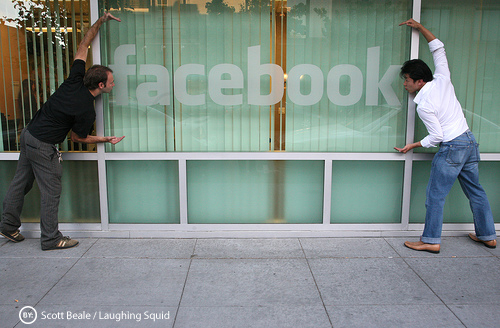
The last 12 months has seen a major shift in how people view social networking. A year ago most adults (who weren’t in youth ministry) said the word “Myspace” with a suspicious scowl. If they used it they kept it on the downlow.
Now everyone has Facebook. (150 million users and growing every second; it would be one of the largest countries in the world by population.) Now, most everyone is jumping on Twitter and getting completely addicted to that. The swarm of humanity has taken what was done in the margins and brought it to the mainstream. It’s a beautiful thing!
As a person who “lives online” through my work, I thought I would share 5 things I love about social networking.
1. Meeting new people. I’m pretty brave so I’ve taken to joining meet-up groups and showing up to meet people who share a special interest. It’s really not as creepy or as weird as I thought it’d be.
2. Learning stuff about people I already know. The “25 random things” meme on Facebook has reached legend status. I’ve been tagged on that thing probably 50 times and I don’t mind reading them all.
3. Reconnecting with long lost friends. Sure, there is the occasional misfire as a person who was a jerk to you in 8th grade friend requests you or wants to follow you on Twitter. But over all, I’ve had amazing reconnections.
4. Getting exposed to the good stuff. This is especially true on Twitter! If there is anything new and noteworthy, social networking sites are all over it way, way before it hits the mainstream media. I suppose that’s both good and bad as there is such a thing as being too current on stuff. Also, a danger to this is that it’s hard sometimes to distinguish right away what is actually newsworthy.
5. Instant feedback. Who needs focus groups anymore? I can pop an idea on Twitter of my Facebook status and get 25-50 responses right away.
What about you? What are things you love about social networking?
Today I finally acted on something I’ve been meaning to do for more than a year. I registered both of our kids names as domains.

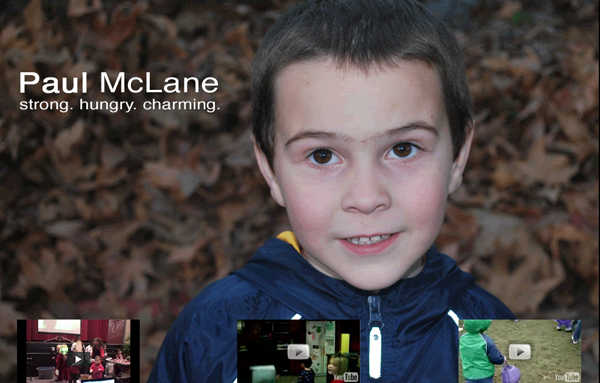
Now, I don’t know if this is for everyone. But for me it makes sense on a lot of fronts.
#1 I can buy today for $10 what may cost thousands when they are adults.
#2 I got to teach the kids about what I do and how I do it. They got to pick the pictures, tell me what they wanted, etc.
#3 They are so excited about having their own websites. Mom and dad talk about theirs all the time. This is just the beginning for each of them.
#4 I have a few more sites i can practice some skills on, quietly.
Essentially, these are just placeholders. But as time goes on I can see us growing these to something more all-encompassing as time goes on.
Prepare to nerd out for the next 8 minutes.

 The other day our youngest son had his mom’s iPod Touch with him as he headed to the bathroom. Resting the device near the sink seemed safe. That is, until he started washing his hands. Moments later he came back out and handed a soaking wet iPod to his mom.
Fearing the worst we fired it up and were happy to see that it was still working. But on further inspection it was clear that there was some moisture under the screen.
Never fear, we have a fix for that! Actually, this works for iPods, cell phones, and pretty much any small electronic advice that’s a little bit wet. Put this tip in your arsenal.
Step One: Power off the device as soon as possible. For an iPod that just means shutting it down. But if it has a battery or is connected to a power supply… turn it off quickly!
Step Two: Dry it off as well as possible with what is visible to you. Don’t take anything apart. Don’t shake it. Just get it dry as possible with a towel.
Step Three: Wrap it in a paper towel and place it a ziplock bag. Don’t seal the ziplock bag! That’ll just make things worse.
Step Four: Place the bag in a window sill or on the dashboard of your car.
Step Five: Give it some time. A day usually seems to do the trick.
Step Six: Take it out of the bag and fire it up.
Typically, this process will remove moisture from circuitry. If it doesn’t fire up it’s safe to say that you have cooked a board or something like that. You can try the process again but if it doesn’t turn on at all it’s not looking good. For us, this process has fixed several phones and, we’re happy to report, removed moisture from mommy’s iPod screen.
What if this doesn’t work? If there is a major problem and this didn’t work I’d suggest talking to my friends at The Pod Drop. Seriously, these guys are better than Apple repair. Typically, Apple will just give you a new one and if isn’t under warranty they will tell you to buy a new one. I’ve seen it myself, the folks at The Pod Drop can bring back almost any DOA iPod. Even better, if they look at it and it can’t be repaired they will likely buy it from you for parts and apply that towards the purchase of a new one.