Tag: Apple

  • How Apple Handles Viruses

    the rainbow connection of apple logo

    As a recent convert to Mac, I truly enjoy the simplicity of our computers. When I say “convert” I also mean that literally. We went all out. I have an iMac, MacBook, and MacBook Pro in my house. 

    With that many Macs in our house I try to keep up on the latest news. And any time Apple tells me to update my computers I do it right away. 

    But I’ve also learned to read between the lines as I have a suspicion that Apple sees the release notes of their updates as public relations. Look how they describe how the latest security update fixes a hole in their software for a virus.

     A design issue exists in the Open Scripting Architecture libraries when determining whether to load scripting addition plugins into applications running with elevated privileges. Sending scripting addition commands to a privileged application may allow the execution of arbitrary code with those privileges. This update addresses the issue by not loading scripting addition plugins into applications running with system privileges. link

    That’s all a lot of jargon. Let me translate. “Open Scripting Architecture allows hackers in.” And by sending out a fix it makes it pretty clear that somewhere a hacker has been exploiting Mac users. I don’t have evidence for that theory, but this statement would imply that.

    A Prediction: Mac OSX will be in the news because of a major virus in the next 12 months. Here’s a few reasons why I say that:

    #1 Mac users are arrogant about their operating system. They brag how their machines don’t have viruses. I’ve heard people say that Mac is immune to viruses. You’re telling me that Mac is absolutely perfect? Um, they send out updates all the time. And last time I checked it was a company run by fallible humans.

    #2 Macs popularity has exploded. There are new users everywhere you look. It was said before that the reason Macs weren’t a target of viruses before was that they represented so few users. I’ve seen my web traffic increase from 3% in 2005 to 15% in 2008 from OSX. That’s a much larger target worth hitting. 

    #3 Hackers are also arrogant. Believe me… there would be high 5’s all over hackerworld for a person who exploited Mac in a big way first. It’s a big huge target and someone is going to hit it. They know that a growing population of new users are the perfect targets because their ignorance and arrogance has made them lazy about security.

    #4 Being a user and a fan makes you blind to reality. Apple has built such a strong brand that their fans vigorously defend the smallest slight towards their perceived perfection. You’ll notice Apple says very little and their fans talk endlessly. It’s a blessing and a curse for the computer maker if you ask me. Look, I have 3 of them in my house and I know they aren’t perfect. But don’t tell hardcore fans that. This is the perfect reason for a hacker to target Mac! Hackers will celebrate the crushed egos of Mac users.

    With all that said I ran that security update and I’ll run all the updates Apple tells me. Let this be a reminder to my fellow users to run Time Machine often. 
  • Paul and the Internet

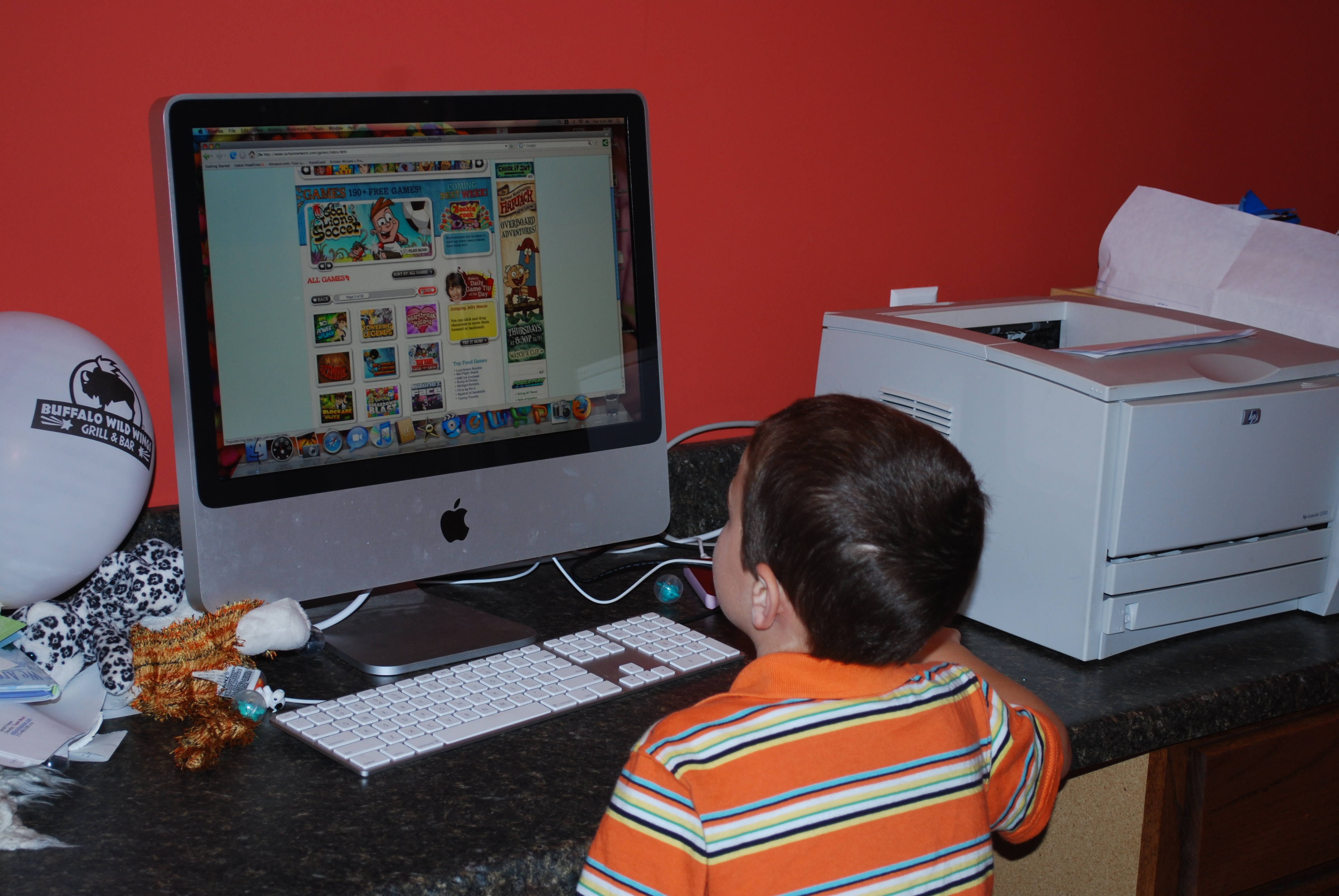
    Paul loves his macI’m a web geek, my wife is a (hot) web geek, and my kids are web geeks. If you don’t have young kids I don’t think you really understand what I mean by “our kids are web geeks.” So here is a visual for you. Paul, who turns 5 next week, navigates the web very well.

    Paul can launch Firefox, click the address bar, and type in the URL of his favorite websites. From there he can completely navigate these sites. This includes some relatively complex things like typing in user names and password and printing documents. Here’s the catch… Paul can’t read. He is 4 years old.

    Imagine all that Megan can do? She is 7 and has mastered browsing the internet, google, and can even launch various programs like Word. One of her favorite things is to write letters, play with the fonts, print them out, and hand them to her friends.

    Sidenote to educators. You need more computers. While my kids may be slightly above the norm you need to step up both the rollout of computer time and the quality of projects you have them do. In first grade Megan would come home and say “I hate computer time. I already did everything at home and was bored.” Yeah, better step it up there to keep her enthusiasm. I don’t care that everyone doesn’t have broadband internet and everyone doesn’t have a computer at home. Educate my kid or you’ll lose her attention. And upgrade the teachers. Got a teacher that doesn’t want to use the computer? Fire ’em. Seriously. My kids don’t need teachers who were good twenty years ago. They deserve a teacher who will educate them for the future. Fire ’em and hire someone who can teach. Do it today. Then you’ll see your precious scores go up. Deal?

    3 Websites ruling the roost this summer

    #1 Club Penguin

    #2 Webkinz

    #3 Cartoon Network

    How do the do this? Just like web browsers are smarter these days, wed design education is smarter as well. The operative word these days is “Interactive media design” or “IMD” for short. 

  • $200 Asterisk for the iPhone 3G


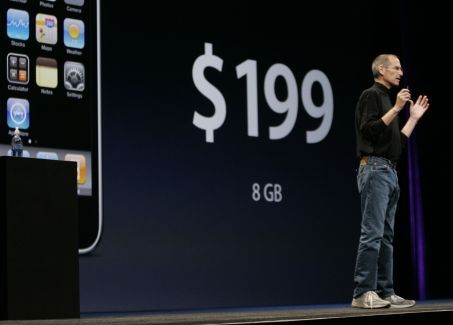
    iphone 3g $199
    If you are like me you didn’t notice the tiny asterisk in this image. But there is one. Do you see it?

    This morning I intended on lining up at the Partridge Creek Apple Store to upgrade both of my AT&T phones to the smoking hot iPhone 3G

    Since I’ve been a loyal AT&T customer since 1998 I knew I needed to call their customer service and make sure there weren’t any surprises. And boy am I glad I did.

    Not pictured here with Steve is the asterisk. You have to be a new customer or have an expired contract with AT&T to get this price. In the dozens of articles and videos I’d watched about the new iPhone I somehow missed this little detail. Stupid Adam, fooled again.

    So, people like me who have been loyal to their wireless company are getting hosed. No love for us on the iPhone. The loyal customer price is $399. Even on the Apple site I can’t find $399 mentioned as the price, but that’s how AT&T has always treated loyal customers… horribly. 

    So, I talked to customer service. If you are like me and are looking to get an iPhone 3G for the advertised $199 instead of the loyal customer price of $399, here are a few tricks the customer service agent told me to try. 

    #1 Cancel your existing account. Yes, she told me that! After 10 years as a customer, I was told the best service I could get with AT&T was to cancel my account. 

    #2 Add lines, suspend lines. To get the $199 I could add 2 lines to my family plan for $10 per month and suspend my current 2 lines for free. Eh? She even told me I should just give away my other 2 lines “to anyone.” 

    #3 Keep calling AT&T until you get someone to agree to give you the upgrade price before your current contract expires. (Mine is in September)

    #4 Open a new account under a new name. If you are like me and have a family plan, just close your account under one name and start a new account under the other. 

    Of course I am not going to do any of these. Next month we are moving across the country and I know from experience with AT&T that they’ll offer me a new two year contract than. This may also be our time to try a new company, like Verizon. 

    AT&T has always had the worst customer service in the mobile phone industry. I’ve long held that AT&T is a great company as long as you never call the 800 number and that is re-confirmed every time I talk to “customer care.” 

    Here I am, a customer of 10 years that would like to re-up his contract for 2 more years at a rate nearly double what he currently pays and I’m told I can do one of 4 “tricks?” 

  • Adam McLane, tech dork

    As if it were not official already. Last week I totally proved my tech dorkiness repeatedly. From randomly fixing computers to picking up the new MacBook to whimsically talking about PHP code and fixing a blog. Of course, this was on top of my normal compulsions to Twitpic all over the place, post to Twitter while driving, and some other things.

    We even joked about my starting a weekly “Tech Tip from Adam” for folks looking to get a little more dorky.

    But my dorkiness was confirmed forever on Friday. Going through the security screening at San Diego I popped open my bag and pulled out 2 MacBooks and my Smartphone. The Homeland Security guy just kind of stared at me.

    It’s true, I love technology. I love gadgets. I love being connected and learning new ways to connect. I guess that means I love being a dork. Wait until July 11th when I pick up the new iPhone.

  • Think Different

    How about you… are you crazy enough to change things? Are you sick of status quo? I am.

    HT to Dennis

  • Our Vision for Our Community

    I’ve had this video ready for a couple of weeks. Below is a description video for our churches vision.

    Since I already had a couple of people ask me how I made the video, here are the details.
    – Obviously, the animation is from Google Earth. I set up the points as a tour and clicked through when it came time to record. (Just timed it out in my head)
    – I recorded the Google Earth presentation using IShowU. This is a simple video screen capture tool available for OSX.
    – I used the Google Earth video as the background in Adobe Premier.
    – I did the voice over at the sound board at church. I recorded it using Garage Band, using some effects to make my voice more “voice over” quality.
    – The rest is just done in Premier. Titles, video layers, etc.

    It was a lot of steps. But I was pleased with the results. The fun part was doing some parts of the project in Premier (PC) and some with Garage Band and IShowU. (Mac) Before I started I actually took the time to make a project list… which helped me keep all of the parts in the right place.

    Where did the idea come from? I saw a video similar to this on Granger Community Church’s website. I based the outline of the script on that video as well as the idea of using Google Earth as the animation tool. Anything beyond the concept I came up with. It was a fun project!

    Since I’m sharing videos, here is the bumper video we made for the service too.

    Someone asked me today how long these videos take. Here’s a ballpark.
    Our Vision for Our Community: 20ish hours. (Conception through completion)
    Lean In Bumper Video: about 1 hour (Conception through completion)

  • Steve Jobs Keynote in 60 Seconds

    Imagine if we could do a sermon like this.

  • Less than perfect Apple experience

    Dress MacSo I don’t get flamed, let me first say that there are a lot of things I like about my new iMac. It’s pretty and it has loads of power.

    OK, that’s out of the way. Now I can complain about the things I’m not thrilled with on my new computer.

    1. It arrived with the wrong operating system. This cost me more than a few hours of my life. While it’s true I didn’t have to pay for Leopard, Apple shouldn’t have sold me a computer with their old operating system at full price without telling me. When I’ve complained about his to other Apple users I’m basically blown off as if this weren’t a big deal. It’s a big deal. I consider my time to be valuable.
    2. It won’t “just connect” to my Windows network at home. I have fiddled with it for ages trying to get the new operating system to talk to our XP Home desktop and my XP Pro laptop. The only solution I could make work was getting my laptop to talk to the Mac one way. In other words I can use a Windows computer to access the Mac but not visa versa. I’ve read dozens of tutorials and helps and it won’t work. That’s not cool in my book. It takes less than 2 minutes to do this in XP… 4 days and still not working on the Mac.
    3. There is really no introduction to Mac/Leopard available. I would consider myself pretty web/tech savvy when it comes to Windows and it has taken me a week to feel like I know how to do some things. If it weren’t for Patti and a few other long-time Mac users I probably would have just taken it back to the Apple store and went out and bought 2 new Windows desktops. At least with Windows I know how to make stuff work. Seriously, if they are looking for flocks of hardy Windows users to convert they are going to have to make the learning curve a whole lot less. I haven’t even figured out how to install new programs yet… at least not “the right way.” When I booted the thing up the first time I wish there was an introduction I could have watched to teach me most of the stuff I’ve had to ask about.
    4. Customer support is actually pretty average. Other than being American-based and not available 24 hours I don’t see anything atypical about being hung up on, put on hold for long amounts of time, and otherwise not helped. I explained my problem to a customer service person and she actually laughed at me. Way to make me feel like a million bucks, lady.
    5. Too many things that your expected to just know. Apparently you aren’t supposed to put DVDs with paper labels in an iMac. When I discovered this on an Mac users forum I was pretty annoyed. It’s just like the fact that my computer didn’t have Leopard installed… I was supposed to just know that too. So it took me a couple hours but I finally got that disc out.

    I know I sound ungrateful. This is a very pretty machine. My kids love it. Heck, I love it. But my experience is so far is that Mac just proves everything Seth Godin wrote in All Marketers Are Liars. The marketing department created a “lie” (e.g. marketing strategy) that their users believe. And they believe it to the core. Whether or not Mac is better than Windows isn’t even the discussion. The assumption that the user base has is that it is a superior product in every conceivable way.

    My point here is that I want people who are switching (as I am) to know that it’s not as easy as you think it’s going to be. Switching platforms is a radical change in how you use a computer. I am not saying “don’t do it” but at the same time I want potential people for the switch to know that it’s not a matter of taking the thing out of the box and plugging it in either. It’s a big change. It’ll take you a long time until it feels natural. All the time I am switching back to my laptop because I can do something easier, faster, and better on Windows than I can on Mac.

    Put that in a commercial!