Tag: social media

  • A Parent’s Guide to Social Media

    Last week, I put together a sweet little seminar for parent’s called, A Parent’s Guide to Social Media.

    It’s an hour-long training session aimed at removing the fear about what their teenagers might be doing online and back-filling it with the latest research, then helps to build a theological framework for raising kids in a digital world.

    Part of the challenge of putting together something like this is that the data behind it will change all the time. (New research comes out from the big players quarterly while lots of additional one-off research is published all the time by universities and the marketing world.)

    That’s why teaching parents principles is more important than merely looking at trends. They need to know what to do today. But they also need to know what’s going to work with the next thing that comes out.

    Long story short, I’ve now down this seminar with two groups of parents and it’s gone pretty well. If you’re interested in having me come to your church or event to present this stuff, just let me know.

  • Learn from me next Saturday in Chicago

    Here’s the deal. I am scheduled to teach two classes next Saturday in Chicago. But as of right now… no one has signed up! I’ve got plenty of people interested as watchers on Skillshare but no one has ponied up the money to attend the class. If I don’t get 4-5 people by Monday at midnight Pacific I’m going to cancel the classes and watch football instead.

    I’ve actually just lowered the cost of the class from $25 to $20 to make it a bit easier.

    Growing Your Business with MailChimp

    Mailchimp is an amazingly powerful tool. Whether you are a small start-up, a restaurant, a band, or a non-profit– Mailchimp can help you grow your business. In this 2-hour class we’ll quickly cover the basics of the service and quickly dive into unleashing the power of this amazing email marketing webapp. We’ll talk about lists & groups, templates, integrations with tools like Eventbrite, Facebook, and Salesforce, and email marketing strategy.

    Register here

    Blogging 101

    This class will be laid back but full of experience, practical application, and practice. As a full-time blogger and blog coach I’ve helped countless bloggers get going for their own blogs and even launch small businesses. Topics covered: (But not limited to) – Getting started for free – Choosing the right platform – Customizing your blog – What to write about – How to write for response – How to build a tribe – Intro to analytics and other measurement tools – Principles of social media interaction The class will be two hours. But the format is loose and I won’t leave until I’ve answered all of your questions. My goal is that you walk away with a firm understanding of what to do AND ready to get started.

    Register here

  • Social media interaction with minors – Where do you draw the line?

    I have a column this week on Slant 33 about this very topic. Here’s some sound bytes.

    Youth ministry is dangerous. It will bring you into temptation. It’ll bring you face to face with your deepest fears and greatest annoyances. It’ll cause you to create policies and break them at the same time. Chances are, as you engage with students online, you’ll see all of that and a whole lot more. 

    Invitation is the dividing line in my eyes. I think that, as we engage with our students through social media, it has to be about permission. I know many of them say things in Facebook messages or chat that aren’t honoring to God. I know many of them have secret Tumblr accounts and private circles on Twitter and/or Google Plus. But I don’t want to force myself there without permission. I don’t think my role as a youth worker should come with expectations that I’m an FBI agent, cracking into their private spaces to discover what they really think. 

    First, I think your church leadership should wrestle through this question together. I know it sounds lame to think about drafting a policy, but there are both philosophy of ministry and legitimate liability concerns to think through. Most school districts do not allow teachers to socialize with students on Facebook. There is good logic there that is worth wrestling through as a staff. Whatever the policy is, it’ll take the staff team policing one another to enforce it. 

    Second, I think that when you do engage your students, you should do it through a ministry account and not your personal account. For instance, it’d be a good idea to create a Facebook page for your ministry or church and then interact with your students by using Facebook as a page. It’s a nuanced difference but an important one. It puts you in a position where you are obviously an agent of the ministry instead of the individual person. Because, at the end of the day, that is your role. Just like you attend a Friday night football game as a representative from the high school ministry, you engage with students online as a representative of a ministry.

    Read the rest (And Tash & Scott’s take on the same question!)

    What say you? 

  • New is dangerous, old is noble

    The flood of print has turned reading into a process of gulping rather than savoring.  ~Warren Chappell (1904-1991)

    I find that people have a curious attitude towards new ways of doing things.

    If I were to tell you that part of my job is to remain informed by reading journals on the study of adolescence, magazines to keep up with the latest trends in adolescent culture, network with youth workers around the world to hear what’s going on in the field of youth ministry, and read book after book of youth ministry training materials… you’d likely have a noble attitude towards my lifestyle.

    Wow, Adam McLane is a well-read, well-informed guy.

    But if I were to tell you that I do all of that sitting in front of a computer all day, reading dozens of blog posts, networking with people on Twitter and Facebook, and reading hundreds of pages of stuff every day to find the very best stuff out there.

    Oh, Adam McLane is addicted to the internet. [Make ugly, judgmental face]

    People’s attitudes towards acquiring news information and reading.

    6 hours of sitting and reading a book or digesting the latest newspaper = noble use of time.

    6 hours of sitting and reading online or digesting the latest news online = evil use of time.

    The same could be said of people’s attitudes towards mobile devices.

    6 hours of sitting behind a desk pushing paperwork around = noble use of time.

    6 hours of actively doing stuff in the field with 30-40 minutes of time away from that to send emails or communicating with co-workers = evil use of time.

    The same could be said about interacting with ones friends.

    I either see or call all of my friends nearly every day = noble use of time & energy.

    I connect or exchange messages with all of my friends nearly every day on either Facebook, Twitter, or text messaging = evil use of time & energy.

    What’s the point?

    I find it disturbing that people say, “You need to manage your time online or with your mobile device. You are probably addicted.” But you will never hear someone say, “Pray for Adam, he’s addicted to reading books. Holy cow, he sits and listens to his friends way too much. I think he is addicted. He’s a communication-aholic.”

    I’m not saying that there aren’t times when I’m horribly out-of-balance or that I’m somehow really perfect. (Because I’m actually quite messed up.)

    What I am saying is that people have had negative attitudes towards people who do things in new or innovative ways for as long people have invented stuff.

    Several thousand years ago there were probably people challenging villagers to not use this new thing called a “bridge” too much or you’d get addicted to it and not really appreciate walking around the canyon or wading through the icy river.

    It’s always been this way.

    Old is noble.

    New is dangerous.

  • Two quick updates from McLane Creative

    A fun outlet for me is building WordPress sites, consulting, and social media campaigns at McLane Creative. Since it’s a creative outlet I tend to be pretty picky with who I work with. Here are three quick slogans I use to describe my work there:

    • Guaranteed to be on budget and past deadline.
    • I tend to chose you more than you chose me.
    • I pick projects that matter to me, regardless of budget.

    Interestingly, this tiny business has continued to grow through 2009-2010. And with marketing slogans like that… how could it not?

    I’ve fallen into a pace where 7-8 projects per years is just about right. Any more or less and it’s just not worth it.

    Two quick structural updates:

    1. I’ve moved all of my hosting from Bluehost to 6sync. More importantly, I’ve moved from a shared hosting environment which lead to some unexplained downtime and nasty malware, to a VPS environment where I’m much more in control. More on this move.
    2. I installed a client collaboration tool. The way MC works is that I build a custom team of freelancers for each project. This is an ultra efficient model of web development for the client… but the pitfall is that it requires that I manage a bunch of people working together for the first time over and over again. The new client area (powered by Collabtive) centralizes the teams communication with the client. More on this move.
  • Control and Social Media

    All day yesterday I got hit up by people excited about Facebook’s announcement of their new groups feature. (Actually, this is a very old feature with some newish features.) Mashable wrote about it. Techcrunch wrote about it. And tons of youth workers were left saying, “This thing is going to be great for youth ministry.

    Here’s what I’m thinking. No one, not even the creators of Facebook, can predict what the next cool feature on Facebook will be.

    Mini-rant about Mashable, Techcrunch: These are now just hype factories for the big social media companies. I’m tiring of their private parties and exclusive access. All that tells me is they are all in bed together. Other than publishing social media companies press releases, their utility is gone for me. My trust for those sites impartiality has vanished.


    Open Theory Never Works in Closed Systems

    When it comes to social media hype never equals mass appeal. The best you can do is create something and hope people discover it and like it.

    • Google spent plenty on Buzz and it has largely been a failure.
    • Apple spent plenty on Ping and it remains to be seen if its anything but a music version of LinkedIn.
    • Tumblr never intended to be the new Xanga but it is.
    • Formspring.me never intended to be hot with middle/high schoolers, but it was on fire last year.

    That’s the funny thing about social media. Open system theory defies hype and that’s what makes it amazing. Big companies and their R&D departments [and overhead and patents] simply can’t predict what will be hot. (And almost always shoot themselves in the foot because they need ROI when the only way to grow is to acquire customers.) So the game isn’t now, never in recent history has been, about creating cool things. It’s about masses of people (cough, 12-19 year olds) adopting the technology as their own and it spinning out of control in unexpected uses.

    Closed system thinking implies that you can control how your users interact with your product. Apple is really the only organization on the planet that gets away with this. They decide what features you will like and they force them on you and you like it. But every time Facebook tries it they get hammered by user backlash. Microsoft learned the hard way that this just forces customers to another product like Apple or Linux. Their latest media campaign is a direct attempt to lie to you by convincing you that their ideas are really your ideas. “I’m Adam and Windows is my idea.” Windows isn’t your idea. If it were it’d be free.

    Open system thinking implies that users control how they interact with the product and the owners/app developers respond. This is the secret ingredient for Apple’s recent success. Twitter will be the first to tell you that they do everything in response to how users utilize their app. To some extent, this is why Facebook has survived to date because the app developed on their open API have people hooked on crap like Farmville. (Their growth of late has been in middle-aged folks using Facebook for gaming, largely at work.) I’ve done dozens of consults with ministries and businesses trying to make a name for themselves with a new technology– I tell them all the same thing, which they balk at. “If you want to be big, build a Facebook app that your audience will love. Then, when you have their trust (and personal information) launch your own site. It’s about users, not money.

    This is why I teach social media principles and don’t do a lot of tutorials

    I don’t know if Facebook groups will be hot among high schoolers. But I do know that the same principles I’ve used to engage people online for more than 10 years will always work, no matter what the technology.

    Principles are timeless while technology is is an ever-morphing magma of response.

  • Catfish

    Tonight I was fortunate to see a screening of the movie Catfish with the San Diego tweetup group. (Another stellar meet-up, the organizers continue to fantastic.)

    The story is about a three New York friends who randomly get to know a family in the upper peninsula of Michigan via Facebook. Their relationship grows over several months to the point where the two filmmaking buddies convince the main character that he has to meet his Michigan friends.

    At the end, the audience is left with more questions than answers. Which is part of the experience of the movie itself, clearly intended. Namely, it is either a narrative documentary or a screenplay reminiscent of The Blair Witch Project. As we milled about in the narthex of the theater no one could really figure it out. My theory is that part of it really is a narrative documentary but when they went to cut it they realized that they needed more of a plot, so they went back an added some screenplay to it. But that’s just my theory. It could be straight documentary and it could be straight screenplay. If it’s 100% screenplay than the writers went largely unnamed and they wrote something brilliant.

    Overall, while certainly entertaining, Catfish is not nearly as titillating as Blair Witch Project. Which means it is probably destined for a limited release in theaters nationwide and a quick entry into DVD-land. I could be wrong– but I just don’t see something there that is going to force a major box office smash.

    As a social media person, I thought the concept was actually pretty fun. It plays with all of the stereotypes and fears people have about living a digital life. Just for good measure it adds a subplot of what big city people think about rural town folk and visa versa.

    You will laugh at the main character because he does stuff that we all do. And you will cringe with him as he shares far too intimate details about his personal conversations via text with his would-be girlfriend, Meg.

    If you like quirky independent movies, this is it.

  • How to adjust privacy settings for Facebook Places

    What is it?

    Facebook describes it this way:

    Places is a Facebook feature that allows you to see where your friends are and share your location in the real world. When you use Places, you’ll be able to see if any of your friends are currently checked in nearby and connect with them easily. You can check into nearby Places to tell your friends where you are, tag your friends in the Places you visit, and view comments your friends have made about the Places you visit. Use Places to experience connecting with people on Facebook in a completely new way. link

    In other words, its a bigger and instantly more popular version of Fourquare, Gowalla, and Yelp. With 97 million American teenagers owning a mobile phone, this has the potential to be huge.

    Facebook has a very well done FAQ are for Places, I’d recommend checking it out and educating yourself.

    How to Adjust Privacy Settings

    For most people, your default settings are going to be fine. By default, you can use a mobile device to tell your friends where you are at. Additionally, by default you are allowing Facebook to point you to other people who are checked in at the same place.

    For people into social networking, this is fine. I actually like that if I check-in at Starbucks I can know who else is there because I might actually like to have a conversation with them. It doesn’t creep me out that I could check-in at Ikea and 20 other people in Ikea who aren’t my friends could know I’m there.

    But a good majority of people don’t use Facebook for social networking. They use it for existing friend connections. In other words, while Facebook is designed to help you expand your network by meeting new people, there are tons of people who want to “protect their privacy” and not network with anyone outside of people they know if real life.

    That’s a personal choice and Facebook allows for that. (Even though its outside of the original design of Facebook, they’ve made concessions.)

    Now, let’s adjust those settings!

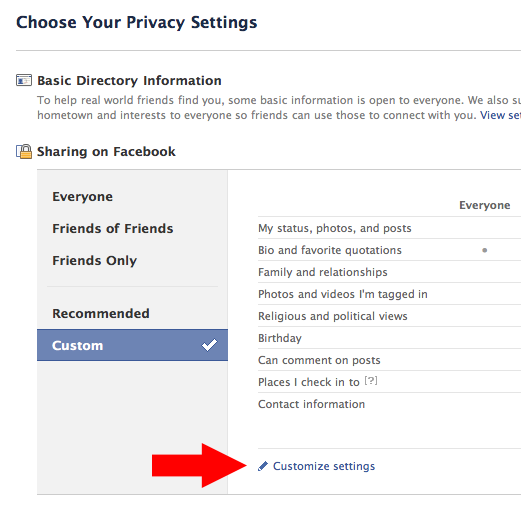
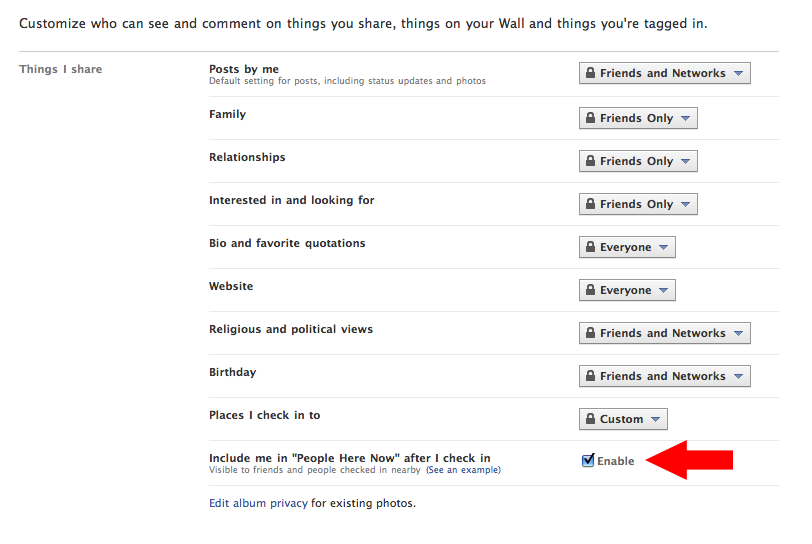
    Step one: Go to the Privacy Settings tab in your account settings. Here’s the link. This is an overview of all of your general settings.
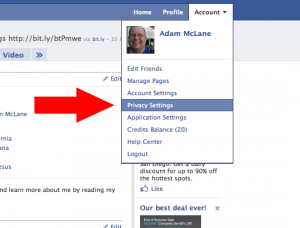
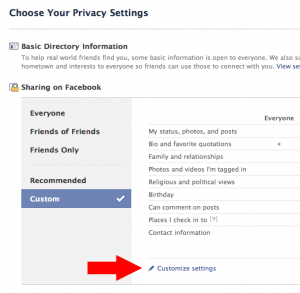
    Step two: Click on “Customize Settings.

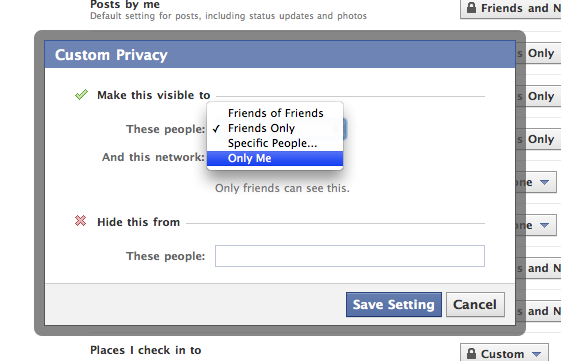
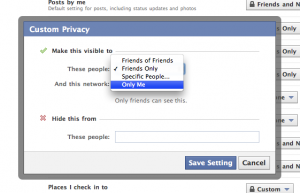
    Step three: Scroll down to “Places I Check In To” and click “Customize.” This will bring up a box where you can select exactly who you want to see where you check in at. If you just want to play with it to get used to it, but don’t want other people to see it, change it to “Only Me.” Changing it to “Only Me” is as private as it gets if you want to check in places. You’ll notice you can also block specific people from seeing where you check in at. Think about who you want to block specifically and list them there. When you are done click “Save Setting” and you are done with this step.
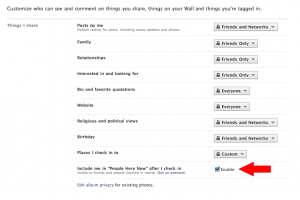
    Step four: Enable or disable the “Here Now” feature. If this whole thing creeps you out, I’d suggest disabling this setting. But also keep in mind that if you want any of the cool freebies that retailers/restaurants may come up with for checking it, you’ll need to keep this enabled. (I’ve gotten plenty of free stuff by checking in via Yelp and even Twitter.)
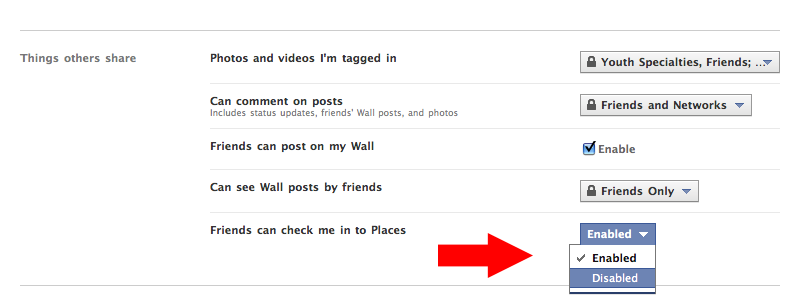
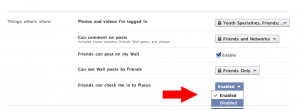
    Step five: Scroll down to “Friends can check me in to Places.This is probably the feature that will get the most people in trouble and will make people the most angry. Say you sit down for lunch at work with a co-worker. You check in and you tag that person as being with you. Now, if you didn’t have that persons permission, all of their friends know that they have checked in at a place because that check in posts to their wall. Also, if they haven’t adjusted their settings in step four, now anyone on Facebook at that location can know they are there. On the other hand, if you feel good about your selections on step three than this is no big deal.
    Done. You can go back to your profile, having adjusted your Places privacy settings to your liking.

    What does Adam recommend?

    Bear in mind that I’m a pretty open person. But I still value some levels of privacy, particularly because I’m a husband and father. Truth is, I don’t even anticipate using this feature unless I’m somewhere cool and want to brag that I am there.

    Here’s my selections for the steps above:

    Step three: I’ve selected “friends only.” I do wish I could select by groups of people. Because I have a friend group labeled “People I Haven’t Met Yet” and I’d prefer that they couldn’t see my location. But until Facebook fixes that, I’m going with “friends only. UPDATE: If you have a friend group you’d like to exclude from your check-ins, you can just type them in the field “Hide this from these people:Here’s what it looks like on my privacy settings page.  I’d recommend NOT choosing “friends of friends” because that basically opens up your location to anyone in the world.

    Step four: I’m a big fan of getting free stuff. So I’m keeping this enabled because it doesn’t bug me and I’ve enjoyed many a free meal. There will soon be lots of iPhone applications that call to this so I want to see where it goes.

    Step five: I feel pretty good about step three. And I also feel pretty good about the places I go and the people I go to them with. So I’m going to keep this enabled for now. Let me tell you though, if someone false checks me in somewhere shady and we’re going to talk. This little feature is going to land a whole heap of people in a whole heap of mess. So, if you aren’t sure about all of your friends, I’d recommend disabling this one.

    Some Places Etiquette

    1. Never, ever, EVER check-in at home. I want to hit people in the shins with a hammer when I see that. Not only are you broadcasting to people where you live, complete with Google Maps directions, you are also telling people that you are home… and when you check-in someplace else, you are tell them YOU AREN’T HOME! Dumb. Dumb. Dumb.
    2. Only check-in at public places. Just like it’s dumb to check-in at your house, it’s really rude to check in at your friends houses. Checking in at a private residence is rude, even if the person says they don’t care. Just don’t do it.
    3. Always ask before checking in your friends. It’s just polite. Maybe they don’t want their friends knowing they had a latte while at work? Just ask.
    4. Check-in sparingly. I know it feels like a game. And games are meant to be won, right? But if you check-in to places 20 times a day you look really, really lonely. My rule is that I only want to check-in places that I think are cool. Sea World? Cool. The local gas station? Not cool. Since I like tiny, family-run businesses… I’m going to check-in at a lot of those because I know it helps them out. I think mom and pops are cool.
    5. Be weary of promotions. With 500 million users and integration into Google Maps retailers are going to go nuts trying to get you to check-in. (As a Google Adwords user, let me tell you… Google is going after us to do promotions!) Don’t be surprised to see deals popping up everywhere. A check-in deal is fine to me. But if I have to tag a bunch of people or write a specific status update to save $5… that’s too far. Don’t subject your friends to that.
    6. Never check-in anywhere after 10:00 PM. Remember when mom said that nothing good happens after 10 PM? If you are out with your friends, it is just better to not check-in. Nothing good is going to come of it.
    7. Remember: Everything you post online is public! All check-ins, all that GPS data, all those tags, all those status updates… they are ultimately public information. You parents can see it. Your boss can see it. The college admissions office can see it. Your significant other can see it. Your future mates can see it. Your children will be able to see it. Even if you’ve made all of your settings private, that data all ultimately belongs to Facebook and they can do with it whatever they want. (And it could always get stolen from them!) If you don’t want those people to see it… don’t post it.
  • 5 Types of Engagement With Each Blog Post

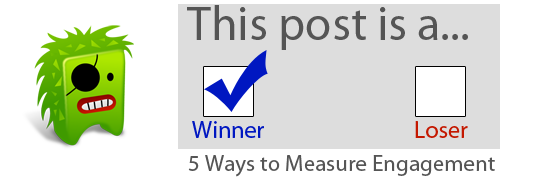
    I’m an engagement preacher. No other stat matters in social media quite as much as engagement. Likes, Retweets, Trackbacks, Comments. These are the things that show that your content isn’t just getting read– it’s getting shared.

    Here are five ways each of my blog posts is engaged with.

    1. Comments (On the blog itself, on Facebook, and on Twitter)
    2. Facebook like and shares (I have a limited reach. But through my reach I have unlimited viral capabilities.)
    3. Twitter links and retweets (Did someone like you post enough to post on their Twitter account? Did anyone retweet the link?)
    4. Private discussion (I get a lot of e-mails, Twitter direct messages, and Facebook messages with each blog post. I even tally the number of times people see me in person and mention something I’ve written. That’s all engagement.)
    5. Blog excerpts (Getting a paragraph pulled from a post and having it create content for another blogger/online magazine is awesome engagement. It’s like an annotated recommendation.)

    What are ways you engage with your audience?

  • How to add the Facebook “like” button to the Thesis WordPress theme

    Earlier this week I started noticing the Facebook “like” button popping up on some of my favorite sites. And then, my co-worker Jonathan installed it on our site at work.

    When I saw that… I knew I had to have it on my blog. Plus I knew I had to master it for some of my McLane Creative clients.

    It took some fiddling around but here is how I’ve gotten it to work. Follow these steps and you can set it up in about 10 minutes.

    Please note: These instructions are for the Thesis theme for WordPress. If you’re looking for a completely customized WordPress theme you can build yourself, I recommend purchasing Thesis.

    Step 1: Download and install the free Thesis OpenHook plugin.

    Step 2: After activating the plugin, go to the settings link for Thesis OpenHook. On my blog it looks like “/wp-admin/themes.php?page=thesis-openhook/options.php”

    Step 3: Scroll down to the hook you’d like to install the code at. I’m using “after post.” But here’s a list of all the hooks and what they are.

    Step 4: Paste the following code into the hook you’d like use.

    Step 5: Click the checkbox “Execute PHP on this hook.” This is important, you will get an error if you don’t click this checkbox!

    Step 6: Press the “Little save button.

    Step 7: Like and retweet this post, telling everyone what a swell guy I am.

    Bonus:As you can see I’ve also added a couple Tweetmeme buttons to the same location. You can download my code for that, just put your Twitter name in the [twitter_user_name] spot and you’re good to go.

    Click here to download –> [download id=”6″]